
iOS 應用內購買(IAP)實作全解析
只要 App 裡涉及虛擬商品的販售,例如遊戲金幣、會員訂閱或功能解鎖,就繞不開 Apple 的應用內購買機制。本文把 IAP 從架構選擇、後台配置一路寫到程式碼落地,順手把實務上最容易被忽略的「憑證補送」環節也一起補齊。
一、先想清楚:驗證交給誰做
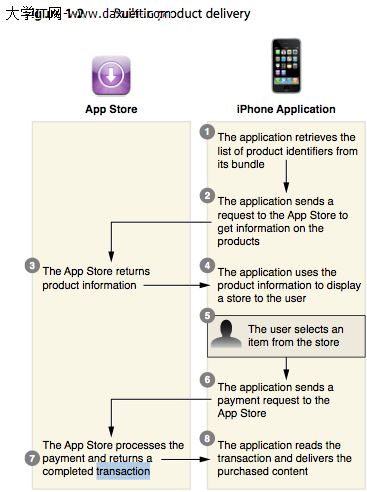
IAP 的購買憑證有兩種驗證路線。第一種是把憑證直接丟給 Apple 伺服器驗證;第二種則由 App 把憑證傳回自有後台,再由後台向 Apple 查證。
實務上幾乎都選第二種,原因有兩個:一是國內網路連到 Apple 驗證端點的延遲相當有感,把驗證搬到自己的伺服器上做,App 端的等待時間可控多了;二是只依賴客戶端回報,等於把「是否已付款」的判斷權交在使用者手裡,駭客只要偽造一份憑證回傳就能白拿商品。加上自有伺服器之後,發貨邏輯、防重複發放、訂閱到期處理都能集中管理。
兩種做法的資料流差異可以對照下面兩張圖:
1. 完全依賴 Apple 伺服器
2. 自建伺服器驗證
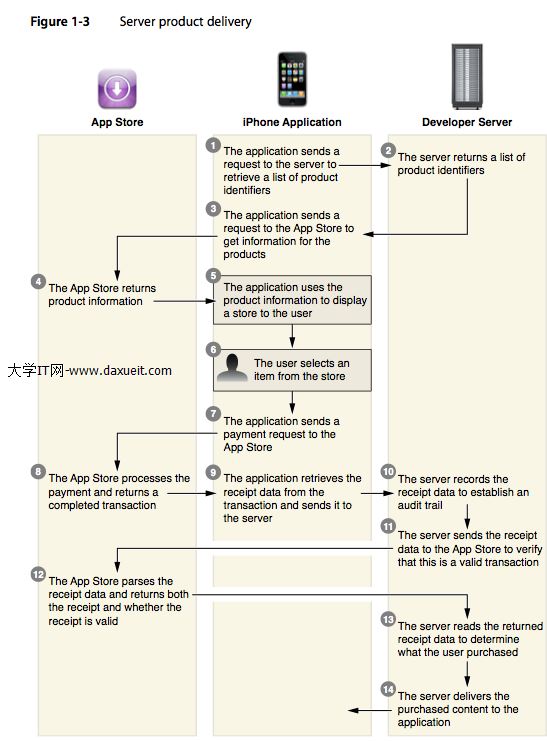
第二種流程拆開來看是這樣:
1. 使用者進入購買頁,App 向自家後台索取商品清單並呈現
2. 使用者點選某個虛擬商品,App 把該商品的 productIdentifier 送給 Apple
3. Apple 依 productIdentifier 回傳商品資訊(名稱、價格、在地化描述等)
4. 使用者確認購買,購買請求送往 Apple
5. 交易完成,Apple 回傳購買憑證(receipt)
6. App 把憑證上傳到自家後台
7. 後台拿憑證向 Apple 查證,Apple 回傳有效性結果
8. 後台把驗證結論回覆 App,App 依結果決定發貨或提示錯誤
二、iTunes Connect 的準備工作
2.1 建立 App 記錄
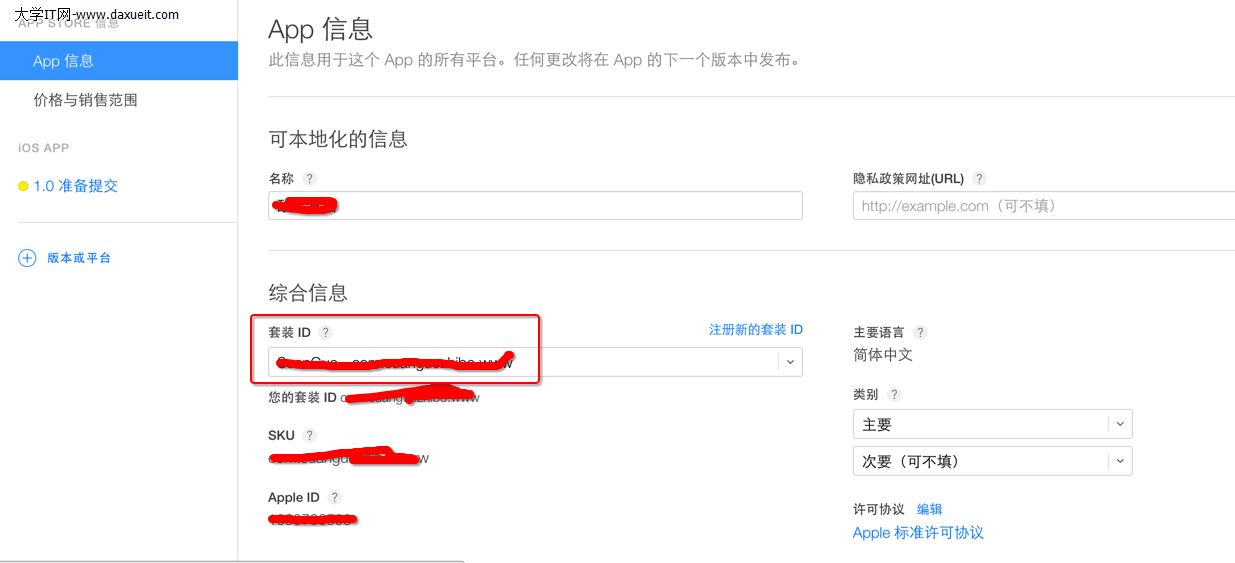
登入 iTunes Connect 新增一個 App,這裡的 Bundle ID 必須和專案 Info.plist 裡的 Bundle Identifier 完全一致,否則後續建立商品時會找不到對應的 App。
2.2 建立虛擬商品與價格表
Apple 把虛擬商品分成五類,選錯類型會直接影響發貨與 restores 行為:
消耗型商品(Consumable)
 用一次就扣光,例如遊戲內的金幣、体力值。額度由 App 自行記帳。

非消耗型商品(Non-consumable)
 買一次永久擁有,使用者可隨時從 App Store 回復購買(restore)。

自動續訂型訂閱(Auto-renewable subscription)
 與非消耗型的差別在於有有效期。例如一年期的付費周刊,內容由開發者定期投遞,到期前系統會自動續約。

非自動續訂型訂閱(Non-renewable subscription)
 有效期與內容可用性由開發者自己的伺服器掌控,而不是交給 App Store 判斷,這點和自動續訂是關鍵差異。

免費訂閱(Free subscription)
 永不過期,僅能用於具備 Newsstand 能力的應用。
其中第 2、3、5 類是以 Apple ID 為單位計算的。也就是說同一個 Apple ID 買了非消耗型商品,該帳號登入的每一台裝置都能使用。第 1、4 類通常屬於「買了就當次用完」,若希望自己做更細的控管,第 4 類會比第 3 類合適。
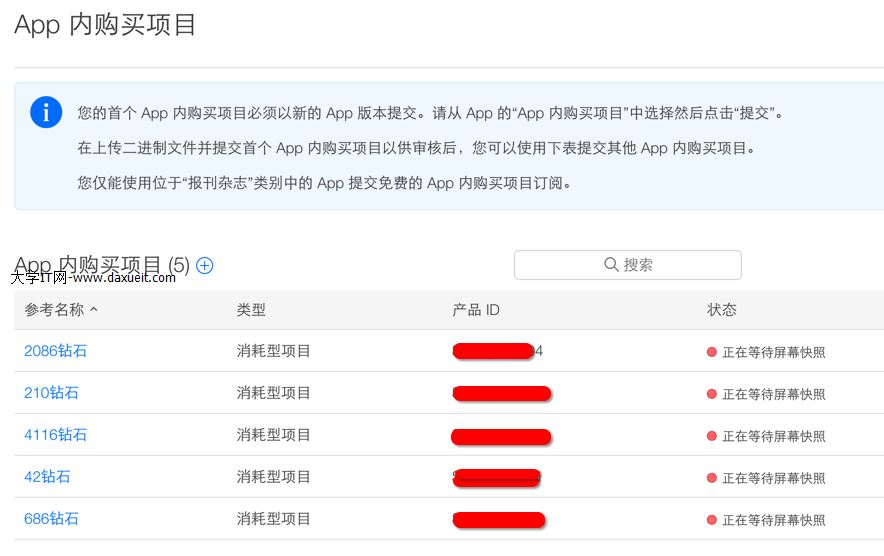
商品建立完成後會看到一組 Product ID,只能由英文字母與數字組成,用來唯一標示該商品。App 就是拿這組 ID 去 Apple 換取商品資訊的。
2.3 別忘了填稅務與銀行帳戶
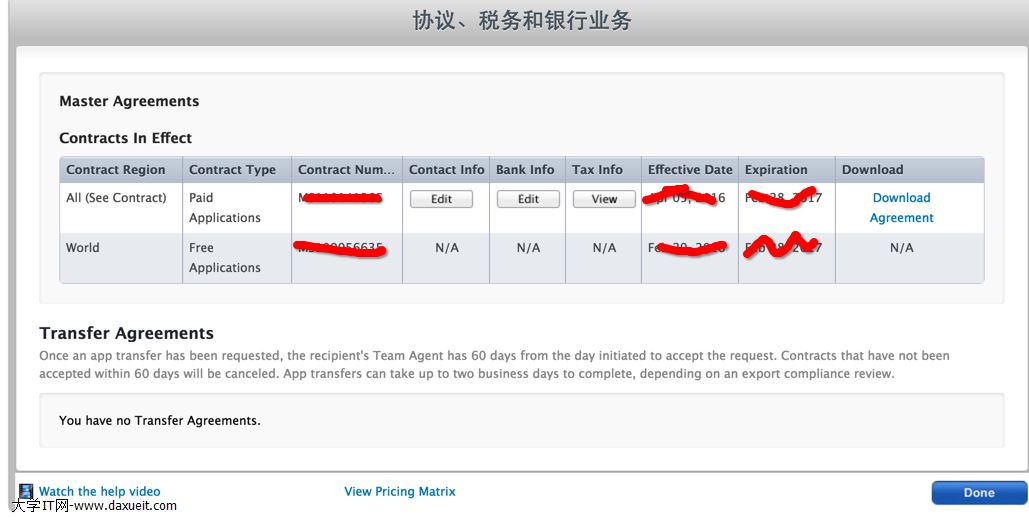
這一步是硬性要求。未完成「協議、稅務與銀行資訊」的設定,App 向 Apple 查詢商品時會直接拿到空清單。
三、iOS 端程式碼實作
前置條件:後台已經能提供商品清單,且每個商品都帶回對應的 productIdentifier,這裡假設已存在 self.productIdent。另外需要在專案中匯入 StoreKit.framework。
3.1 先確認使用者是否允許 IAP
裝置層級的「App 內購買」開關若被關掉,後續所有請求都會失敗,所以要先擋一次。同時記得在 viewDidLoad 註冊交易觀察者,並在 dealloc 移除,避免重複註冊。
// 移除監聽
-(void)dealloc {
    [[SKPaymentQueue defaultQueue] removeTransactionObserver:self];
}

// 註冊監聽
- (void)viewDidLoad {
    [super viewDidLoad];
    [[SKPaymentQueue defaultQueue] addTransactionObserver:self];
}

// 點擊購買
- (void)buyProdution:(UIButton *)sender {
    if ([SKPaymentQueue canMakePayments]) {
        [self getProductInfo:self.productIdent];
    } else {
        [self showMessage:@"使用者已停用 App 內付費功能"];
    }
}
3.2 向 Apple 查詢商品並下單
// 以 productIdentifier 向 Apple 查詢商品資訊
- (void)getProductInfo:(NSString *)productIdentifier {
    NSArray *product = [[NSArray alloc] initWithObjects:productIdentifier, nil];
    NSSet *set = [NSSet setWithArray:product];
    SKProductsRequest *request = [[SKProductsRequest alloc] initWithProductIdentifiers:set];
    request.delegate = self;
    [request start];
    [self showMessageManualHide:@"正在確認商品資訊,請稍候"];
}

// 查詢成功
- (void)productsRequest:(SKProductsRequest *)request didReceiveResponse:(SKProductsResponse *)response {
    [self hideHUD];
    NSArray *myProduct = response.products;
    if (myProduct.count == 0) {
        [self showMessage:@"無法取得商品資訊,請稍後再試"];
        return;
    }
    SKPayment *payment = [SKPayment paymentWithProduct:myProduct[0]];
    [[SKPaymentQueue defaultQueue] addPayment:payment];
}

// 查詢失敗
- (void)request:(SKRequest *)request didFailWithError:(NSError *)error {
    [self hideHUD];
    [self showMessage:[error localizedDescription]];
}
3.3 交易狀態回呼
所有下單結果都會從 updatedTransactions 回來,要在這裡分流處理四種狀態。
- (void)paymentQueue:(SKPaymentQueue *)queue updatedTransactions:(NSArray *)transactions {
    [self hideHUD];
    for (SKPaymentTransaction *transaction in transactions) {
        switch (transaction.transactionState) {
            case SKPaymentTransactionStatePurchased: {
                // 交易完成,取出憑證後送往後台驗證
                self.receipt = [GTMBase64 stringByEncodingData:
                    [NSData dataWithContentsOfURL:[[NSBundle mainBundle] appStoreReceiptURL]]];
                [self checkReceiptIsValid];
                [self completeTransaction:transaction];
                break;
            }
            case SKPaymentTransactionStateFailed:
                [self failedTransaction:transaction];
                break;
            case SKPaymentTransactionStateRestored:
                [self showMessage:@"已恢復先前購買"];
                [self restoreTransaction:transaction];
                break;
            case SKPaymentTransactionStatePurchasing:
                [self showMessage:@"正在送出付款請求,請稍候"];
                break;
            default:
                break;
        }
    }
}

- (void)completeTransaction:(SKPaymentTransaction *)transaction {
    [[SKPaymentQueue defaultQueue] finishTransaction:transaction];
}

- (void)failedTransaction:(SKPaymentTransaction *)transaction {
    if (transaction.error.code != SKErrorPaymentCancelled) {
        UIAlertView *alertView = [[UIAlertView alloc] initWithTitle:nil
            message:@"購買失敗,請重試" delegate:self
            cancelButtonTitle:@"取消" otherButtonTitles:@"重試", nil];
        [alertView show];
    } else {
        [self showMessage:@"使用者取消交易"];
    }
    [[SKPaymentQueue defaultQueue] finishTransaction:transaction];
}

- (void)restoreTransaction:(SKPaymentTransaction *)transaction {
    [[SKPaymentQueue defaultQueue] finishTransaction:transaction];
}
3.4 把憑證交給後台驗證
- (void)checkReceiptIsValid {
    [AFHTTPSessionManager manager] GET:@"後台驗證介面位址"
        parameters:@"請求參數(務必包含購買憑證)"
        success:^(NSURLSessionDataTask * _Nonnull task, id _Nonnull responseObject) {
            if (/* 憑證有效 */) {
                // 發放商品、更新本地狀態
            } else {
                // 憑證無效,提示使用者並記錄日誌
            }
        }
        failure:^(NSURLSessionDataTask * _Nullable task, NSError * _Nonnull error) {
            UIAlertView *alertView = [[UIAlertView alloc] initWithTitle:nil
                message:@"購買失敗,請重試" delegate:self
                cancelButtonTitle:@"取消" otherButtonTitles:@"重試", nil];
            [alertView show];
        }];
}
3.5 網路失敗時:把憑證存下來
這是很多實作會漏掉的一塊。使用者在地鐵裡完成付款,App 卻在把憑證送出去的當下斷網,如果什麼都不做,錢扣了、貨沒到,客訴就來了。做法是先把憑證落地存檔,等下次啟動再補送,成功後刪除。
先準備一個全域可存取的檔案路徑:
#define AppStoreInfoLocalFilePath [NSString stringWithFormat:@"%@/%@/",
    [NSSearchPathForDirectoriesInDomains(NSDocumentDirectory, NSUserDomainMask, YES) lastObject],
    @"EACEF35FE363A75A"]
// 提醒使用者:選擇「取消」代表稍後補送,選擇「重試」代表立刻再驗一次
-(void)alertView:(UIAlertView *)alertView clickedButtonAtIndex:(NSInteger)buttonIndex {
    if (buttonIndex == 0) {
        [self saveReceipt];
    } else {
        [self checkReceiptIsValid];
    }
}

// 持久化憑證。實務上建議連同日期、使用者 ID 一起存,方便區分多筆憑證
-(void)saveReceipt {
    NSString *fileName = [AppUtils getUUIDString];
    NSString *savedPath = [NSString stringWithFormat:@"%@%@.plist", AppStoreInfoLocalFilePath, fileName];
    NSDictionary *dic = [NSDictionary dictionaryWithObjectsAndKeys:
        self.receipt, Request_transactionReceipt,
        self.date,   DATE,
        self.userId, USERID, nil];
    [dic writeToFile:savedPath atomically:YES];
}
3.6 App 啟動時補送未成功的憑證
- (BOOL)application:(UIApplication *)application didFinishLaunchingWithOptions:(NSDictionary *)launchOptions {
    NSFileManager *fileManager = [NSFileManager defaultManager];

    if (![fileManager fileExistsAtPath:AppStoreInfoLocalFilePath]) {
        // 目錄不存在,代表沒有待補送的憑證,建立目錄即可
        [fileManager createDirectoryAtPath:AppStoreInfoLocalFilePath
              withIntermediateDirectories:YES attributes:nil error:nil];
    } else {
        // 目錄存在,代表有上次驗證失敗的憑證,重新送一次
        [self sendFailedIapFiles];
    }
    return YES;
}

// 掃描目錄,逐一重送
- (void)sendFailedIapFiles {
    NSFileManager *fileManager = [NSFileManager defaultManager];
    NSError *error = nil;
    NSArray *cacheFileNameArray = [fileManager contentsOfDirectoryAtPath:AppStoreInfoLocalFilePath error:&error];
    if (error == nil) {
        for (NSString *name in cacheFileNameArray) {
            if ([name hasSuffix:@".plist"]) {
                NSString *filePath = [NSString stringWithFormat:@"%@/%@", AppStoreInfoLocalFilePath, name];
                [self sendAppStoreRequestBuyPlist:filePath];
            }
        }
    } else {
        DebugLog(@"AppStoreInfoLocalFilePath error:%@", [error domain]);
    }
}

// 參數依自家後台介面調整,但憑證本身一定要送
-(void)sendAppStoreRequestBuyPlist:(NSString *)plistPath {
    NSString *path = [NSString stringWithFormat:@"%@%@", AppStoreInfoLocalFilePath, plistPath];
    NSDictionary *dic = [NSDictionary dictionaryWithContentsOfFile:path];

    NSMutableDictionary *params = [NSMutableDictionary dictionaryWithObjectsAndKeys:
        [dic objectForKey:USERID], USERID,
        [dic objectForKey:DATE], DATE,
        [dic objectForKey:Request_transactionReceipt], Request_transactionReceipt, nil];

    [AFHTTPSessionManager manager] GET:@"後台驗證介面位址" parameters:params
        success:^(NSURLSessionDataTask * _Nonnull task, id _Nonnull responseObject) {
            if (/* 憑證有效 */) {
                [self removeReceipt];
            } else {
                // 憑證確實無效,這裡才做清單清理
            }
        }
        failure:^(NSURLSessionDataTask * _Nullable task, NSError * _Nonnull error) {
            // 網路仍不通,保留檔案等下次啟動
        }];
}

// 驗證成功後刪除檔案
-(void)removeReceipt {
    [AppUtils removeIapFailedPath:AppStoreInfoLocalFilePath];
}

+ (void)removeIapFailedPath:(NSString *)plistPath {
    NSString *path = [NSString stringWithFormat:@"%@/%@", AppStoreInfoLocalFilePath, plistPath];
    NSFileManager *fileManager = [NSFileManager defaultManager];
    if ([fileManager fileExistsAtPath:AppStoreInfoLocalFilePath]) {
        [fileManager removeItemAtPath:AppStoreInfoLocalFilePath error:nil];
    }
    if ([fileManager fileExistsAtPath:path]) {
        [fileManager removeItemAtPath:path error:nil];
    }
}
結語
整條 IAP 鏈路最關鍵的觀念其實只有一句:發貨的唯一依據是後台驗證通過的結果,不是 App 說了算。把憑證補送機制一起做進去,才能應付真實世界裡各種糟糕的網路狀況。有不清楚的地方歡迎留言討論。
延伸閱讀
https://openfibers.github.io/blog/2015/02/28/in-app-purchase-walk-through/
https://www.himigame.com/iphone-cocos2d/550.html
https://blog.devtang.com/2012/12/09/in-app-purchase-check-list/
https://yarin.blog.51cto.com/1130898/549141
- 上一篇文章: iOS 接入微信授權登錄完整流程
- 下一篇文章: iOS 代理設計的兩種寫法與取捨