
iOS —— NNSURLSessionDataTask
一、基本簡介
1. NSURLSessionDataTask 是 NSURLSessionTask 的子類,是一個具體的 網絡請求(task) 類,是網絡請求中最常用的請求之一
通常,NSURLSessionDataTask 用來請求數據,可以用來下載數據資源,例如 JSON 數據,圖片數據等
2. 通常有以下幾種方法創建一個 data task
1)方法一 : 使用 NSURLSession 的實例方法
1 // @param url 待請求的 URL 地址
2 // @param completionHandler 回調方法
3 // @param data 從服務器請求到的數據
4 // @param response 響應頭信息
5 // @param error 錯誤信息
6 - (NSURLSessionDataTask *)dataTaskWithURL:(NSURL *)url completionHandler:(void (^)(NSData * _Nullable data, NSURLResponse * _Nullable response, NSError * _Nullable error))completionHandler;
注意 :
該方法中會自動將 url 轉換為一個請求對象(NSURLRequest),並且該請求對象是 GET 請求方式
回調方法是在子線程中運行的,所以如果在回調方法中刷新 UI 必須回到主線程中
回調方法中有兩個參數 response / error,這兩個參數和 該消息的接受者(即 NSURLSessionDataTask 對象)中的 response / error 是指同一個內容,即地址相同
使用該方法的缺點是不能監聽獲取數據的進度,因為只有當全部請求完數據後,才會調用這個方法,也就是說,data 中的數據是請求的全部數據
2)方法二 : 使用 NSURLSession 的實例方法
// @param request 請求對象
- (NSURLSessionDataTask *)dataTaskWithRequest:(NSURLRequest *)request completionHandler:(void (^)(NSData * _Nullable data, NSURLResponse * _Nullable response, NSError * _Nullable error))completionHandler;
方法二與方法一不同的地方在於 : 方法二可以手動設置請求對象,這樣一來,就可以指定請求方式 GET/POST 中的一個;而方法一只能是 GET 請求方式
剩余的全部一樣
3)方法三 : 代理
方法一和方法二唯一的缺點就是不能監控請求進度,因為只有當請求完全部的數據後才會調用回調方法,如果想要監控請求進度,必須使用代理的方法
使用代理首先要自定義 NSURLSession 對象,使用下面的方法可以設置代理對象
// @param configuration 配置信息對象
// @param delegate 代理對象
// @param queue 代理方法在哪個線程中運行,如果傳 nil 則會在子線程中運行代理方法
+ (NSURLSession *)sessionWithConfiguration:(NSURLSessionConfiguration *)configuration delegate:(nullable id <NSURLSessionDelegate>)delegate delegateQueue:(nullable NSOperationQueue *)queue;
同時,必須遵守相關的協議
在使用下面的方法創建 data task
- (NSURLSessionDataTask *)dataTaskWithURL:(NSURL *)url;
- (NSURLSessionDataTask *)dataTaskWithRequest:(NSURLRequest *)request;
這兩個方法的區別和方法一/方法二一樣,使用 url 則方法內部會自動將其轉換為一個 請求對象,並且是 GET 請求方式
二、示例代碼
因為我是把所有的代碼寫到一個 demo 裡的,所以有些目前不需要的東西可以不必理會
1)GET/POST 請求
首先在 main.storyboard 中拖入一個 UINavigationController ,並設置 staticcell,如圖
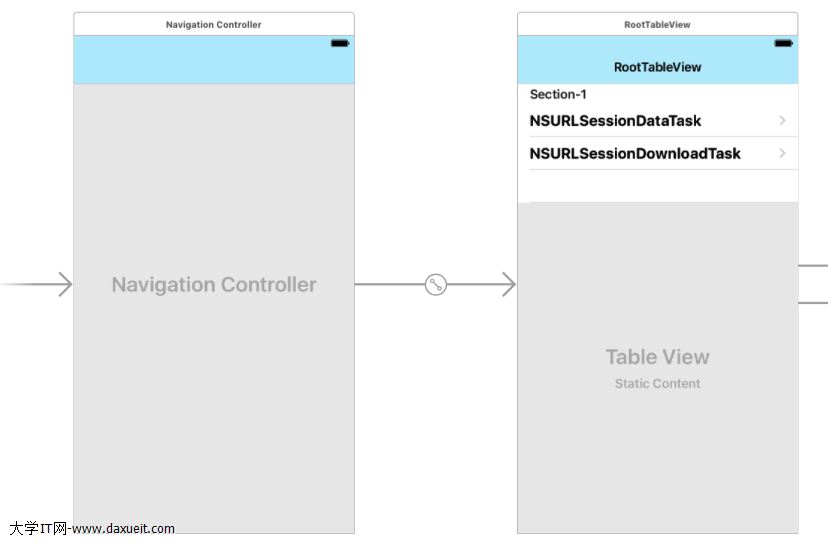
然後拖入一個 UIViewController 並選中第一個 cell,即 NSURLSessionDataTask,將 cell 和 UIViewController 連線,選擇 push
在這個 UIViewController 中拖入一系列控件,如圖
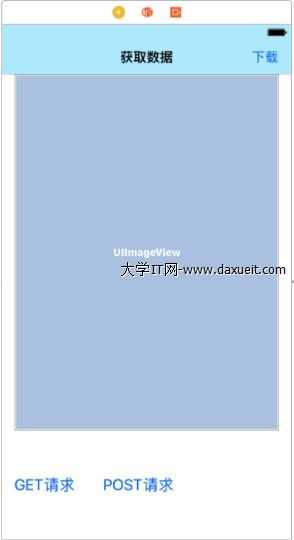
右上角的 UIBarButtonItem 是跳轉到下一個界面的,不用管它
UIViewController 中的代碼如下
 1 #import "LHDataTaskViewController.h"
 2
 3 // GET 請求的 URL
 4 static NSString * imageURL = @"http://120.25.226.186:32812/resources/images/minion_01.png";
 5
 6 // POST 請求的 URL
 7 static NSString * dataURL = @"http://api.hudong.com/iphonexml.do";
 8
 9 @interface LHDataTaskViewController ()
10
11 #pragma mark - 屬性
12 @property (weak, nonatomic) IBOutlet UIImageView *showImageView;
13
14 @property (nonatomic, strong) NSURLSession * session;
15 @property (nonatomic, strong) NSURLSessionDataTask * dataTask;
16
17 @end
18
19 @implementation LHDataTaskViewController
20
21 #pragma mark - ViewController 生命周期
22 - (void)viewDidLoad {
23
24     [super viewDidLoad];
25
26     // 1. 初始化 NSURLSession 對象
27     self.session = [NSURLSession sharedSession];
28
29 }
30
31 - (void)didReceiveMemoryWarning {
32
33     [super didReceiveMemoryWarning];
34
35 }
1. GET 請求
設置 "GET請求" 按鈕的 動作方法
 1 #pragma mark - button 動作方法
 2 #pragma mark 發送 GET 請求獲取圖片資源
 3 - (IBAction)GETButtonClick:(id)sender {
 4
 5     NSLog(@"dataTask的狀態 --- %li", _dataTask.state);
 6
 7     // 1. 初始化 NSURLSesionDataTask 對象
 8     self.dataTask = [_session dataTaskWithURL:[NSURL URLWithString:imageURL] completionHandler:^(NSData * _Nullable data, NSURLResponse * _Nullable response, NSError * _Nullable error) {
 9
10         // 1). 定義 UIImage 對象,並用接受的數據(data)初始化
11         UIImage * image = [UIImage imageWithData:data];
12
13         // 2). 返回主線程刷新UI
14         dispatch_async(dispatch_get_main_queue(), ^{
15
16             self.showImageView.image = image;
17
18         });
19
20         NSLog(@"dataTask的狀態 --- %li", _dataTask.state);
21
22         // 此時,所有數據已經全部接受完畢,所以,已經接受的的數據和所要接受的總數據是相等的
23         // 因為沒有發送數據,所以發送數據都為 0
24         NSLog(@"已接受到的數據量 --- %lli", _dataTask.countOfBytesReceived); // 48347
25         NSLog(@"所要接受到的數據總量 --- %lli", _dataTask.countOfBytesExpectedToReceive); // 48347
26         NSLog(@"已經發送的數據量 --- %lli", _dataTask.countOfBytesSent); // 0
27         NSLog(@"所要發送的數據總量 --- %lli", _dataTask.countOfBytesExpectedToSend); // 0
28
29     }];
30
31     // 2. 發送請求,執行 task
32     [_dataTask resume];
33
34 }
其中,24行 —— 27行 中用到的屬性,在上一節已經介紹過
注意 : NSURLSessionTask 中所有的 task 都需要 resume 來開始
2. POST 請求
設置 "POST請求" 按鈕的動作方法
 1 - (IBAction)POSTButtonClick:(UIButton *)sender {
 2
 3     // 1. 創建請求對象(可變)
 4     NSMutableURLRequest * request = [NSMutableURLRequest requestWithURL:[NSURL URLWithString:dataURL]];
 5
 6     // 2. 設置請求方法為 POST 請求
 7     request.HTTPMethod = @"POST";
 8
 9     request.HTTPBody = [@"type=focus-c" dataUsingEncoding:NSUTF8StringEncoding];
10
11     // 1. 初始化 NSURLSessionDataTask 對象
12     self.dataTask = [_session dataTaskWithRequest:request completionHandler:^(NSData * _Nullable data, NSURLResponse * _Nullable response, NSError * _Nullable error) {
13
14         NSLog(@"%@", [[NSString alloc] initWithData:data encoding:NSUTF8StringEncoding]);
15
16     }];
17
18     [_dataTask resume];
19
20 }
2. 代理
使用代理的方法來進行網絡請求,並且可以監控請求進度
現在 mian.storyboard 中拖入一個 UIViewController 並添加控件,如圖
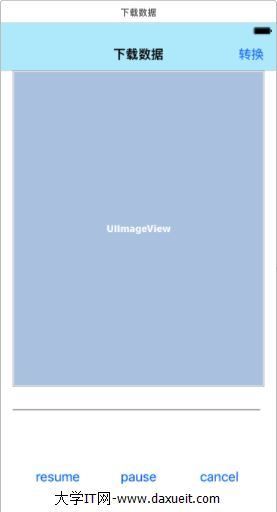
本次請求的是一張圖片數據,請求完之後會將圖片顯示到屏幕上的 UIImageView,resume 按鈕是開始請求,pause 按鈕是暫停請求,cance 按鈕是取消請求,中間還有一個 UIProgressView,用於顯示請求的進度,並將這些控件與插座變量關聯
UIViewController 中的代碼如下,該 ViewController 要遵守相關協議 <NSURLSessionDataDelegate>
 1 #import "LHDataTaskDownloadViewController.h"
 2
 3 // 待訪問的 URL
 4 static NSString * imageURL = @"http://f12.topit.me/o129/10129120625790e866.jpg";
 5
 6 @interface LHDataTaskDownloadViewController () <NSURLSessionDataDelegate>
 7
 8 #pragma mark - 屬性列表
 9 #pragma mark 插座變量
10 @property (weak, nonatomic) IBOutlet UIImageView *showImageView;
11 @property (weak, nonatomic) IBOutlet UIProgressView *progressView;
12 @property (weak, nonatomic) IBOutlet UIButton *resumeButton;
13 @property (weak, nonatomic) IBOutlet UIButton *pauseButton;
14 @property (weak, nonatomic) IBOutlet UIButton *cancelButton;
15
16 #pragma mark 網絡對象
17 @property (nonatomic, strong) NSURLSession * session;
18 @property (nonatomic, strong) NSURLSessionDataTask * dataTask;
19
20 #pragma mark 用於接受數據的對象
21 @property (nonatomic, strong) NSMutableData * data;
22
23 @end
24
25 @implementation LHDataTaskDownloadViewController
26
27 - (void)viewDidLoad {
28
29     [super viewDidLoad];
30
31     // 1. 初始化 NSURLSession 對象,delegateQueue 為協議方法運行的線程,傳 nil 則在子線程中運行
32     self.session = [NSURLSession sessionWithConfiguration:[NSURLSessionConfiguration defaultSessionConfiguration] delegate:self delegateQueue:nil];
33
34     // 2. 初始化 NSURLSessionDataTask 對象,默認為 GET
35     self.dataTask = [_session dataTaskWithURL:[NSURL URLWithString:imageURL]];
36
37     // 2. 將 cancelButton 和 pauseButton 按鈕設置為不可用
38     _cancelButton.enabled = NO;
39
40     _pauseButton.enabled = NO;
41
42 }
開始按鈕的動作方法
 1 - (IBAction)resumeButtonClick:(id)sender {
 2
 3     // 1. 判斷當前的狀態,data task 默認為 暫停狀態
 4     if (_dataTask.state == NSURLSessionTaskStateSuspended) {
 5
 6         _pauseButton.enabled = YES;
 7
 8         _cancelButton.enabled = YES;
 9
10         // 1). 開始請求 task
11         [_dataTask resume];
12
13     }
14
15 }
暫停按鈕的動作方法
 1 - (IBAction)pauseButtonClick:(id)sender {
 2
 3     // 1. 判斷 task 當前的狀態,如果處於正在接受數據的狀態,則暫停
 4     if (_dataTask.state == NSURLSessionTaskStateRunning) {
 5
 6         [_dataTask suspend];
 7
 8     }
 9
10 }
取消按鈕的動作方法
 1 - (IBAction)cancelButtonClick:(id)sender {
 2
 3     // 1. 判斷 task 當前的狀態,如果處於正在接受數據的狀態或暫停狀態,則取消
 4     if (_dataTask.state == NSURLSessionTaskStateRunning || _dataTask.state == NSURLSessionTaskStateSuspended) {
 5
 6         // 1). 取消 task
 7         [_dataTask cancel];
 8
 9         // 2). 設置滑動條的值
10         _progressView.progress = 0;
11
12         // 3). 創建對話框VC
13         UIAlertController * alertVC = [UIAlertController alertControllerWithTitle:@"提示" message:@"該 Task 已經被取消" preferredStyle:UIAlertControllerStyleAlert];
14
15         // 4). 顯示對話框VC
16         [self presentViewController:alertVC animated:YES completion:nil];
17
18         // 5). 創建動作按鈕
19         UIAlertAction * cancelAction = [UIAlertAction actionWithTitle:@"取消" style:UIAlertActionStyleCancel handler:^(UIAlertAction * _Nonnull action) {
20
21             [self.navigationController popViewControllerAnimated:YES];
22
23         }];
24
25         // 6). 將動作按鈕添加到對話框VC
26         [alertVC addAction:cancelAction];
27
28     }
29
30 }
協議方法
#pragma mark 接收到服務器響應時調用,默認情況下不接受數據,所以要允許
// @param session 當前的會話對象
// @param dataTask 當前的 data task 對象
// @param response 響應頭對象
// @param completionHandler 回調
- (void)URLSession:(NSURLSession *)session dataTask:(NSURLSessionDataTask *)dataTask didReceiveResponse:(NSURLResponse *)response completionHandler:(void (^)(NSURLSessionResponseDisposition))completionHandler {

    NSLog(@"%@", NSStringFromSelector(_cmd));

    // 1. 初始化數據對象
    self.data = [[NSMutableData alloc] init];

    // 2. 允許接受數據,如果沒有寫這句,則後面代理的方法不會被執行
    completionHandler(NSURLSessionResponseAllow);

}
其中,NSURLSessionResponseDisposition 是一個枚舉
1 typedef NS_ENUM(NSInteger, NSURLSessionResponseDisposition) {
2     NSURLSessionResponseCancel = 0,        // 取消接受數據,之後的代理方法不會被執行,相當於 [task cancel];
3     NSURLSessionResponseAllow = 1,         // 允許接受數據,之後的代理方法會被執行
4     NSURLSessionResponseBecomeDownload = 2,// 使當前的 data task 變為 download task,當轉換為 download task 時,會將數據下載到 tmp 文件中,不需要再接受數據了,並且必須調用下面的 iii) 方法,並且在該方法中可以什麼都不寫,但必須被調用
5     NSURLSessionResponseBecomeStream NS_ENUM_AVAILABLE(10_11, 9_0) = 3,// 使當前的 data task 變為 stream task
6 } NS_ENUM_AVAILABLE(NSURLSESSION_AVAILABLE, 7_0);
 1 #pragma mark 接受到數據時調用,可能會調用多次
 2 - (void)URLSession:(NSURLSession *)session dataTask:(NSURLSessionDataTask *)dataTask didReceiveData:(NSData *)data {
 3
 4     NSLog(@"%@", NSStringFromSelector(_cmd));
 5
 6     // 1. 拼接收到的數據
 7     [self.data appendData:data];
 8
 9     // 2. 回到主線程刷新 UI
10     dispatch_async(dispatch_get_main_queue(), ^{
11
12         _progressView.progress = (float)_dataTask.countOfBytesReceived/_dataTask.countOfBytesExpectedToReceive;
13
14     });
15
16 }
 1 #pragma mark 請求結束或失敗時調用
 2 - (void)URLSession:(NSURLSession *)session task:(NSURLSessionTask *)task didCompleteWithError:(NSError *)error {
 3
 4     NSLog(@"%@", NSStringFromSelector(_cmd));
 5
 6     UIImage * image = [UIImage imageWithData:_data];
 7
 8     dispatch_async(dispatch_get_main_queue(), ^{
 9
10         NSLog(@"currentThread --- %@", [NSThread currentThread]);
11
12         self.showImageView.image = image;
13
14     });
15
16 }
這個方法並不是 NSURLSessionTaskDelegate 協議中的方法,適合所有的 task

- iPhone 6s史上最詳細3D Touch使用方法全攻略
- 蘋果如何查看UDID?iPhone/iPad查看UDID教程
- iPhone6/iPhone6 plus港版和國行版有哪些區別?港版和國行區別介紹
- 小雨傘TinyUmbrella工具支持iOS8.2/iOS8.1.3降級 附下載地址
- iOS8.4.1怎麼升級 iOS8.4.1正式版升級圖文教程
- iPhone手機如何省電?
- 判斷textField裡面是否有空
- iOS 捕獲程序崩潰日志
- 整理UIImagePickerController、保存圖片到相冊問題
- iOS8.4怎麼升級?iPhone4s/5/5c/5s/6/6 Plus升級iOS8.4圖文教程