iOS頁面間傳值的方式(Delegate/NSNotification/Block/NSUserDefault)
iOS頁面間傳值的方式(NSUserDefault/Delegate/NSNotification/Block)
實現了以下iOS頁面間傳值:1.委托delegate方式;2.通知notification方式;3.block方式;4.UserDefault或者文件方式;5.單例模式方式;6.通過設置屬性,實現頁面間傳值
在iOS開發中,我們經常會遇到頁面間跳轉傳值的問題,現歸納總結一下:
情況1:A頁面跳轉到B頁面
方法:
在B頁面的控制器中,編寫對應的屬性,在A頁面跳轉到B頁面的地方,給B的屬性賦值即可
@property(nonatomic) NSInteger flag;//當前系統標示(0:其他傳值方式;1:block傳值方式)
在A頁面的試圖控制器中
- (IBAction)showSecondView:(id)sender {
    SecondViewController *second = [[SecondViewController alloc] initWithNibName:@"SecondViewController" bundle:nil];
    second.delegate = self;
    second.flag = 0;
    [self presentViewController:second animated:YES completion:nil];
}
情況2:A頁面跳轉到B頁面,B頁面再跳轉回A頁面
主流方案:
(1)通過委托delegate的方式實現
 設置協議及方法
//SecondViewController.h
@protocol secondViewDelegate
-(void)showName:(NSString *)nameString;
@end
設置代理(為防止循環引用,此次采用了weak)
//SecondViewController.h
@interface SecondViewController : UIViewController
@property (nonatomic, weak)id<secondViewDelegate> delegate;
@property (nonatomic, copy) ablock block;
@end
點擊按鈕傳遞數組讓其顯示
//SecondViewController.m
- (IBAction)delegateMethod:(id)sender {
    if ([self notEmpty]) {
        [self.delegate showName:self.nameTextField.text];
        [self dismissViewControllerAnimated:YES completion:nil];
    }else{
        [self showAlert];
    }
}
調用,顯示
//RootViewController.m
-(void)showName:(NSString *)nameString{
    self.nameLabel.text = nameString;
}
最重要也是最容易忽略的,就是一定要設置delegate的指向。
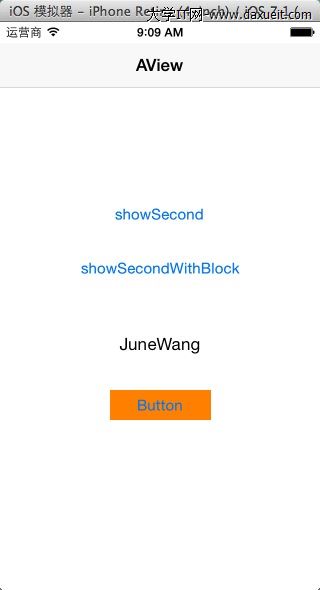
效果:
(2)通過通知notification的方式實現
 在B頁面的控制器中,發送通知:
//SecondViewController.m
- (IBAction)notificationMethod:(id)sender {
    if ([self notEmpty]) {
        [[NSNotificationCenter defaultCenter] postNotificationName:@"ChangeNameNotification" object:self userInfo:@{@"name":self.nameTextField.text}];
        [self dismissViewControllerAnimated:YES completion:nil];
    }else{
        [self showAlert];
    }
}
在A頁面的控制器中,注冊通知:
//RootViewController.m
- (void)viewDidLoad
{
    [super viewDidLoad];
    // Do any additional setup after loading the view from its nib.
    [[NSNotificationCenter defaultCenter] addObserver:self selector:@selector(ChangeNameNotification:) name:@"ChangeNameNotification" object:nil];
}
當我們不使用時,要記得刪掉通知:
//RootViewController.m
-(void)dealloc{
    [[NSNotificationCenter defaultCenter] removeObserver:self];
}
調用,顯示
//RootViewController.m

-(void)ChangeNameNotification:(NSNotification*)notification{
    NSDictionary *nameDictionary = [notification userInfo];
    self.nameLabel.text = [nameDictionary objectForKey:@"name"];
}
(3)block方式實現
分析:
在B試圖控制器中,定義一個block,參數為字符串
//SecondViewController.h
typedef void (^ablock)(NSString *str);
//SecondViewController.h

@property (nonatomic, copy) ablock block;
在B試圖控制器中,
- (IBAction)blockMethod:(id)sender {
    if ([self notEmpty]) {
        if (self.block) {
            self.block(self.nameTextField.text);
            [self dismissViewControllerAnimated:YES completion:nil];
        }
    }else{
        [self showAlert];
    }
}
在A試圖顯示,回調block
- (IBAction)showSecondWithBlock:(id)sender {
    SecondViewController *second = [[SecondViewController alloc] initWithNibName:@"SecondViewController" bundle:nil];
    [self presentViewController:second animated:YES completion:nil];
    second.block = ^(NSString *str){
        self.nameLabel.text = str;
    };
}
鏈接一篇描述block回調挺有意思的文章:http://blog.csdn.net/mobanchengshuang/article/details/11751671
在查閱資料的過程中,我還看到了以下幾種方案:
(1)使用SharedApplication,定義一個變量來傳遞(感覺和單例的方式一樣)
(2)使用文件,或者NSUserdefault來傳遞
//通過文件或者UserDefault方式存值(感覺不太適合此類傳值,如果要用文件或者UserDefault方式存值的話,可以考慮此方式)
- (IBAction)userDefaultMethod:(id)sender {
    if ([self notEmpty]) {
        [[NSUserDefaults standardUserDefaults] setObject:self.nameTextField.text forKey:@"myNameText"];
        [self dismissViewControllerAnimated:YES completion:nil];
    }else{
        [self showAlert];
    }
}
在A試圖控制器顯示
-(void)viewDidAppear:(BOOL)animated{
    [super viewDidAppear:animated];
    //如果想測試通過UserDefault方式傳值或者通過單例方式傳值,取消以下注釋即可
/*
    if ([[[NSUserDefaults standardUserDefaults] objectForKey:@"myNameText"] length] != 0) {
        self.nameLabel.text = [[NSUserDefaults standardUserDefaults] objectForKey:@"myNameText"];
        [[NSUserDefaults standardUserDefaults] setObject:@"" forKey:@"myNameText"];
    }
    DataSource *dataSource = [DataSource sharedDataSource];
    if ([dataSource.myName length] != 0) {
        self.nameLabel.text = dataSource.myName;
        dataSource.myName = @"";
    }
*/
}
(3)通過一個單例的class來傳遞
B試圖控制器
//通過單例方式傳值(感覺不太適合此類傳值,如果要用單例方式傳值的話,可以考慮此方式)
- (IBAction)singletonMethod:(id)sender {
    if ([self notEmpty]) {
        DataSource *dataSource = [DataSource sharedDataSource];
        dataSource.myName = self.nameTextField.text;
        [self dismissViewControllerAnimated:YES completion:nil];
    }else{
        [self showAlert];
    }
}
A試圖控制器顯示
-(void)viewDidAppear:(BOOL)animated{
    [super viewDidAppear:animated];
    //如果想測試通過UserDefault方式傳值或者通過單例方式傳值,取消以下注釋即可
/*
    if ([[[NSUserDefaults standardUserDefaults] objectForKey:@"myNameText"] length] != 0) {
        self.nameLabel.text = [[NSUserDefaults standardUserDefaults] objectForKey:@"myNameText"];
        [[NSUserDefaults standardUserDefaults] setObject:@"" forKey:@"myNameText"];
    }
    DataSource *dataSource = [DataSource sharedDataSource];
    if ([dataSource.myName length] != 0) {
        self.nameLabel.text = dataSource.myName;
        dataSource.myName = @"";
    }
*/
}
@end
這裡面用到了單例模式,編寫了DataSource這個類,存放數據
//
//  DataSource.h
//  TestCallBack
//
//  Created by csdc-iMac on 14-7-17.
//  Copyright (c) 2014年 JuneWang. All rights reserved.
//

#import <Foundation/Foundation.h>

@interface DataSource : NSObject
@property (nonatomic, strong) NSString *myName;
+(DataSource*)sharedDataSource;
@end
//
//  DataSource.m
//  TestCallBack
//
//  Created by csdc-iMac on 14-7-17.
//  Copyright (c) 2014年 JuneWang. All rights reserved.
//

#import "DataSource.h"

@implementation DataSource
+(DataSource *)sharedDataSource{
    static DataSource *dataSource = nil;
    static dispatch_once_t once;
    dispatch_once(&once, ^{
        dataSource = [DataSource new];
    });
    return dataSource;
}
@end
程序運行截圖
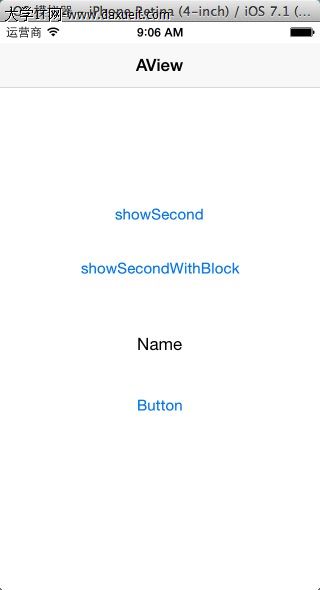
A視圖:
B視圖
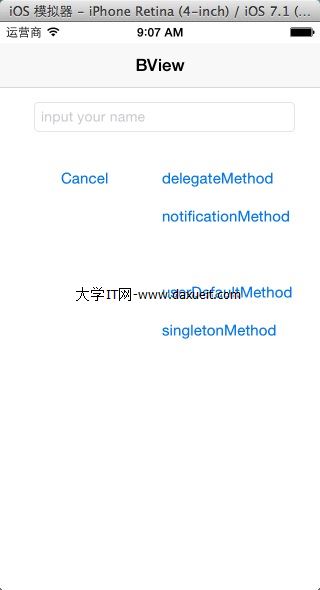
當輸入姓名,並點擊對應的確認按鈕後,會回到A視圖,並顯示在B視圖中輸入的姓名