觸摸事件的攔截
編輯:IOS技巧綜合
[摘要]本文是對觸摸事件的攔截的講解,對學習IOS蘋果軟件開發有所幫助,與大家分享。
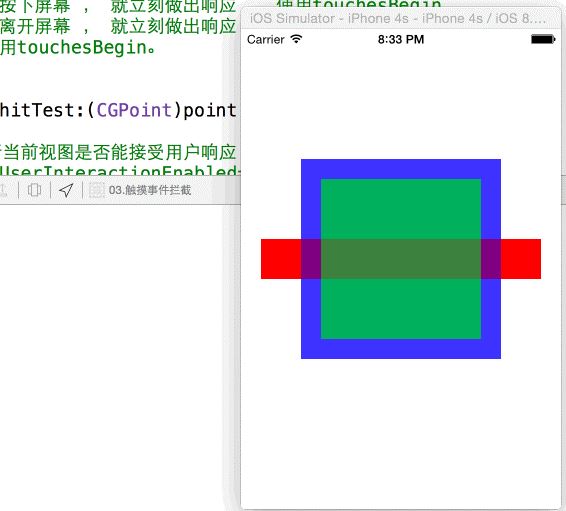
案例:三個疊在一起的圖形,在重疊部分通過事件攔截來響應相應視圖的手勢。
uiview不接受處理事件的三種情況:
不接收用戶交互:userInterfactionEnable = no;
隱藏: hidden = yes;
透明:alpha = 0~ 0.01
注意:通過storyBoard或xib創建的視圖 , initwithFrame方法不會被執行,需要使用- (void)awakeFromNib;
實例化三種顏色的視圖:
 - (void)awakeFromNib
 {

         RedView *view1 = [[RedView alloc]initWithFrame:CGRectMake(20, 210, 280, 40)];
         [self addSubview:view1];
         self.redView = view1;

         BlueView *view2 = [[BlueView alloc]initWithFrame:CGRectMake(60, 130, 200, 200)];
         [self addSubview:view2];
         [view2 setAlpha:0.5];
         self.blueView = view2;

         GreenView *view3 = [[GreenView alloc]initWithFrame:CGRectMake(80, 150, 160, 160)];
         [self addSubview:view3];
         [view3 setAlpha:0.5];
         self.greenView = view3;

 }
通過以下兩個方法來進行手勢攔截:
- (UIView *)hitTest:(CGPoint)point withEvent:(UIEvent *)event;
- (BOOL)pointInside:(CGPoint)point withEvent:(UIEvent *)event;
重寫hittext方法,攔截用戶觸摸視圖的順序
hitTest方法的都用是由window來負責觸發的。
如果希望用戶按下屏幕 , 就立刻做出響應 , 使用touchesBegin
如果希望用戶離開屏幕 , 就立刻做出響應 , 使用touchesEnd
通常情況下使用touchesBegin,以防止用戶認為點擊了沒有反應。
把hitTest的點轉換為 redView的點,使用convertPoint: toView;
CGPoint redP = [self convertPoint:point toView:self.redView];
判斷一個點是否在視圖的內部:
if ([self.greenView pointInside:greenP withEvent:event]) {
return self.greenView;
}
hitTest攔截時間的代碼:
 -(UIView *)hitTest:(CGPoint)point withEvent:(UIEvent *)event
 {
     //1.判斷當前視圖是否能接受用戶響應
     /*self.UserInteractionEnabled=YES
       self.alpha > 0.01;
       self.hidden = no;
      */
     //2.遍歷其中的所有的子視圖,能否對用戶觸摸做出相應的響應
     //3.把event交給上級視圖活上級視圖控制器處理
     //4.return nil;如果返回nil,說明當前視圖及其子視圖均不對用戶觸摸做出反應。
     /*
      參數說明:
         point:參數是用戶觸摸位置相對於當前視圖坐標系的點;
      注視:以下兩個是聯動使用的,以遞歸的方式判斷具體響應用戶事件的子視圖
             - (UIView *)hitTest:(CGPoint)point withEvent:(UIEvent *)event;
             - (BOOL)pointInside:(CGPoint)point withEvent:(UIEvent *)event;
         這兩個方法僅在攔截觸摸事件時使用,他會打斷響應者鏈條,平時不要調用。
      提醒:如果沒有萬不得已的情況,最好不要自己重寫hitTest方法;
      */
     CGPoint redP = [self convertPoint:point toView:self.redView];
     //轉換綠色視圖的點
     CGPoint greenP = [self convertPoint:point toView:self.greenView];
     //pointInside  使用指定視圖中的坐標點來判斷是否在視圖內部,最好不要在日常開發中都用。
     if ([self.greenView pointInside:greenP withEvent:event]) {
         return self.greenView;
     }
     NSLog(@"%@",NSStringFromCGPoint(redP));
     if ([self.redView pointInside:redP withEvent:event]) {
         return self.redView;
     }
     return [super hitTest:point withEvent:event];
 }
代碼在:https://github.com/zhangjinling/IOSProgects/tree/master/%E6%89%8B%E5%8A%BF/03.%E8%A7%A6%E6%91%B8%E4%BA%8B%E4%BB%B6%E6%8B%A6%E6%88%AA

相關文章
+- iOS輕點、觸摸和手勢代碼開辟
- 舉例講授iOS運用開辟中hitTest觸摸事宜的編寫辦法
- iOS開辟之觸摸事宜和手勢
- iOS開辟之觸摸事宜
- iOS開辟中應用cocos2d添加觸摸事宜的辦法
- iOS之事件的傳遞和響應機制
- Xcode後門事件:蘋果手機app被置病毒怎麼辦?[多圖]
- Xcode後門事件:蘋果App被置病毒不完全名單公布[多圖]
- iOS10亮相在即:歷屆蘋果WWDC大會大事件回顧
- 蘋果iOS10.0.2更新補充:修復Kevo觸摸解鎖功能
- 蘋果iOS9要更流暢了:或增觸摸預測功能
- iOS7.1查看日歷具體事件小技巧
- 如何在iOS 7通知中心顯示日歷事件列表
- iPhone6輸入法引起的屏幕觸摸無反應怎麼辦?
- iPhone6輸入法致觸摸屏失靈怎麼辦?