iOS學習之UILable上顯示不同的字體和顏色
編輯:IOS技巧綜合
[摘要]本文是對iOS學習之UILable上顯示不同的字體和顏色的講解,對學習IOS蘋果軟件開發有所幫助,與大家分享。
在項目開發中,我們經常會遇到在這樣一種情形:在一個UILabel 使用不同的顏色或不同的字體來體現字符串,在iOS 6 以後我們可以很輕松的實現這一點,官方的API 為我們提供了UILabel類的attributedText, 使用不同顏色和不同字體的字符串,我們可以使用NSAttributedText 和 NSMutableAttributedText 類來實現。
現實代碼:
1 2 3 4@interfaceViewController : UIViewController
@property(nonatomic, strong)IBOutletUILabel *attrLabel;
- (IBAction)next:(id)sender;
@end
.m文件 在viewDidLoad方法中添加以下代碼:
1 2 3 4 5 6 7 8 9self.title = @"For iOS 6 & later";
NSMutableAttributedString*str = [[NSMutableAttributedStringalloc] initWithString:@"Using NSAttributed String"];
[str addAttribute:NSForegroundColorAttributeNamevalue:[UIColor blueColor] range:NSMakeRange(0,5)];
[str addAttribute:NSForegroundColorAttributeNamevalue:[UIColor redColor] range:NSMakeRange(6,12)];
[str addAttribute:NSForegroundColorAttributeNamevalue:[UIColor greenColor] range:NSMakeRange(19,6)];
[str addAttribute:NSFontAttributeNamevalue:[UIFont fontWithName:@"Arial-BoldItalicMT"size:30.0] range:NSMakeRange(0, 5)];
[str addAttribute:NSFontAttributeNamevalue:[UIFont fontWithName:@"HelveticaNeue-Bold"size:30.0] range:NSMakeRange(6, 12)];
[str addAttribute:NSFontAttributeNamevalue:[UIFont fontWithName:@"Courier-BoldOblique"size:30.0] range:NSMakeRange(19, 6)];
attrLabel.attributedText = str;
效果圖:
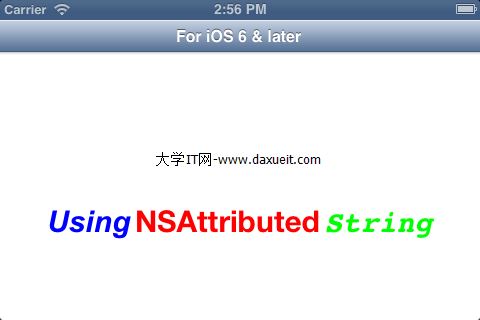
如果想在iOS6.0以前版本實現這個效果,需要使用到一個第三方庫TTTAttributedLabel,同時還有導入CoreText.frame框架.
- 上一頁:iOS繪圖
- 下一頁:iOS 之單例,代理,通知,KVO,Block全能解析



相關文章
+