UIscrollView和UIPageControl的循環滾動
編輯:IOS技巧綜合
[摘要]本文是對UIscrollView和UIPageControl的循環滾動的講解,對學習IOS蘋果軟件開發有所幫助,與大家分享。
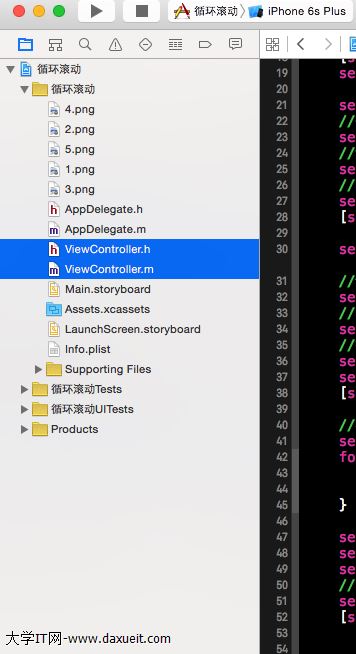
因為昨天在網上找了很久,很多只能實現向右滾動,而且一張圖一個imageview ,感覺工作量很可怕啊 , 下面的例子就是不論你多少圖 , 只和我代碼裡面的幾個數值有關, 只需要修改分頁和循環i的最大值,當然為了方便 , 您最好把圖片的名字改成有序的 。 方便您添加到可變集合中。

如果這樣的頁面你有五頁 或則更多都可以實現好像從最後一張圖跳到第一張圖。
這個其實總共只有3個image,圖都是用循環加進去的 。
上代碼
#import <UIKit/UIKit.h>
#define WIDTH self.view.bounds.size.width
#define HEIGHT self.view.bounds.size.height
@interface ViewController : UIViewController<UIScrollViewDelegate>
@property(strong,nonatomic)  UIScrollView *scrollview;
@property(strong,nonatomic)  UIPageControl *pagecontrol;
//存儲圖片
@property(strong,nonatomic)  NSMutableArray * imageArray;
//當前頁碼
@property(assign,nonatomic)  int  currentPage;
//存儲圖片
@property(strong,nonatomic) UIImageView * firstImage;
@property(strong,nonatomic)  UIImageView * secondImage;
@property(strong,nonatomic)  UIImageView *thirdImage;

@end
#import "ViewController.h"

@interface ViewController ()

@end

@implementation ViewController

- (void)viewDidLoad {
    [super viewDidLoad];
    self.scrollview=[[UIScrollView alloc]initWithFrame:CGRectMake(0, 20, WIDTH,HEIGHT )];

    self.scrollview.contentSize=CGSizeMake(WIDTH*3, 0);
    //是否分頁
    self.scrollview.pagingEnabled=YES;
    //添加代理
    self.scrollview.delegate=self;
    //隱藏滾動條
    self.scrollview.showsHorizontalScrollIndicator=NO;
    [self.view addSubview:self.scrollview];

    self.pagecontrol=[[UIPageControl alloc]initWithFrame:CGRectMake(WIDTH/5*3, HEIGHT/5*4, WIDTH/3, 40)];
    //設置當前頁
    self.pagecontrol.currentPage=0;
    //分頁
    self.pagecontrol.numberOfPages=5;
    //指定頁碼顏色
    self.pagecontrol.currentPageIndicatorTintColor=[UIColor redColor];
    self.pagecontrol.pageIndicatorTintColor=[UIColor blueColor];
    [self.view addSubview:self.pagecontrol];

    //初始化存儲圖片的集合
    self.imageArray=[NSMutableArray array];
    for (int i=1; i<6; i++) {
        UIImage *image=[UIImage imageNamed:[NSString stringWithFormat:@"%d",i]];
        [self.imageArray addObject:image];
    }

    self.firstImage=[[UIImageView alloc]init];
    self.secondImage=[[UIImageView alloc]init];
    self.thirdImage=[[UIImageView alloc]init];
    //當前頁碼
    self.currentPage=0;
    [self reloadImage];


}
-(void)reloadImage
{
    //第一種情況 , 第一頁
    if (self.currentPage==0) {
        self.firstImage.image=[self.imageArray lastObject];
        self.secondImage.image = [self.imageArray objectAtIndex:self.currentPage];
        self.thirdImage.image = [self.imageArray objectAtIndex:self.currentPage + 1];
    }
    //    第二種情況 最後一頁
    else if (self.currentPage == self.imageArray.count - 1) {
        self.firstImage.image = [self.imageArray objectAtIndex:self.currentPage - 1];
        self.secondImage.image = [self.imageArray objectAtIndex:self.currentPage];
        self.thirdImage.image = [self.imageArray objectAtIndex:0];
    }
    //    第三種情況  中間頁
    else {
        self.firstImage.image = [self.imageArray objectAtIndex:self.currentPage - 1];
        self.secondImage.image = [self.imageArray objectAtIndex:self.currentPage];
        self.thirdImage.image = [self.imageArray objectAtIndex:self.currentPage + 1];
    }
    self.firstImage.frame = CGRectMake(0, 0, WIDTH, HEIGHT);
    self.secondImage.frame = CGRectMake(WIDTH, 0, WIDTH, HEIGHT);
    self.thirdImage.frame = CGRectMake(WIDTH* 2, 0, WIDTH, HEIGHT);

    [self.scrollview addSubview:self.firstImage];
    [self.scrollview addSubview:self.secondImage];
    [self.scrollview addSubview:self.thirdImage];

    self.scrollview.contentOffset = CGPointMake(WIDTH, 0);


}


-(void)scrollViewDidEndDecelerating:(UIScrollView *)scrollView
{

    float x= self.scrollview.contentOffset.x;
    //向左
    if (x<0||x==0) {
        if (self.currentPage==0) {
            self.currentPage=(int)self.imageArray.count-1;
        }
        else{
            self.currentPage--;
        }
    }
    //向右
    if (x > WIDTH * 2 || x == WIDTH * 2) {
        if (self.currentPage == (int)self.imageArray.count - 1) {
            self.currentPage = 0;
        }
        else {
            self.currentPage++ ;
        }
    }

    self.pagecontrol.currentPage = self.currentPage;

    [self reloadImage];


}
- (void)didReceiveMemoryWarning {
    [super didReceiveMemoryWarning];
    // Dispose of any resources that can be recreated.
}

@end
- 上一頁:the bundle at bundle path is not signed using an apple submission certificate
- 下一頁:Pinyin Comparison 拼音辨別 V1.1


相關文章
+- iOS開源一個簡略的訂餐app UI框架
- Objective-C 代碼與Javascript 代碼互相挪用實例
- 在uiview 的tableView中點擊cell進入跳轉到另外一個界面的完成辦法
- iOS開辟之UIScrollView控件詳解
- 進修iOS自界說導航掌握器UINavigationController
- IOS中UITableView轉動到指定地位
- iOS為UIView設置暗影後果
- iOS設置UIButton文字顯示地位和字體年夜小、色彩的辦法
- iOS開辟之UIPickerView完成城市選擇器的步調詳解
- iOS長按UIlabel完成可復制功效
- iOS開辟中UIWebView的加載當地數據的三種方法
- iOS中修正UITextField占位符字體色彩的辦法總結
- iOS簡略登錄LoginViewController、注冊RegisterViewController等功效完成辦法
- IOS 仿時間網選票UI實例代碼
- iOS推送之當地告訴UILocalNotification