IOS自定義場景切換動畫。
編輯:IOS技巧綜合
[摘要]本文是對IOS自定義場景切換動畫。的講解,對學習IOS蘋果軟件開發有所幫助,與大家分享。

IOS中我們可以通過Storyborad以及segue來實現我們自己的場景切換動畫,新建項目使用Single View Application模板並取名為MyCustomSegue。
使用storyboard托出另一UIViewController並分設置兩個控制器的視圖顏色,並設置跳轉頁面的segue為custom
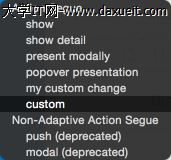
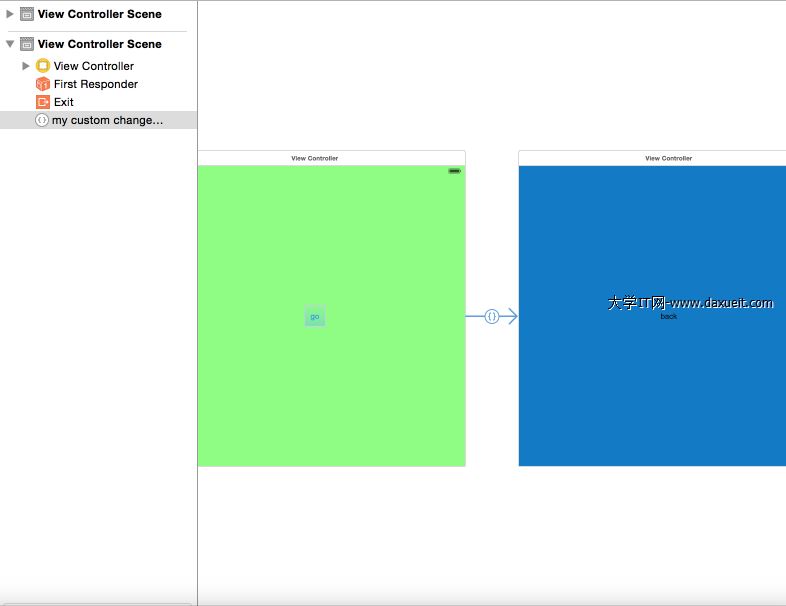
設置如圖

新建文件MyCustomChangeSegue並重新perform方法
 @implementation MyCustomChangeSegue

 -(void)perform
 {
     UIViewController *sourceViewController = self.sourceViewController;
     UIViewController *destViewController = self.destinationViewController;

     [UIView animateWithDuration:1 animations:^{
         CGPoint centerPoint = sourceViewController.view.center;
         sourceViewController.view.frame = CGRectMake(centerPoint.x,centerPoint.y , 0, 0);
         sourceViewController.view.alpha = 0;
     } completion:^(BOOL success){
         UIView *destView = destViewController.view;
         sourceViewController.view.hidden = YES;
         [[sourceViewController.view superview] addSubview:destView];
         CGRect destRect = destView.frame;
         CGPoint centerPoint = destView.center;
         destView.frame = CGRectMake(centerPoint.x,centerPoint.y , 0, 0);
         destView.alpha = 0;
         [UIView animateWithDuration:0.3 animations:^{
             destView.frame = destRect;
             destView.alpha = 1;
         } completion:^(BOOL success){
             destView.alpha = 1;
             destView.frame = destRect;
             sourceViewController.view.hidden = NO;
             [sourceViewController presentViewController:destViewController animated:NO completion:nil];
         }];
     }];
 }

 @end
運行程序點擊go按鈕,我們就會看到神奇的一幕了!


相關文章
+