BadgeValueView
編輯:IOS技巧綜合
[摘要]本文是對BadgeValueView的講解,對學習IOS蘋果軟件開發有所幫助,與大家分享。
BadgeValueView
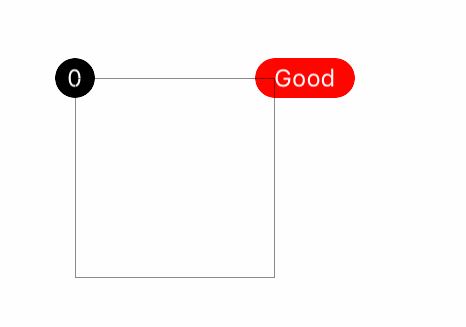
效果
源碼
https://github.com/YouXianMing/UI-Component-Collection 中的BadgeValueView
//
//  BadgeValueView.h
//  BadgeView
//
//  Created by YouXianMing on 16/5/17.
//  Copyright © 2016年 YouXianMing. All rights reserved.
//

#import <UIKit/UIKit.h>

typedef NS_ENUM(NSUInteger, BadgePosition) {

    BadgePositionCenterLeft,
    BadgePositionCenterRight,

    BadgePositionTopLeft,
    BadgePositionTopRight,

    BadgePositionBottomLeft,
    BadgePositionBottomRight,
};

@interface BadgeValueView : UIView

/**
 *  bedge值
 */
@property (nonatomic, strong) NSString  *badgeValue;

/**
 *  被附著的view
 */
@property (nonatomic, weak)   UIView    *contentView;

/**
 *  敏感字符增長寬度,默認值為4
 */
@property (nonatomic)  CGFloat        sensitiveTextWidth;

/**
 *  敏感增長寬度,默認為10
 */
@property (nonatomic)  CGFloat        sensitiveWidth;

/**
 *  固定高度,默認為20
 */
@property (nonatomic)  CGFloat        fixedHeight;

/**
 *  位置信息,默認為BadgePositionTopRight
 */
@property (nonatomic)  BadgePosition  position;

/**
 *  字體,默認為12
 */
@property (nonatomic, strong) UIFont    *font;

/**
 *  字體顏色,默認為白色
 */
@property (nonatomic, strong) UIColor   *textColor;

/**
 *  bedge顏色,默認為紅色
 */
@property (nonatomic, strong) UIColor   *badgeColor;

/**
 *  開始生效
 */
- (void)makeEffect;

/**
 *  設置BadgeValue
 *
 *  @param value    BadgeValue
 *  @param animated 是否執行動畫
 */
- (void)setBadgeValue:(NSString *)value animated:(BOOL)animated;

@end
//
//  BadgeValueView.m
//  BadgeView
//
//  Created by YouXianMing on 16/5/17.
//  Copyright © 2016年 YouXianMing. All rights reserved.
//

#import "BadgeValueView.h"
#import "UIView+SetRect.h"

@interface BadgeValueView ()

@property (nonatomic, strong) UILabel *label;

@end

@implementation BadgeValueView

- (instancetype)init {

    if (self = [super init]) {

        self.sensitiveWidth     = 10;
        self.fixedHeight        = 20;
        self.sensitiveTextWidth = 4;
        self.position           = BadgePositionTopRight;
        self.font               = [UIFont systemFontOfSize:12.f];
        self.textColor          = [UIColor whiteColor];
        self.badgeColor         = [UIColor redColor];
    }

    return self;
}

- (void)makeEffect {

    // 標簽
    self.label               = [[UILabel alloc] init];
    self.label.textColor     = self.textColor;
    self.label.textAlignment = NSTextAlignmentCenter;
    self.label.font          = self.font;
    [self addSubview:self.label];

    // 背景色
    self.backgroundColor     = self.badgeColor;
    self.width               = self.fixedHeight;
    self.height              = self.fixedHeight;
    self.layer.cornerRadius  = self.fixedHeight / 2.f;
    self.layer.masksToBounds = YES;

    [_contentView addSubview:self];
}

- (void)setBadgeValue:(NSString *)badgeValue animated:(BOOL)animated {

    _badgeValue = badgeValue;

    // 是否執行動畫
    if (animated) {

        [UIView animateWithDuration:0.15f animations:^{

            self.alpha = badgeValue.length == 0 ? 0 : 1;
        }];

    } else {

        self.alpha = badgeValue.length == 0 ? 0 : 1;
    }

    // 如果值為空,則不執行後續操作
    if (badgeValue.length <= 0) {

        return;
    }

    // 設置文本
    self.label.text = badgeValue;
    [self.label sizeToFit];

    // 更新尺寸
    if (self.label.width + self.sensitiveTextWidth > self.width) {

        self.width += self.sensitiveWidth;

    } else {

        self.width = self.fixedHeight;
    }

    // 更新文本尺寸
    self.label.center = self.middlePoint;

    // 根據位置更新尺寸
    CGFloat offset = self.fixedHeight / 2.f;
    self.position == BadgePositionCenterLeft  ? self.left = -offset, self.centerY = self.contentView.middleY : 0;
    self.position == BadgePositionCenterRight ? self.left = self.contentView.width - offset, self.centerY = self.contentView.middleY : 0;

    self.position == BadgePositionTopLeft     ? self.left = -offset, self.y    = -offset : 0;
    self.position == BadgePositionTopRight    ? self.top  = -offset, self.left = self.contentView.width - offset : 0;

    self.position == BadgePositionBottomLeft  ? self.left = -offset, self.top = self.contentView.height - offset : 0;
    self.position == BadgePositionBottomRight ? self.left = self.contentView.width - offset, self.top = self.contentView.height - offset : 0;
}

- (void)setBadgeValue:(NSString *)badgeValue {

    [self setBadgeValue:badgeValue animated:NO];
}

@end
- 上一頁:iOS多圖片下載
- 下一頁:iOS筆記之NSSet


相關文章
+- iPhone/iPad開辟經由過程LocalNotification完成iOS准時當地推送功效
- iOS開辟之widget完成詳解
- iOS突變圓環扭轉動畫CAShapeLayer CAGradientLayer
- iOS Runntime 靜態添加類辦法並挪用-class_addMethod
- iOS開辟之UIKeyboardTypeNumberPad數字鍵盤自界說按鍵
- iOS中應用UISearchBar控件限制輸出字數的完成辦法
- IOS完成上滑隱蔽NvaigtionBar而下拉則顯示後果
- iOS中searchBar(搜刮框)光標初始地位後移
- IOS完成自界說通明配景的tabbar
- 若何完成IOS_SearchBar搜刮欄及症結字高亮
- 處理Alamofire庫在iOS7下設置Head有效的成績
- IOS完成選擇城市後跳轉Tabbar後果
- iOS 隱蔽tabbar代碼詳解
- iOS中的導航欄UINavigationBar與對象欄UIToolBar要點解析
- iOS中的UISearchBar搜刮框組件基本應用指南