iOS獲取app圖標和啟動圖片名字(AppIcon and LaunchImages name)
在某種場景下,可能我們需要獲取app的圖標名稱和啟動圖片的名稱。比如說app在前台時,收到了遠程通知但是通知欄是不會有通知提醒的,這時我想做個模擬通知提示,需要用到icon名稱;再比如在加載某個控制器時,想設置該控制器的背景圖片為啟動圖片,需要用到啟動圖片名稱。
而事實上icon圖片放在系統AppIcon文件夾裡,啟動圖片放在系統LaunchImage文件夾裡,取這些圖片的名稱和其他一般資源圖片名稱不一樣。

為了方便舉例子,咱們先簡單粗暴點
假設當前項目只支持iPhone設備,並且只支持豎屏;而且當前項目裡已經設置好了AppIcon圖標和啟動圖片,
如何獲取icon圖標名稱和啟動圖片名稱呢 ?
上代碼和打印日志:
/** 獲取app的icon圖標名稱 */
- (void)getAppIconName{

    NSDictionary *infoDict = [[NSBundle mainBundle] infoDictionary];

    //獲取app中所有icon名字數組
    NSArray *iconsArr = infoDict[@"CFBundleIcons"][@"CFBundlePrimaryIcon"][@"CFBundleIconFiles"];
    //取最後一個icon的名字
    NSString *iconLastName = [iconsArr lastObject];

    //打印icon名字
    NSLog(@"iconsArr: %@", iconsArr);
    NSLog(@"iconLastName: %@", iconLastName);
    /*
     打印日志:
     iconsArr: (
         AppIcon29x29,
         AppIcon40x40,
         AppIcon60x60
     )
     iconLastName: AppIcon60x60
     */
}

/** 獲取app的啟動圖片名稱,並設置為本控制器背景圖片 */
- (void)getLaunchImageName{

    NSString *launchImageName = @"";  //啟動圖片名稱變量
    CGFloat screenHeight = [UIScreen mainScreen].bounds.size.height;

    //獲取與當前設備匹配的啟動圖片名稱
    if (screenHeight == 480){ //4,4S
        launchImageName = @"LaunchImage-700";
    }
    else if (screenHeight == 568){ //5, 5C, 5S, iPod
        launchImageName = @"LaunchImage-700-568h";
    }
    else if (screenHeight == 667){ //6, 6S
        launchImageName = @"LaunchImage-800-667h";
    }
    else if (screenHeight == 736){ // 6Plus, 6SPlus
        launchImageName = @"LaunchImage-800-Portrait-736h";
  }

   if (launchImageName.length < 1) return; //設備啟動圖片為控制器的背景圖片

   UIImage *img = [UIImage imageNamed:launchImageName];
   self.view.backgroundColor = [UIColor colorWithPatternImage:img];
}
打印當前只支持iPhone設備並且只支持豎屏場景下的所有啟動圖片信息:
/** 打印app裡面所有啟動圖片名稱信息 */
- (void)printAllLaunchImageInfo{

    NSDictionary *infoDict = [[NSBundle mainBundle] infoDictionary];

    //獲取所有啟動圖片信息數組
    NSArray *launchImagesArr = infoDict[@"UILaunchImages"];

    NSLog(@"launchImagesArr: %@", launchImagesArr);
    /*
     打印日志:啟動圖片的名字是固定的
     launchImagesArr: (
         {
             UILaunchImageMinimumOSVersion = "8.0";
             UILaunchImageName = "LaunchImage-800-Portrait-736h";
             UILaunchImageOrientation = Portrait;
             UILaunchImageSize = "{414, 736}";
         },
         {
             UILaunchImageMinimumOSVersion = "8.0";
             UILaunchImageName = "LaunchImage-800-Landscape-736h";
             UILaunchImageOrientation = Landscape;
             UILaunchImageSize = "{414, 736}";
         },
         {
             UILaunchImageMinimumOSVersion = "8.0";
             UILaunchImageName = "LaunchImage-800-667h";
             UILaunchImageOrientation = Portrait;
             UILaunchImageSize = "{375, 667}";
         },
         {
             UILaunchImageMinimumOSVersion = "7.0";
             UILaunchImageName = "LaunchImage-700";
             UILaunchImageOrientation = Portrait;
             UILaunchImageSize = "{320, 480}";
         },
         {
             UILaunchImageMinimumOSVersion = "7.0";
             UILaunchImageName = "LaunchImage-700-568h";
             UILaunchImageOrientation = Portrait;
             UILaunchImageSize = "{320, 568}";
         }
     )
     */
}
看到了,項目AppIcon圖標和啟動圖片信息,都可以從[[NSBundle mainBundle] infoDictionary] 獲得,當前這裡面還包含了app的其他信息如版本、app名稱、設備類型、支持方向。。。
打印所有信息看看:
/** 打印app工程配置信息 */
- (void)printInfoDictionary{

    NSDictionary *infoDict = [[NSBundle mainBundle] infoDictionary];
    NSLog(@"%@", infoDict);

    /*
     打印日志:
     {
         BuildMachineOSBuild = 15G31;
         CFBundleDevelopmentRegion = en;
         CFBundleExecutable = TanTest;
         CFBundleIcons =     {
             CFBundlePrimaryIcon =         {
                 CFBundleIconFiles =             (
                     AppIcon29x29,
                     AppIcon40x40,
                     AppIcon60x60
                 );
             };
         };
         CFBundleIdentifier = "net.tan.xxx";
         CFBundleInfoDictionaryVersion = "6.0";
         CFBundleInfoPlistURL = "Info.plist -- file:///Users/PX/Library/Developer/CoreSimulator/Devices/7020368B-C160-42C0-B3C5-5F958FA82EF5/data/Containers/Bundle/Application/77D8C333-A6AF-4183-B79A-A5BEDCD08E1A/TanTest.app/";
         CFBundleName = TanTest;
         CFBundleNumericVersion = 16809984;
         CFBundlePackageType = APPL;
         CFBundleShortVersionString = "1.0";
         CFBundleSignature = "????";
         CFBundleSupportedPlatforms =     (
            iPhoneSimulator
         );
         CFBundleVersion = 1;
         DTCompiler = "com.apple.compilers.llvm.clang.1_0";
         DTPlatformBuild = "";
         DTPlatformName = iphonesimulator;
         DTPlatformVersion = "9.3";
         DTSDKBuild = 13E230;
         DTSDKName = "iphonesimulator9.3";
         DTXcode = 0731;
         DTXcodeBuild = 7D1014;
         LSRequiresIPhoneOS = 1;
         MinimumOSVersion = "6.0";
         UIDeviceFamily =     (
         1
         );
         UILaunchImageFile = LaunchImage;
         UILaunchImages =     (
             {
                 UILaunchImageMinimumOSVersion = "8.0";
                 UILaunchImageName = "LaunchImage-800-Portrait-736h";
                 UILaunchImageOrientation = Portrait;
                 UILaunchImageSize = "{414, 736}";
             },
             {
                 UILaunchImageMinimumOSVersion = "8.0";
                 UILaunchImageName = "LaunchImage-800-Landscape-736h";
                 UILaunchImageOrientation = Landscape;
                 UILaunchImageSize = "{414, 736}";
             },
             {
                 UILaunchImageMinimumOSVersion = "8.0";
                 UILaunchImageName = "LaunchImage-800-667h";
                 UILaunchImageOrientation = Portrait;
                 UILaunchImageSize = "{375, 667}";
             },
             {
                 UILaunchImageMinimumOSVersion = "7.0";
                 UILaunchImageName = "LaunchImage-700";
                 UILaunchImageOrientation = Portrait;
                 UILaunchImageSize = "{320, 480}";
             },
             {
                 UILaunchImageMinimumOSVersion = "7.0";
                 UILaunchImageName = "LaunchImage-700-568h";
                 UILaunchImageOrientation = Portrait;
                 UILaunchImageSize = "{320, 568}";
             }
         );
         UILaunchStoryboardName = LaunchScreen;
         UIMainStoryboardFile = Main;
         UIRequiredDeviceCapabilities =     (
            armv7
         );
         UISupportedInterfaceOrientations =     (
            UIInterfaceOrientationPortrait
         );
     }
     */
}
----------- 接下來我們再來在app既支持iPhone和iPad設備,又支持橫屏和豎屏時,AppIcon和LaunchImage是怎樣的以及如何獲取 ---------
先上兩張圖,再上測試代碼:
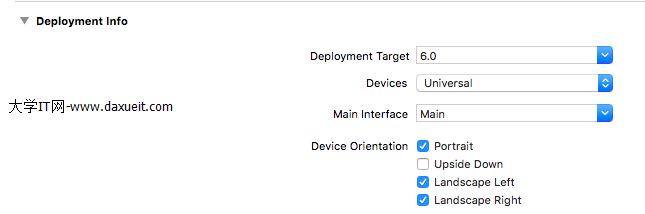
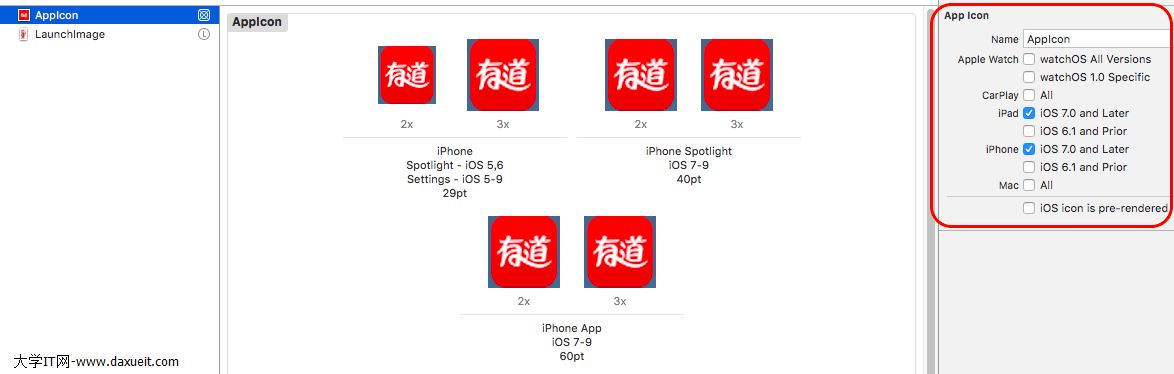
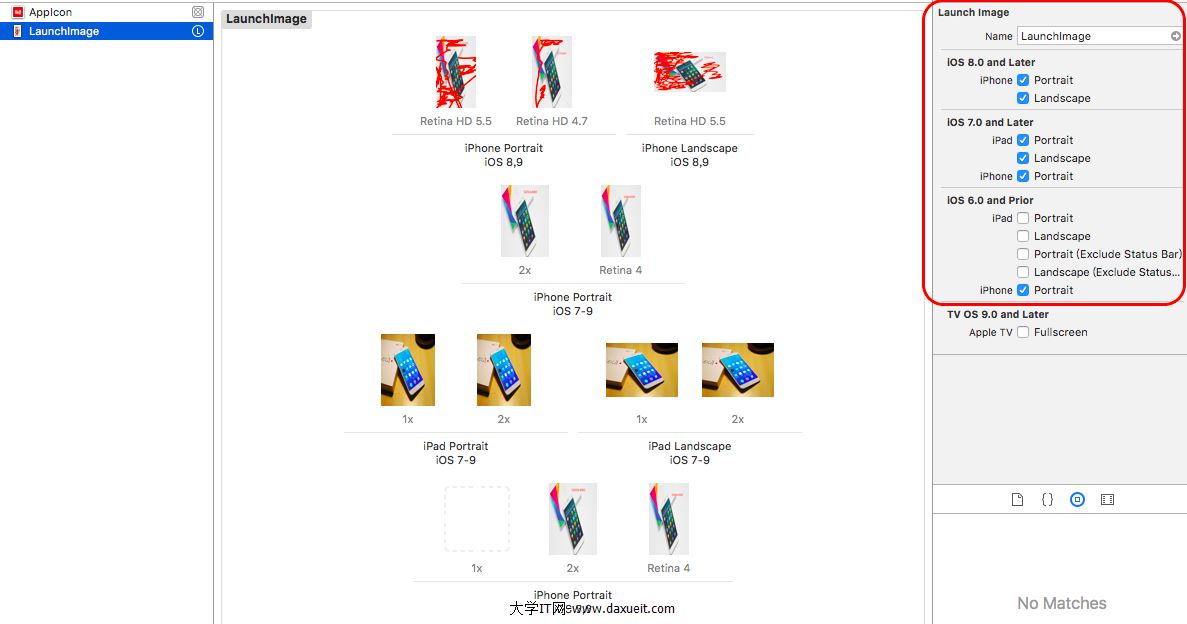
測試代碼:
1、獲取AppIcon所有icon圖標名稱
/** 支持iPhone和iPad, 獲取app的icon圖標名稱 */
- (void)getAppIconName{

    NSDictionary *infoDict = [[NSBundle mainBundle] infoDictionary];

    //獲取app中所有icon名字數組
    NSArray *iconsArr = infoDict[@"CFBundleIcons"][@"CFBundlePrimaryIcon"][@"CFBundleIconFiles"];
    //取最後一個icon的名字
    NSString *iconLastName = [iconsArr lastObject];

    //打印icon名字
    NSLog(@"iconsArr: %@", iconsArr);
    NSLog(@"iconLastName: %@", iconLastName);
    /*
     打印日志(29pt和40pt iPhone和iPad都用到;60pt --- iPhone, 76pt和83.5pt --- iPad):
     iconsArr: (
         AppIcon29x29,
         AppIcon40x40,
         AppIcon60x60,
         AppIcon76x76,
         "AppIcon83.5x83.5"
     )
     iconLastName: AppIcon83.5x83.5
     */
}
2、獲取在支持iPhone和iPad開發,支持橫屏和豎屏時,獲取啟動圖片,並設為背景圖片代碼
(iPhone設備只有在Plus, 即5.5英寸才有豎屏和橫屏兩套圖片,其他4、5、6豎屏橫屏共用一張啟動圖片)
/**
 支持iPhone和iPad, 支持橫屏、豎屏,
 獲取app的啟動圖片名稱,並設置為本控制器背景圖片
 */
- (void)getLaunchImageName{

    NSString *launchImageName = @"";  //啟動圖片名稱變量
    CGFloat screenHeight = [UIScreen mainScreen].bounds.size.height; //屏幕高度
    CGFloat screenWidth = [UIScreen mainScreen].bounds.size.width; //屏幕寬度

    //設備界面方向
    UIInterfaceOrientation orientation = [UIApplication sharedApplication].statusBarOrientation;

    BOOL isPortrait = UIInterfaceOrientationIsPortrait(orientation);// 是否豎屏
    BOOL isLandscape = UIInterfaceOrientationIsLandscape(orientation);//是否橫屏

    //獲取與當前設備匹配的啟動圖片名稱
    //4、4S 豎屏,橫屏
    if ((isPortrait && screenHeight == 480) || (isLandscape && screenWidth == 480)){
        launchImageName = @"LaunchImage-700";
    }
    //5、5C、5S、iPod 豎屏,橫屏
    else if ((isPortrait && screenHeight == 568) || (isLandscape && screenWidth == 568)){
        launchImageName = @"LaunchImage-700-568h";
    }
    //6、6S 豎屏,橫屏
    else if ((isPortrait && screenHeight == 667) || (isLandscape && screenWidth == 667)){
        launchImageName = @"LaunchImage-800-667h";
    }
    //6Plus、6SPlus豎屏
    else if (isPortrait && screenHeight == 736){
        launchImageName = @"LaunchImage-800-Portrait-736h";
    }
    //6Plus、6SPlus 橫屏
    else if (isLandscape && screenWidth == 736){
        launchImageName = @"LaunchImage-800-Landscape-736h";
    }
    //iPad 豎屏
    else if (isPortrait && screenHeight == 1024){
        launchImageName = @"LaunchImage-700-Portrait";
    }
    //iPad 橫屏
    else if (isLandscape && screenWidth == 1024){
        launchImageName = @"LaunchImage-700-Landscape";
    }

    if (launchImageName.length < 1) return;

    //設備啟動圖片為控制器的背景圖片
    UIImage *img = [UIImage imageNamed:launchImageName];
    self.view.backgroundColor = [UIColor colorWithPatternImage:img];
}
3、打印出所有啟動圖片信息
/** 打印app裡面所有啟動圖片名稱信息 */
- (void)printAllLaunchImageInfo{

    NSDictionary *infoDict = [[NSBundle mainBundle] infoDictionary];

    //獲取所有啟動圖片信息數組
    NSArray *launchImagesArr = infoDict[@"UILaunchImages"];

    NSLog(@"launchImagesArr: %@", launchImagesArr);
    /*
     打印日志:啟動圖片的名字是固定的
     launchImagesArr: (
         {
             UILaunchImageMinimumOSVersion = "8.0";
             UILaunchImageName = "LaunchImage-800-Portrait-736h";
             UILaunchImageOrientation = Portrait;
             UILaunchImageSize = "{414, 736}";
         },
         {
             UILaunchImageMinimumOSVersion = "8.0";
             UILaunchImageName = "LaunchImage-800-Landscape-736h";
             UILaunchImageOrientation = Landscape;
             UILaunchImageSize = "{414, 736}";
         },
         {
             UILaunchImageMinimumOSVersion = "8.0";
             UILaunchImageName = "LaunchImage-800-667h";
             UILaunchImageOrientation = Portrait;
             UILaunchImageSize = "{375, 667}";
         },
         {
             UILaunchImageMinimumOSVersion = "7.0";
             UILaunchImageName = "LaunchImage-700";
             UILaunchImageOrientation = Portrait;
             UILaunchImageSize = "{320, 480}";
         },
         {
             UILaunchImageMinimumOSVersion = "7.0";
             UILaunchImageName = "LaunchImage-700-568h";
             UILaunchImageOrientation = Portrait;
             UILaunchImageSize = "{320, 568}";
         },
         {
             UILaunchImageMinimumOSVersion = "7.0";
             UILaunchImageName = "LaunchImage-700-Portrait";
             UILaunchImageOrientation = Portrait;
             UILaunchImageSize = "{768, 1024}";
         },
         {
             UILaunchImageMinimumOSVersion = "7.0";
             UILaunchImageName = "LaunchImage-700-Landscape";
             UILaunchImageOrientation = Landscape;
             UILaunchImageSize = "{768, 1024}";
         }
     )
     */
}
4、打印所有配置信息
/** 打印app工程配置信息 */
- (void)printInfoDictionary{

    NSDictionary *infoDict = [[NSBundle mainBundle] infoDictionary];
    NSLog(@"%@", infoDict);
    /*
     打印日志:
    {
        BuildMachineOSBuild = 15G31;
        CFBundleDevelopmentRegion = en;
        CFBundleExecutable = TanTest;
        CFBundleIcons =     {
            CFBundlePrimaryIcon =         {
                CFBundleIconFiles =             (
                                                 AppIcon29x29,
                                                 AppIcon40x40,
                                                 AppIcon60x60,
                                                 AppIcon76x76,
                                                 "AppIcon83.5x83.5"
                                                 );
            };
        };
        CFBundleIdentifier = "net.tan.xxx";
        CFBundleInfoDictionaryVersion = "6.0";
        CFBundleInfoPlistURL = "Info.plist -- file:///Users/PX/Library/Developer/CoreSimulator/Devices/3246F9AE-1D73-4E4F-8DDF-F591DBE64F63/data/Containers/Bundle/Application/7DD6C793-F882-43CF-9897-1433411289E6/TanTest.app/";
        CFBundleName = TanTest;
        CFBundleNumericVersion = 16809984;
        CFBundlePackageType = APPL;
        CFBundleShortVersionString = "1.0";
        CFBundleSignature = "????";
        CFBundleSupportedPlatforms =     (
                                          iPhoneSimulator
                                          );
        CFBundleVersion = 1;
        DTCompiler = "com.apple.compilers.llvm.clang.1_0";
        DTPlatformBuild = "";
        DTPlatformName = iphonesimulator;
        DTPlatformVersion = "9.3";
        DTSDKBuild = 13E230;
        DTSDKName = "iphonesimulator9.3";
        DTXcode = 0731;
        DTXcodeBuild = 7D1014;
        LSRequiresIPhoneOS = 1;
        MinimumOSVersion = "9.0";
        UIDeviceFamily =     (
                              1,
                              2
                              );
        UILaunchImageFile = LaunchImage;
        UILaunchImages =     (
                              {
                                  UILaunchImageMinimumOSVersion = "8.0";
                                  UILaunchImageName = "LaunchImage-800-Portrait-736h";
                                  UILaunchImageOrientation = Portrait;
                                  UILaunchImageSize = "{414, 736}";
                              },
                              {
                                  UILaunchImageMinimumOSVersion = "8.0";
                                  UILaunchImageName = "LaunchImage-800-Landscape-736h";
                                  UILaunchImageOrientation = Landscape;
                                  UILaunchImageSize = "{414, 736}";
                              },
                              {
                                  UILaunchImageMinimumOSVersion = "8.0";
                                  UILaunchImageName = "LaunchImage-800-667h";
                                  UILaunchImageOrientation = Portrait;
                                  UILaunchImageSize = "{375, 667}";
                              },
                              {
                                  UILaunchImageMinimumOSVersion = "7.0";
                                  UILaunchImageName = "LaunchImage-700";
                                  UILaunchImageOrientation = Portrait;
                                  UILaunchImageSize = "{320, 480}";
                              },
                              {
                                  UILaunchImageMinimumOSVersion = "7.0";
                                  UILaunchImageName = "LaunchImage-700-568h";
                                  UILaunchImageOrientation = Portrait;
                                  UILaunchImageSize = "{320, 568}";
                              },
                              {
                                  UILaunchImageMinimumOSVersion = "7.0";
                                  UILaunchImageName = "LaunchImage-700-Portrait";
                                  UILaunchImageOrientation = Portrait;
                                  UILaunchImageSize = "{768, 1024}";
                              },
                              {
                                  UILaunchImageMinimumOSVersion = "7.0";
                                  UILaunchImageName = "LaunchImage-700-Landscape";
                                  UILaunchImageOrientation = Landscape;
                                  UILaunchImageSize = "{768, 1024}";
                              }
                              );
        UILaunchStoryboardName = LaunchScreen;
        UIMainStoryboardFile = Main;
        UIRequiredDeviceCapabilities =     (
                                            armv7
                                            );
        UISupportedInterfaceOrientations =     (
                                                UIInterfaceOrientationPortrait,
                                                UIInterfaceOrientationLandscapeLeft,
                                                UIInterfaceOrientationLandscapeRight
                                                );
    }*/

}
原文鏈接:http://www.cnblogs.com/tandaxia/p/5820217.html
- 上一頁:你真的了解UIScrollView嗎?
- 下一頁:iOS學習