
Swift 串接 QQ 分享:攔截分享結果並提示成功或失敗
編輯:iOS 7 技巧
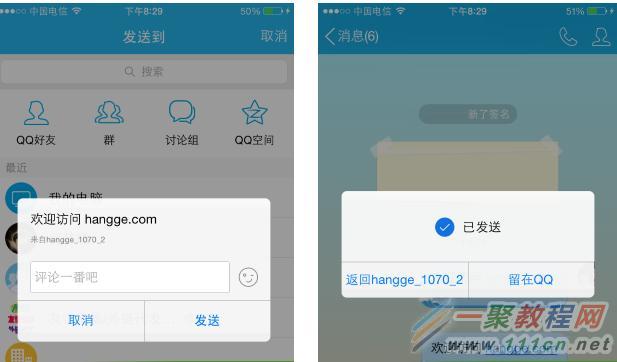
先前寫過如何在 App 裡呼叫騰訊官方 SDK,把訊息分享到手機 QQ 的好友或空間。但那篇只講到「發得出去」,還沒處理「分享完之後怎樣」。

用 QQApiInterface.send() 送出訊息後,會回傳一個 QQApiSendResultCode,從它可以判斷「QQ 有沒有被成功喚起」;失敗時還能取得原因(API 不支援、沒安裝 QQ 等等)。
不過「叫得起來」跟「使用者真的分享了」是兩件事。本文要示範的是:透過 delegate 回呼,抓到最終的分享結果。
效果
分享完畢返回 App 時,畫面上會跳出提示,說明成功或失敗;失敗時連帶顯示錯誤原因。
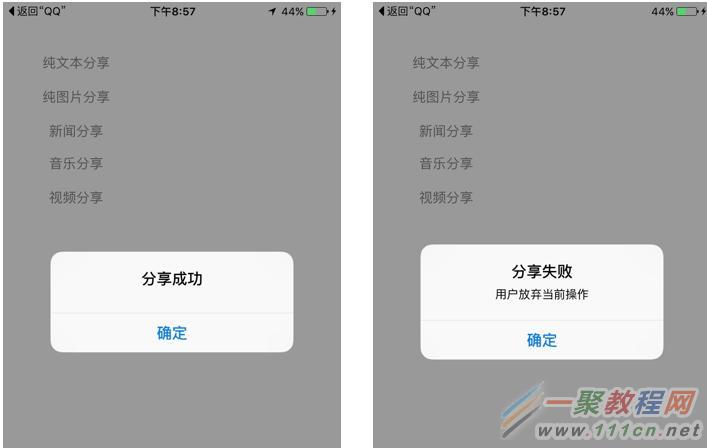
實作位置:AppDelegate
ViewController 的分享程式碼與前一篇相同,這裡不重複。真正要動的是 AppDelegate:
- 除了原本就必須改寫的 openURL 方法,還要讓 AppDelegate 採用 QQApiInterfaceDelegate 協定。
- 實作
onResp(_:),這是 QQ 回傳結果的入口。 - 在 onResp 裡先確認 resp 是 SendMessageToQQResp 類型,再比對 resp.type 是否為分享回應,最後依 resp.result 的字串值判斷結果。
import UIKit

@UIApplicationMain
class AppDelegate: UIResponder, UIApplicationDelegate, QQApiInterfaceDelegate  {

    var window: UIWindow?

    //重寫openURL
    func application(_ app: UIApplication, open url: URL,
                     options: [UIApplicationOpenURLOptionsKey : Any] = [:]) -> Bool {
        QQApiInterface.handleOpen(url, delegate: self)
        return TencentOAuth.handleOpen(url)
    }

    //處理來至QQ的響應
    func onResp(_ resp: QQBaseResp!) {
        print("--- onResp ---")
        //確保是對我們QQ分享操作的回調
        if resp.isKind(of: SendMessageToQQResp.self) {
            //QQApi應答消息類型判斷(手Q -> 第三方應用)
            if uint(resp.type) == ESENDMESSAGETOQQRESPTYPE.rawValue {
                let title = resp.result == "0" ? "分享成功" : "分享失敗"
                var message = ""
                switch(resp.result){
                case "-1":
                    message = "參數錯誤"
                case "-2":
                    message = "該群不在自己的群列表裡面"
                case "-3":
                    message = "上傳圖片失敗"
                case "-4":
                    message = "用戶放棄當前操作"
                case "-5":
                    message = "客戶端內部處理錯誤"
                default: //0
                    break
                }

                //顯示消息
                showAlert(title: title, message: message)
            }
        }
    }

    //處理來至QQ的請求
    func onReq(_ req:QQBaseReq!){
        print("--- onReq ---")
    }

    //處理QQ在線狀態的回調
    func isOnlineResponse(_ response: [AnyHashable : Any]!) {
        print("--- isOnlineResponse ---")
    }

    //顯示消息
    func showAlert(title:String, message:String){
        let alertController = UIAlertController(title: title,
                                                message: message, preferredStyle: .alert)
        let cancelAction = UIAlertAction(title: "確定", style: .cancel, handler: nil)
        alertController.addAction(cancelAction)
        self.window?.rootViewController!.present(alertController, animated: true,
                                                 completion: nil)
    }

    func application(_ application: UIApplication,
                     didFinishLaunchingWithOptions launchOptions:
                     [UIApplicationLaunchOptionsKey: Any]?) -> Bool {
        return true
    }

    func applicationWillResignActive(_ application: UIApplication) {}
    func applicationDidEnterBackground(_ application: UIApplication) {}
    func applicationWillEnterForeground(_ application: UIApplication) {}
    func applicationDidBecomeActive(_ application: UIApplication) {}
    func applicationWillTerminate(_ application: UIApplication) {}
}
幾個實務眉角
resp.result 是字串而非數字,比對時要記得加引號,這是很容易出錯的地方。另外 -4 代表使用者中途按返回放棄,屬於正常行為而非錯誤,提示文案上建議用中性語氣,不要寫成「失敗」嚇到使用者。
最後,alert 是從 rootViewController 跳出來的,若你的 App 有自訂的頁面容器或此時正處於 modal 流程中,記得改成對「目前最上層的 controller」呈現,否則可能完全看不到提示。