
FMDB 資料庫增刪改查實戰教學
FMDB 是 iOS 上對 SQLite 的 Objective-C 封裝,能把資料存到本機。相較於直接寫 C 的 sqlite3 API,FMDB 把連線、 statement 生命週期與結果集遍歷都包好了,程式碼可讀性高很多。以下示範完整的增刪改查。
第一步:加入 sqlite3 並匯入 FMDB
依序選擇「專案 → Build Phases → Link Binary With Libraries」,點下方加號,搜尋 sqlite3 並加入 libsqlite3.dylib。
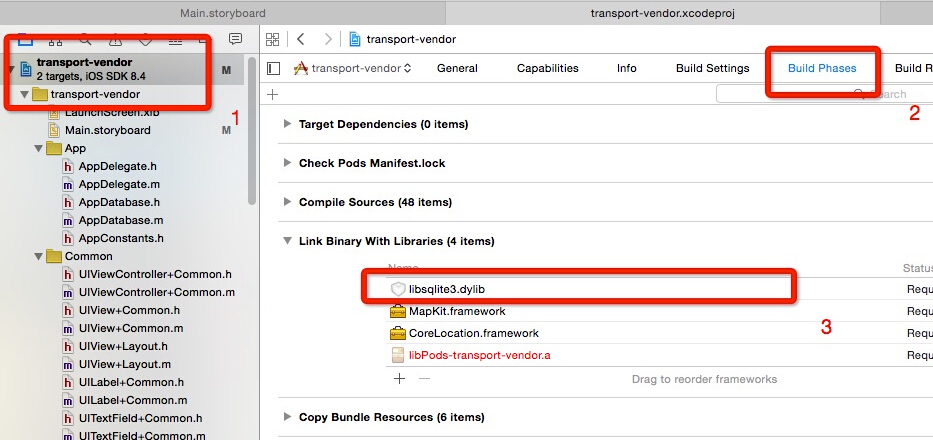
接著用 CocoaPods 在 Podfile 中加入 FMDB 並執行 pod install,然後在需要使用的類別中引入 #import <FMDB/FMDB.h>。
第二步:實作增刪改查
新增、修改、刪除三種操作的結構幾乎一樣,都是組出 SQL 字串後交給 executeUpdate:;查詢則用 executeQuery: 搭配 FMResultSet 遍歷。
#pragma mark - FMDB 資料庫操作

// 新增
- (void)insert
{
    if ([_db open]) {
        NSString *sql1 = [NSString stringWithFormat:
            @"INSERT INTO '%@' ('%@','%@','%@','%@','%@','%@','%@','%@','%@','%@') "
             "VALUES ('%@','%@','%@','%@','%@','%@','%@','%@','%@','%@')",
             TABLENAME,
             @"starting", @"destination", @"goodsName", @"car", @"goodsWeight",
             @"goodsVolume", @"intentionPrice", @"bail", @"mark", @"status",
             _startingLabel.text, _destinationLabel.text, goodsNameTextField.text,
             selectVehicleLabel.text, goodsWeightTextField.text, goodsVolumeTextField.text,
             intentionPriceTextField.text, bailTextField.text, markLabel.text, @"0"];

        BOOL res = [_db executeUpdate:sql1];
        if (!res) { NSLog(@"error when insert db table"); }
        else      { NSLog(@"success to insert db table"); }
        [_db close];
    }
}

// 修改
- (void)update
{
    if ([_db open]) {
        NSString *updateSql = [NSString stringWithFormat:
            @"update %@ set %@='%@' where %@='%@'",
            TABLENAME, DESTINATION, @"目的地 上海", STARTING, @"蕪湖 出發地"];

        BOOL res = [_db executeUpdate:updateSql];
        if (!res) { NSLog(@"error when update db table"); }
        else      { NSLog(@"success to update db table"); }
        [_db close];
    }
}

// 刪除
- (void)delete
{
    if ([_db open]) {
        NSString *deleteSql = [NSString stringWithFormat:
            @"delete from %@ where %@ = '%@'", TABLENAME, STARTING, @"蕪湖 出發地"];

        BOOL res = [_db executeUpdate:deleteSql];
        if (!res) { NSLog(@"error when delete db table"); }
        else      { NSLog(@"success to delete db table"); }
        [_db close];
    }
}

// 查詢
- (void)query
{
    if ([_db open]) {
        NSString *sql = [NSString stringWithFormat:@"SELECT * FROM %@", TABLENAME];
        FMResultSet *rs = [_db executeQuery:sql];

        while ([rs next]) {
            int Id       = [rs intForColumn:@"ID"];
            NSString *name    = [rs stringForColumn:STARTING];
            NSString *age     = [rs stringForColumn:DESTINATION];
            NSString *address = [rs stringForColumn:GOODSNAME];
            NSLog(@"id = %d, name = %@, age = %@ address = %@",
                  Id, name, age, address);
        }
        [_db close];
    }
}
SQL 字串的組成規則
以新增為例:INSERT INTO '%@' (...) VALUES (...) 中,第一個 %@ 是表名,接著括號內的多個 %@ 是欄位名稱,而 VALUES 後面的 %@ 則依序對應前面每個欄位的值。順序錯了就會寫入錯誤的欄位,這是除錯時最該先檢查的地方。
這份程式碼在正式專案中必須修正的問題
1. 改用參數化查詢。用 stringWithFormat: 拼接 SQL 有 SQL Injection 風險,且遇到單引號等特殊字元會直接語法錯誤。FMDB 已提供綁定參數的寫法,應優先採用:
[_db executeUpdate:@"INSERT INTO orders (start, dest, goods) VALUES (?,?,?)",
     _startingLabel.text, _destinationLabel.text, goodsNameTextField.text];
2. FMDatabase 要長期持有。每次操作都開一次連線、關一次連線效率很差,實務上會在 App 啟動時建立一次連線並保存為單例,或改用 FMDatabaseQueue 做序列化存取,避免多執行緒同時寫入造成資料損毀。
3. 記得檢查回傳值。executeUpdate: 回傳 BOOL,失敗時可用 [_db lastErrorMessage] 取得原因,別只印一行 log 就跳過。
4. 建表要處理版本升級。第一次開啟資料庫時建立表格,後續版本若有欄位變更,需要比對版本號並執行 ALTER TABLE 遷移,否則使用者更新 App 後就會遇到「no such column」而崩潰。
- 上一篇文章: iOS 取得目前是星期幾的程式碼
- 下一篇文章: 升級 Xcode 7 後 CocoaPods 失效的三個錯誤與解法