IOS開發之數據庫FMDB增、刪、改、查的使用教程
編輯:IOS7技巧
IOS開發中我們用到最多的是api接口了,其實做游戲開發時我們會到有FMDB數據庫了,這個可以方便保存數據在本地了,當然有些充值類的還是需要通過服務器來實現,下文我們介紹的是數據庫FMDB增、刪、改、查的使用例子。
FMDB是一個XCODE的中一個輕量級的數據庫,用於將網絡資源存儲在本地。所以,FMDB是一個很實用,很關鍵的知識點。在這裡寫了個簡單的例子,基於FMDB的添刪改查操作,代碼可能比較亂,希望不要傷了各位的眼睛。其中添加刪除更改的操作都非常簡單,不需要做太多操作,只需要用到FMDB封裝好的executeUpdate方法就行了。
第一步、加入sqlite3的包文件
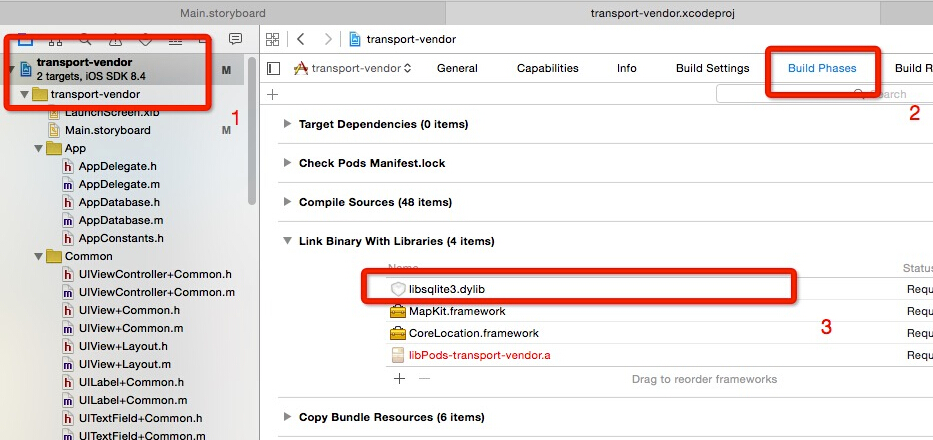
如圖所示,依次選擇並查找工程名->build phases->link binary with libraries按下方的加號鍵,在彈出的搜索框中搜索sqlite3,選擇libsqlite3.dylib->add。至此,已經添加完畢。然後在pod 中導入FMDB這個包。
第二步、增、刪、改、查 的實現
#pragma mark - FMDB數據庫操作

//插入

-(void)insert

{  if ([_db open]) {

     NSString *sql1 = [NSString stringWithFormat:

                       @"INSERT INTO
'%@'
 (
'%@'
,
'%@'
,
'%@'
,
'%@'
,
'%@'
,
'%@'
,
'%@'
,
'%@'
,
'%@'
,
'%@'
) VALUES (
'%@'
,
'%@'
,
'%@'
,
'%@'
,
'%@'
,
'%@'
,
'%@'
,
'%@'
,
'%@'
,
'%@'
)",

                       TABLENAME, @"starting", @"destination", @"goodsName", @"car", @"goodsWeight", @"goodsVolume",@"intentionPrice",@"bail",@"mark",@"status",_startingLabel.text,_destinationLabel.text,goodsNameTextField.text,selectVehicleLabel.text,goodsWeightTextField.text,goodsVolumeTextField.text,intentionPriceTextField.text,bailTextField.text,markLabel.text,@"0"];

     BOOL res = [_db executeUpdate:sql1];


     if (!res) {

         NSLog(@"error when insert db table");

     } else {

         NSLog(@"success to insert db table");

     }

     [_db close];

    }

}

//修改

-(void)update

{

    if ([_db open]) {

     NSString *updateSql = [NSString stringWithFormat:@"update %@ set
%@='%@'
 where
%@='%@'",TABLENAME,DESTINATION
,@"目的地 上海",STARTING,@"蕪湖 出發地"];

        BOOL res = [_db executeUpdate:updateSql];


        if (!res) {

            NSLog(@"error when insert db table");

        } else {

            NSLog(@"success to insert db table");

        }

        [_db close];

    }


}

//刪除

-(void)delete

{

     if ([_db open]) {

         NSString *deleteSql = [NSString stringWithFormat:

                                 @"delete from %@ where %@ =
'%@'
",

                                 TABLENAME, STARTING, @"蕪湖 出發地"];

         BOOL res = [_db executeUpdate:deleteSql];


         if (!res) {

             NSLog(@"error when insert db table");

         } else {

             NSLog(@"success to insert db table");

         }

         [_db close];

     }

}


 //查詢

 - (void)query

 {


     if ([_db open]) {

         NSString * sql = [NSString stringWithFormat:

                           @"SELECT * FROM
%@",TABLENAME
];

         FMResultSet * rs = [_db executeQuery:sql];

         while ([rs next]) {

             int Id = [rs intForColumn:@"ID"];

             NSString * name = [rs stringForColumn:STARTING];

             NSString * age = [rs stringForColumn:DESTINATION];

             NSString * address = [rs stringForColumn:GOODSNAME];

             NSLog(@"id = %d, name = %@, age = %@  address = %@", Id, name, age, address);

         }

         [_db close];

     }

}
至此,增刪改查已經全部實現完畢,可能看的不是很懂我其中的的一些變量,其實變量都是次要的,真正操作增刪改查的就那幾個關鍵字,像插入中的 @”INSERT INTO ‘%@’ (‘%@’, ‘%@’, ….) VALUES (‘%@’, ‘%@’,…)”,第一個%@代表著表名,括號中的多個%@代表的表中元素的名字,後面VALUES中的多個%@都是一一對應前面的元素的值。好了,介紹就到這裡,感謝查看。

相關文章
+