
iOS 9 越獄後替系統瘦身:把用不到的內建服務一次剝除
越獄最直接的價值,是打開了「第三方應用」這道門。除此之外,它還帶來一個常被忽略的好處:你可以真正動手整理系統,把從來不用、卻一直佔著空間的內建項目清掉。先前我們談過越獄後儲存空間不足的處理方式,這次則要更進一步,示範如何替 iOS 9 做「精簡手術」。
⚠️ 事前提醒:以下操作需要直接刪除系統檔案,屬於高風險行為。動手前請完整備份,並確 yourself 知道自己刪的是什麼。若中途出狀況,唯一救援方式通常是重新刷機。
示範:移除 Twitter 相關元件
先用傳輸線把越獄裝置連上電腦,開啟檔案管理工具並找到「文件 → 檔案系統(越獄)」,逐一刪除下列路徑的檔案:
/Applications/SocialUIService.app/PlugIns/com.apple.social.TwitterComposeService.appex
/System/Library/AccessibilityBundles/TwitterFramework.axbundle
/System/Library/AccessibilityBundles/TwitterSettings.axbundle
/System/Library/PreferenceBundles/TwitterSettings.bundle
/System/Library/Accounts/Authentication/TwitterAuthenticationPlugin.bundle
/System/Library/Frameworks/Social.framework/XPCServices/com.apple.twitter.xpc
/System/Library/Frameworks/Twitter.framework
/System/Library/PreferenceBundles/TwitterSettings.bundle
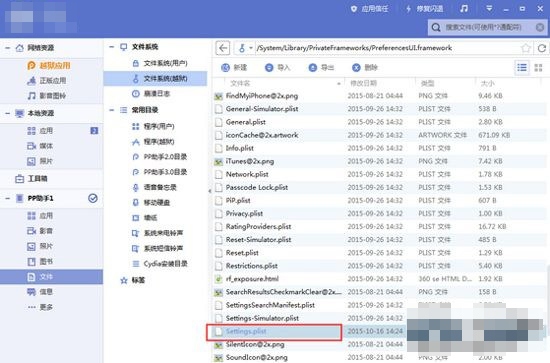
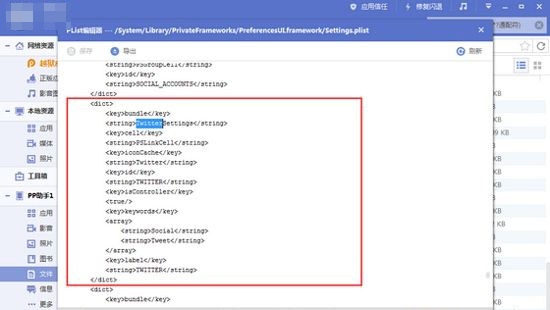
接著前往 /System/Library/PrivateFrameworks/PreferencesUI.framework,雙擊開啟 Settings.plist,搜尋「Twitter」,把對應的區塊刪掉後存檔。
重新開機,再打開「設定」,Twitter 的項目就已經消失。
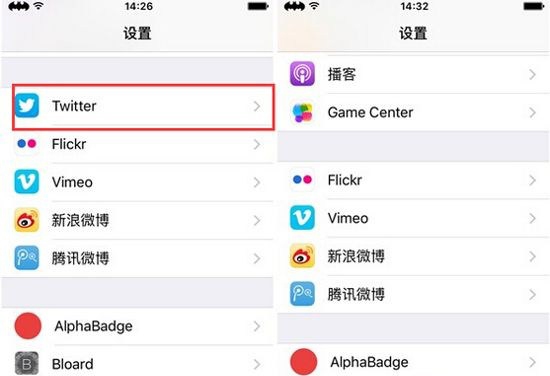
其他可移除的項目與對應路徑
Facebook、新浪微博、騰訊微博、Vimeo、Flickr 等社群設定的刪除邏輯完全相同,只是路徑不同:
/Applications/FacebookAccountMigrationDialog.app
/System/Library/AccessibilityBundles/FacebookSettings.axbundle
/System/Library/PreferenceBundles/FacebookSettings.bundle
/Applications/SocialUIService.app/PlugIns/com.apple.social.FacebookComposeService.appex
/System/Library/Accounts/Authentication/FacebookAuthenticationPlugin.bundle
/System/Library/Frameworks/Social.framework/XPCServices/com.apple.facebook.xpc
/System/Library/Accounts/Access/FacebookAccessPlugin.bundle
Vimeo
/Applications/SocialUIService.app/PlugIns/com.apple.social.VimeoComposeService.appex
/System/Library/PreferenceBundles/VimeoSettings.bundle
/System/Library/Accounts/Authentication/VimeoAuthenticationPlugin.bundle
/System/Library/Frameworks/Social.framework/XPCServices/com.apple.vimeo.xpc
Flickr
/System/Library/PreferenceBundles/FlickrSettings.bundle
/Applications/SocialUIService.app/PlugIns/com.apple.social.FlickrComposeService.appex
/System/Library/Accounts/Authentication/FlickrAuthenticationPlugin.bundle
/System/Library/Frameworks/Social.framework/XPCServices/com.apple.flickr.xpc
騰訊微博
/System/Library/PreferenceBundles/TencentWeiboSettings.bundle
/System/Library/Accounts/Authentication/TencentWeiboAuthenticationPlugin.bundle
/System/Library/Accounts/Access/TencentWeiboAccessPlugin.bundle
/Applications/SocialUIService.app/PlugIns/com.apple.social.TencentWeiboComposeService.appex
/System/Library/Frameworks/Social.framework/XPCServices/com.apple.tencentweibo.xpc
/Applications/Preferences.app/TencentWeiboSettings@2x.png
新浪微博
/System/Library/PreferenceBundles/WeiboSettings.bundle
/Applications/SocialUIService.app/PlugIns/com.apple.social.SinaWeiboComposeService.appex
/System/Library/Accounts/Authentication/WeiboAuthenticationPlugin.bundle
/System/Library/Frameworks/Social.framework/XPCServices/com.apple.weibo.xpc
Podcasts 播客
/Applications/Podcasts.app
/System/Library/AccessibilityBundles/Podcasts.axbundle
/System/Library/Assistant/Plugins/Podcasts.assistantBundle
/private/var/mobile/Library/SpringBoard/PushStore/com.apple.podcasts.pushstore
Tips 提示
/Applications/Tips.app
/Library/LaunchDaemons/com.apple.tips.plist
/System/Library/AccessibilityBundles/Tips.axbundle
/System/Library/PrivateFrameworks/Tips.framework
/User/Library/Preferences/com.apple.tipsd.plist
/etc/asl/com.apple.tips
/etc/asl/com.apple.tipsd
Stocks 股票
/Applications/Stocks.app
/System/Library/WeeAppPlugins/StocksWeeApp.bundle
/System/Library/AccessibilityBundles/Stocks-Assistant.axbundle
/System/Library/AccessibilityBundles/Stocks.axbundle
/System/Library/AccessibilityBundles/StocksFramework.axbundle
/System/Library/AccessibilityBundles/StocksWeeApp.axbundle
/System/Library/Assistant/Plugins/Stocks.assistantBundle
/System/Library/Assistant/UIPlugins/Stocks.siriUIBundle
/System/Library/PrivateFrameworks/Stocks.framework
iAd 廣告服務
/Applications/AdSheet.app
/Applications/iAdOptOut.app
/System/Library/AccessibilityBundles/iAdFramework.axbundle
/System/Library/AccessibilityBundles/AdSheet.axbundle
/System/Library/Frameworks/iAd.framework
/System/Library/DataClassMigrators/iAd.migrator
/etc/asl/com.apple.iad.logging
Compass 指南針
/Applications/Compass.app
/System/Library/AccessibilityBundles/Compass.axbundle
/System/Library/AccessibilityBundles/CompassViewCalibrationService.axbundle
/System/Library/HidPlugins/CompassBacklightCompensation.plugin
/System/Library/HidPlugins/CompassPlugin.plugin
/System/Library/LocationBundles/CompassCalibration.bundle
/System/Library/PreferenceBundles/CompassSettings.bundle
/System/Library/PrivateFrameworks/CompassUI.framework
/Applications/CompassCalibrationViewService.app
清完之後重新開機,你會發現設定裡清爽不少,系統也拿回了一些寶貴的空間。記得一次只處理一項,刪完先重開機確認無誤,再進行下一個,出問題時才容易回溯。
- 上一篇文章: iOS 9 越獄後屏蔽移動 3G,讓 2G/4G 自由切換
- 下一篇文章: iOS 9 越獄後 Cydia 一開就閃退?分兩種情況對症下藥