
iOS 9 越獄後刪掉 Facebook、Twitter:系統瘦身實作
iOS 9 越獄之後,你取得了設備的最高權限,其中一項常被拿來用的就是移除那些用不到的原生應用。以下是刪除 Facebook、Twitter 等內建整合服務的做法,已實測可行。

(提醒:新手請勿輕易嘗試系統精簡,出錯的代價是重刷系統。)
一、刪除 Twitter(以 Twitter 為例)
1、把越獄設備連上電腦版 PP 助手,進入【檔案-檔案系統(越獄)】,逐一刪除以下檔案:
/Applications/SocialUIService.app/PlugIns/com.apple.social.TwitterComposeService.appex
/System/Library/AccessibilityBundles/TwitterFramework.axbundle
/System/Library/AccessibilityBundles/TwitterSettings.axbundle
/System/Library/PreferenceBundles/TwitterSettings.bundle
/System/Library/Accounts/Authentication/TwitterAuthenticationPlugin.bundle
/System/Library/Frameworks/Social.framework/XPCServices/com.apple.twitter.xpc
/System/Library/Frameworks/Twitter.framework
/System/Library/PreferenceBundles/TwitterSettings.bundle
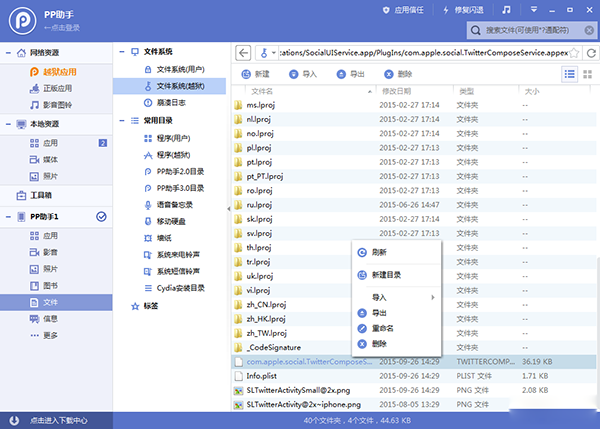
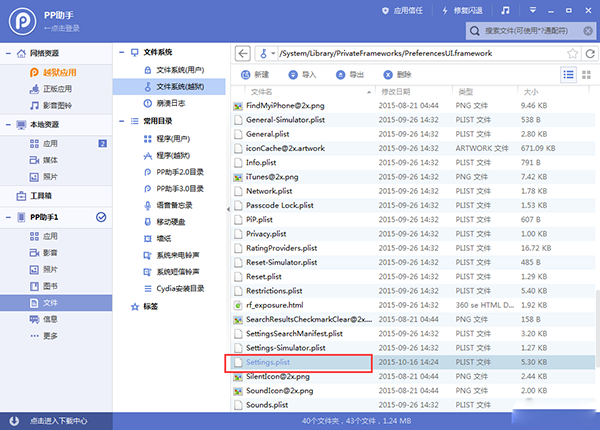
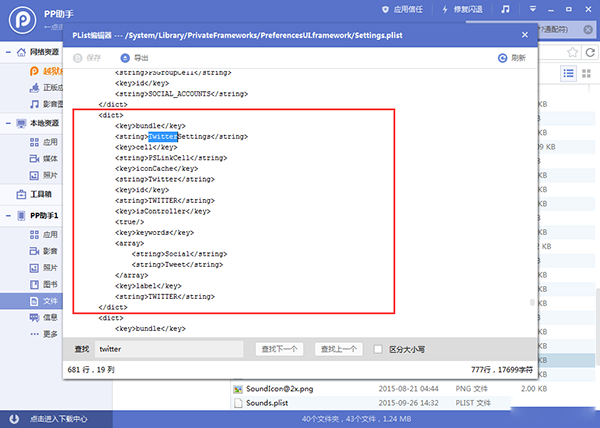
2、接著打開【/System/Library/PrivateFrameworks/PreferencesUI.framework】,雙擊開啟【Settings.plist】,搜尋【Twitter】並刪除對應段落,存檔。
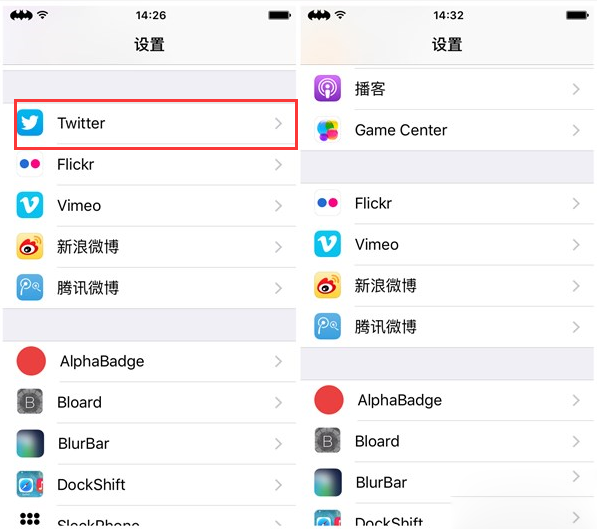
3、重啟設備後,設定裡就不會再有 Twitter 那一項。
4、其他應用的做法相同,路徑如下:
Facebook:
/Applications/FacebookAccountMigrationDialog.app
/System/Library/AccessibilityBundles/FacebookSettings.axbundle
/System/Library/PreferenceBundles/FacebookSettings.bundle
/Applications/SocialUIService.app/PlugIns/com.apple.social.FacebookComposeService.appex
/System/Library/Accounts/Authentication/FacebookAuthenticationPlugin.bundle
/System/Library/Frameworks/Social.framework/XPCServices/com.apple.facebook.xpc
/System/Library/Accounts/Access/FacebookAccessPlugin.bundle
Vimeo:
/Applications/SocialUIService.app/PlugIns/com.apple.social.VimeoComposeService.appex
/System/Library/PreferenceBundles/VimeoSettings.bundle
/System/Library/Accounts/Authentication/VimeoAuthenticationPlugin.bundle
/System/Library/Frameworks/Social.framework/XPCServices/com.apple.vimeo.xpc
Flickr:
/System/Library/PreferenceBundles/FlickrSettings.bundle
/Applications/SocialUIService.app/PlugIns/com.apple.social.FlickrComposeService.appex
/System/Library/Accounts/Authentication/FlickrAuthenticationPlugin.bundle
/System/Library/Frameworks/Social.framework/XPCServices/com.apple.flickr.xpc
騰訊微博:
/System/Library/PreferenceBundles/TencentWeiboSettings.bundle
/System/Library/Accounts/Authentication/TencentWeiboAuthenticationPlugin.bundle
/System/Library/Accounts/Access/TencentWeiboAccessPlugin.bundle
/Applications/SocialUIService.app/PlugIns/com.apple.social.TencentWeiboComposeService.appex
/System/Library/Frameworks/Social.framework/XPCServices/com.apple.tencentweibo.xpc
/Applications/Preferences.app/TencentWeiboSettings@2x.png
新浪微博:
/System/Library/PreferenceBundles/WeiboSettings.bundle
/Applications/SocialUIService.app/PlugIns/com.apple.social.SinaWeiboComposeService.appex
/System/Library/Accounts/Authentication/WeiboAuthenticationPlugin.bundle
/System/Library/Frameworks/Social.framework/XPCServices/com.apple.weibo.xpc
Podcast:
/Applications/Podcasts.app
/System/Library/AccessibilityBundles/Podcasts.axbundle
/System/Library/Assistant/Plugins/Podcasts.assistantBundle
/private/var/mobile/Library/SpringBoard/PushStore/com.apple.podcasts.pushstore
提示:
/Applications/Tips.app
/Library/LaunchDaemons/com.apple.tips.plist
/System/Library/AccessibilityBundles/Tips.axbundle
/System/Library/PrivateFrameworks/Tips.framework
/User/Library/Preferences/com.apple.tipsd.plist
/etc/asl/com.apple.tips
/etc/asl/com.apple.tipsd
股市:
/Applications/Stocks.app
/System/Library/WeeAppPlugins/StocksWeeApp.bundle
/System/Library/AccessibilityBundles/Stocks-Assistant.axbundle
/System/Library/AccessibilityBundles/Stocks.axbundle
/System/Library/AccessibilityBundles/StocksFramework.axbundle
/System/Library/AccessibilityBundles/StocksWeeApp.axbundle
/System/Library/Assistant/Plugins/Stocks.assistantBundle
/System/Library/Assistant/UIPlugins/Stocks.siriUIBundle
/System/Library/PrivateFrameworks/Stocks.framework
iAD:
/Applications/AdSheet.app
/Applications/iAdOptOut.app
/System/Library/AccessibilityBundles/iAdFramework.axbundle
/System/Library/AccessibilityBundles/AdSheet.axbundle
/System/Library/Frameworks/iAd.framework
/System/Library/DataClassMigrators/iAd.migrator
/etc/asl/com.apple.iad.logging
指南針:
/Applications/Compass.app
/System/Library/AccessibilityBundles/Compass.axbundle
/System/Library/AccessibilityBundles/CompassViewCalibrationService.axbundle
/System/Library/HidPlugins/CompassBacklightCompensation.plugin
/System/Library/HidPlugins/CompassPlugin.plugin
/System/Library/LocationBundles/CompassCalibration.bundle
/System/Library/PreferenceBundles/CompassSettings.bundle
/System/Library/PrivateFrameworks/CompassUI.framework
/Applications/CompassCalibrationViewService.app
最後強烈建議:動任何系統檔案之前先做完整備份。這些路徑多為系統框架的一部分,刪錯一個就可能導致無法開機。