
iOS 9.3 描述檔在哪下載?安裝教學
編輯:蘋果手機教程

蘋果 iOS 9.3 描述檔下載安裝教學
1、複製以下位址:
https://bbs.feng.com/plugin.php? id=attachment_download:tongji&aid=11375253&name=iOS_beta_Configuration_Profile.mobileconfig&server=https://att4.weiphone.net&url =201601/12/025901twsfmexjpxvwbwue.attach
使用蘋果內建的 Safari 瀏覽器打開,依提示安裝描述檔,然後重新啟動 iPhone。
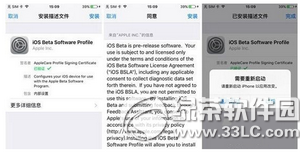
2、打開「設定」—「通用」—「軟體更新」,即可看到 iPhone 正在下載 iOS 9.3,等待下載完成後點擊「立即安裝」,就能把 iPhone 升級到最新的 iOS 9.3。
- 上一篇文章: iPhone 如何設定常用短語?文本替換教學
- 下一篇文章: iOS 9 怎麼為特定聯絡人設定專屬鈴聲?