
iPhone SE 數字訊號怎麼換回圓點
編輯:iOS 相關教學
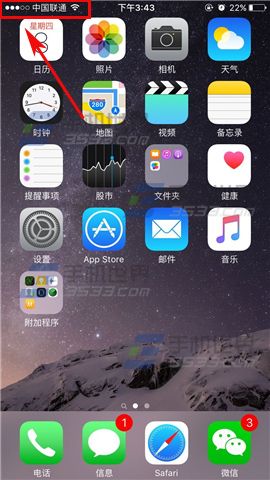
iPhone SE 想從數字訊號切回圓點顯示,做法如下。
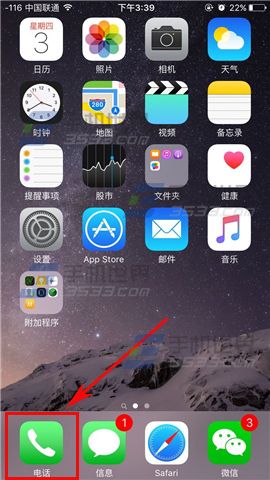
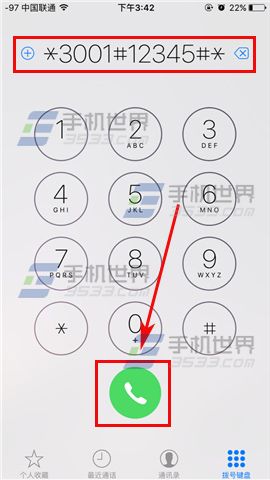
1)打開「電話」,在撥號鍵盤輸入 *3001#12345#* 後按下撥號。
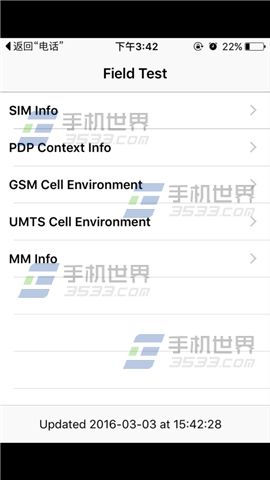
2)進入 Field Test 介面後,只要按一下 Home 鍵回到桌面,訊號就會切換回圓點顯示。
- 上一篇文章: iPhone 6s 通訊錄重複太多?用 QQ 同步助手合併
- 下一篇文章: Wallet 裡找不到 Apple Pay?改個地區就能先試
iPhone SE 想從數字訊號切回圓點顯示,做法如下。
1)打開「電話」,在撥號鍵盤輸入 *3001#12345#* 後按下撥號。
2)進入 Field Test 介面後,只要按一下 Home 鍵回到桌面,訊號就會切換回圓點顯示。