
用 progressView 仿做滴滴打車的圓形倒數計時
編輯:iOS 相關教學
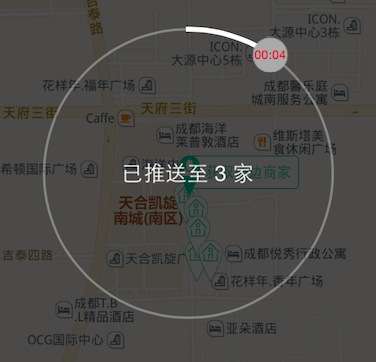
那種「外圈圓弧隨時間推進、中間顯示剩餘秒數、旁邊跟著一個小圓點繞行」的倒數動畫,在等待回應的場景裡很常見。以下用 CALayer 與 CABasicAnimation 完整實作一個可重複使用的元件。
整體結構
元件分三層:CCProgressView 是對外的容器與計時器;CCProgress(CAShapeLayer)負責畫底圈與進度弧;CCProgressThumb 負責那顆繞行的小圓點與時間文字。對外只暴露三個 block 回呼,方便使用者在開始、進行中、結束時插入自己的邏輯。
// CCProgressView.h
#import <UIKit/UIKit.h>
#import <QuartzCore/QuartzCore.h>

/** 動畫開始 */
typedef void (^block_progress_start)();

/** 動畫進行中,參數為已經過的時間 */
typedef void (^block_progress_animing)(NSTimeInterval);

/** 動畫結束 */
typedef void (^block_progress_stop)();

@interface CCProgressView : UIView
{
    NSTimeInterval _animationTime;
}

@property (nonatomic, strong) UILabel *centerLabel;   // 中央文字
@property (nonatomic, copy) block_progress_start start;
@property (nonatomic, copy) block_progress_animing animing;
@property (nonatomic, copy) block_progress_stop stop;

- (void)setAnimationTime:(NSTimeInterval)animationTime;
- (void)startAnimation;
- (void)stopAnimation;

@end
CCProgressView.m
#import "CCProgressView.h"

#define kProgressThumbWh   30     // 小圓點尺寸
#define kAnimTimeInterval  0.1    // 計時器間隔

#pragma mark - 繞行的小圓點

@interface CCProgressThumb : CALayer
{
    NSTimeInterval _animationTime;
}
@property (assign, nonatomic) double startAngle;
@property (nonatomic, strong) UILabel *timeLabel;
@end

@implementation CCProgressThumb

- (instancetype)init
{
    if ((self = [super init])) {
        [self setupLayer];
    }
    return self;
}

- (void)layoutSublayers
{
    _timeLabel.frame = self.bounds;
    [_timeLabel sizeToFit];
    _timeLabel.center = CGPointMake(CGRectGetMidX(self.bounds) - _timeLabel.frame.origin.x,
                                    CGRectGetMidY(self.bounds) - _timeLabel.frame.origin.y);
}

- (void)setupLayer
{
    // 畫出圓形底
    UIGraphicsBeginImageContext(CGSizeMake(kProgressThumbWh, kProgressThumbWh));
    CGContextRef ctx = UIGraphicsGetCurrentContext();
    CGContextSetLineWidth(ctx, 1);
    CGContextSetFillColorWithColor(ctx, [UIColor lightGrayColor].CGColor);
    CGContextSetStrokeColorWithColor(ctx, [UIColor lightGrayColor].CGColor);
    CGContextAddEllipseInRect(ctx, CGRectMake(1, 1, kProgressThumbWh - 2, kProgressThumbWh - 2));
    CGContextDrawPath(ctx, kCGPathFillStroke);

    UIImage *circle = UIGraphicsGetImageFromCurrentImageContext();
    UIGraphicsEndImageContext();

    UIImageView *circleView = [[UIImageView alloc] initWithImage:circle];
    circleView.frame = CGRectMake(0, 0, kProgressThumbWh, kProgressThumbWh);
    [self addSublayer:circleView.layer];

    // 時間文字
    _timeLabel = [[UILabel alloc] initWithFrame:self.bounds];
    _timeLabel.textColor = [UIColor redColor];
    _timeLabel.font = [UIFont systemFontOfSize:10];
    _timeLabel.textAlignment = NSTextAlignmentCenter;
    _timeLabel.text = @"00:00";
    [self addSublayer:_timeLabel.layer];

    // 從 12 點方向起始
    _startAngle = - M_PI / 2;
}

- (void)setAnimationTime:(NSTimeInterval)animationTime
{
    _animationTime = animationTime;
}

- (double)calculatePercent:(NSTimeInterval)fromTime toTime:(NSTimeInterval)toTime
{
    double progress = 0.0f;
    if ((toTime > 0) && (fromTime > 0)) {
        progress = fromTime / toTime;
        if ((progress * 100) > 100) {
            progress = 1.0f;
        }
    }
    return progress;
}

- (void)startAnimation
{
    CAKeyframeAnimation *pathAnimation = [CAKeyframeAnimation animationWithKeyPath:@"position"];
    pathAnimation.calculationMode = kCAAnimationPaced;
    pathAnimation.fillMode = kCAFillModeForwards;
    pathAnimation.removedOnCompletion = YES;
    pathAnimation.duration = kAnimTimeInterval;
    pathAnimation.repeatCount = 0;
    pathAnimation.autoreverses = YES;

    CGMutablePathRef arcPath = CGPathCreateMutable();
    CGPathAddPath(arcPath, NULL, [self bezierPathFromParentLayerArcCenter]);
    pathAnimation.path = arcPath;
    CGPathRelease(arcPath);

    [self addAnimation:pathAnimation forKey:@"position"];
}

/**
 * 依父 layer 尺寸計算一段圓弧路徑
 */
- (CGPathRef)bezierPathFromParentLayerArcCenter
{
    CGFloat centerX = CGRectGetWidth(self.superlayer.frame) / 2.0;
    CGFloat centerY = CGRectGetHeight(self.superlayer.frame) / 2.0;

    double tmpStartAngle = _startAngle;
    _startAngle = _startAngle + (2 * M_PI) * kAnimTimeInterval / _animationTime;

    return [UIBezierPath bezierPathWithArcCenter:CGPointMake(centerX, centerY)
                                          radius:centerX
                                      startAngle:tmpStartAngle
                                        endAngle:_startAngle
                                       clockwise:YES].CGPath;
}

- (void)stopAnimation
{
    [self removeAllAnimations];
}

- (void)dealloc
{
    [[NSNotificationCenter defaultCenter] removeObserver:self];
}

@end


#pragma mark - 進度圓弧

@interface CCProgress : CAShapeLayer
{
    NSTimeInterval _animationTime;
}
@property (assign, nonatomic) double initialProgress;
@property (nonatomic) NSTimeInterval elapsedTime;      // 已用時間
@property (assign, nonatomic) double percent;
@property (nonatomic, strong) UIColor *circleColor;
@property (nonatomic, strong) CAShapeLayer *progress;
@property (nonatomic, strong) CCProgressThumb *thumb;
@property (nonatomic, assign) CGRect frame;
@end

@implementation CCProgress

- (instancetype)init
{
    if ((self = [super init])) {
        [self setupLayer];
    }
    return self;
}

- (void)layoutSublayers
{
    self.path = [self bezierPathWithArcCenter];
    self.progress.path = self.path;
    self.thumb.frame = CGRectMake((320 - kProgressThumbWh) / 2.0f, 180,
                                  kProgressThumbWh, kProgressThumbWh);
    [super layoutSublayers];
}

- (void)setupLayer
{
    // 底圈
    self.path = [self bezierPathWithArcCenter];
    self.fillColor = [UIColor clearColor].CGColor;
    self.strokeColor = [UIColor colorWithRed:0.86f green:0.86f blue:0.86f alpha:0.4f].CGColor;
    self.lineWidth = 2;

    // 進度弧
    self.progress = [CAShapeLayer layer];
    self.progress.path = self.path;
    self.progress.fillColor = [UIColor clearColor].CGColor;
    self.progress.strokeColor = [UIColor whiteColor].CGColor;
    self.progress.lineWidth = 4;
    self.progress.lineCap = kCALineCapSquare;
    self.progress.lineJoin = kCALineCapSquare;
    [self addSublayer:self.progress];

    // 繞行的小圓點
    self.thumb = [[CCProgressThumb alloc] init];
    [self addSublayer:self.thumb];
}

- (CGPathRef)bezierPathWithArcCenter
{
    CGFloat centerX = CGRectGetWidth(self.frame) / 2.0;
    CGFloat centerY = CGRectGetHeight(self.frame) / 2.0;
    return [UIBezierPath bezierPathWithArcCenter:CGPointMake(centerX, centerY)
                                          radius:centerX
                                      startAngle:(- M_PI / 2)
                                        endAngle:(3 * M_PI / 2)
                                       clockwise:YES].CGPath;
}

- (void)setCircleColor:(UIColor *)circleColor
{
    self.progress.strokeColor = circleColor.CGColor;
}

- (void)setAnimtionTime:(NSTimeInterval)animtionTime
{
    _animationTime = animtionTime;
    [self.thumb setAnimationTime:animtionTime];
}

- (void)setElapsedTime:(NSTimeInterval)elapsedTime
{
    _initialProgress = [self calculatePercent:_elapsedTime toTime:_animationTime];
    _elapsedTime = elapsedTime;
    self.progress.strokeEnd = self.percent;
    [self startAnimation];
}

- (double)percent
{
    _percent = [self calculatePercent:_elapsedTime toTime:_animationTime];
    return _percent;
}

- (double)calculatePercent:(NSTimeInterval)fromTime toTime:(NSTimeInterval)toTime
{
    double progress = 0.0f;
    if ((toTime > 0) && (fromTime > 0)) {
        progress = fromTime / toTime;
        if ((progress * 100) > 100) {
            progress = 1.0f;
        }
    }
    return progress;
}

- (void)startAnimation
{
    // 以 strokeEnd 做動畫,就是圓弧「長出來」的效果
    CABasicAnimation *pathAnimation = [CABasicAnimation animationWithKeyPath:@"strokeEnd"];
    pathAnimation.duration = kAnimTimeInterval;
    pathAnimation.fromValue = @(self.initialProgress);
    pathAnimation.toValue = @(self.percent);
    pathAnimation.removedOnCompletion = YES;
    [self.progress addAnimation:pathAnimation forKey:nil];

    [self.thumb startAnimation];
    self.thumb.timeLabel.text = [self stringFromTimeInterval:_elapsedTime shorTime:YES];
}

- (void)stopAnimation
{
    _elapsedTime = 0;
    self.progress.strokeEnd = 0.0;
    [self removeAllAnimations];
    [self.thumb stopAnimation];
}

/**
 * 秒數格式化為 mm:ss 或 hh:mm:ss
 */
- (NSString *)stringFromTimeInterval:(NSTimeInterval)interval shorTime:(BOOL)shortTime
{
    NSInteger ti = (NSInteger)interval;
    NSInteger seconds = ti % 60;
    NSInteger minutes = (ti / 60) % 60;
    NSInteger hours = (ti / 3600);

    if (shortTime) {
        return [NSString stringWithFormat:@"%02ld:%02ld", (long)hours, (long)seconds];
    } else {
        return [NSString stringWithFormat:@"%02ld:%02ld:%02ld",
                (long)hours, (long)minutes, (long)seconds];
    }
}

@end


#pragma mark - 對外容器

@interface CCProgressView ()
@property (nonatomic, strong) CCProgress *progressLayer;
@property (nonatomic, strong) NSTimer *timer;
@end

@implementation CCProgressView

- (instancetype)init
{
    if ((self = [super init])) {
        [self setupView];
    }
    return self;
}

- (instancetype)initWithFrame:(CGRect)frame
{
    if ((self = [super initWithFrame:frame])) {
        [self setupView];
    }
    return self;
}

- (void)layoutSubviews
{
    [super layoutSubviews];
    self.progressLayer.frame = self.bounds;
    [self.centerLabel sizeToFit];
    self.centerLabel.center = CGPointMake(self.center.x - self.frame.origin.x,
                                          self.center.y - self.frame.origin.y);
}

- (void)setupView
{
    self.backgroundColor = [UIColor clearColor];
    self.clipsToBounds = NO;

    self.progressLayer = [[CCProgress alloc] init];
    self.progressLayer.frame = self.bounds;
    [self.layer addSublayer:self.progressLayer];

    _centerLabel = [[UILabel alloc] initWithFrame:self.bounds];
    _centerLabel.font = [UIFont systemFontOfSize:18];
    _centerLabel.textAlignment = NSTextAlignmentCenter;
    _centerLabel.textColor = [UIColor whiteColor];
    _centerLabel.text = @"已推送至 3 家";
    [self.layer addLayer:_centerLabel.layer];
}

- (void)setAnimationTime:(NSTimeInterval)animationTime
{
    _animationTime = animationTime;
    [self.progressLayer setAnimtionTime:animationTime];
}

- (void)startAnimation
{
    if (!_timer) {
        _timer = [NSTimer timerWithTimeInterval:kAnimTimeInterval
                                         target:self
                                       selector:@selector(doTimerSchedule)
                                       userInfo:nil
                                        repeats:YES];
        // 加入 CommonModes,滾動時計時才不會被暫停
        [[NSRunLoop currentRunLoop] addTimer:_timer forMode:NSRunLoopCommonModes];
    }
    self.progressLayer.elapsedTime = 0;
    if (_start) _start();
}

- (void)doTimerSchedule
{
    self.progressLayer.elapsedTime = self.progressLayer.elapsedTime + kAnimTimeInterval;
    if (_animing) _animing(self.progressLayer.elapsedTime);

    if (self.progressLayer.elapsedTime >= _animationTime) {
        [self stopAnimation];
    }
}

- (void)stopAnimation
{
    if (_stop) _stop();
    if (_timer) {
        [_timer invalidate];
        _timer = nil;
    }
    [_progressLayer stopAnimation];
}

@end
使用方式
_progressView = [[CCProgressView alloc]
                 initWithFrame:CGRectMake((APP_WIDTH - 240) / 2.0f,
                                          (APP_HEIGHT - 240) / 2.0f, 240, 240)];
[_progressView setAnimationTime:60];

_progressView.start = ^() {
    NSLog(@"開始");
};

_progressView.animing = ^(NSTimeInterval currentTime) {
    NSLog(@"進行中");
};

__block id weakSelf = self;
_progressView.stop = ^() {
    NSLog(@"結束");
    [weakSelf dismiss];
};

[self addSubview:_progressView];
[_progressView startAnimation];
三個實作要點
圓弧靠 strokeEnd。底圈與進度弧是同一條 UIBezierPath,差別只在進度層的 strokeEnd 從 0 走到 1。這比重新繪製路徑省事,動畫也由 Core Animation 交給 GPU 處理。
小圓點靠 CAKeyframeAnimation 走同一條路徑。把橢圓路徑設給 pathAnimation.path,並用 kCAAnimationPaced 讓速度沿路徑均勻分布,圓點就會精準地貼著圓弧前進。
計時器要掛在 CommonModes。這是原程式碼裡一個容易被忽略但很關鍵的細節。若只加到預設的 NSDefaultRunLoopMode,當使用者拖動 ScrollView 時 run loop 會切到 tracking 模式,計時器就會停止觸發,倒數看起來像卡住了。
- 上一篇文章: iOS 取得網路類型的方法彙總與分析
- 下一篇文章: 用 Objective-C 實作 2048 的算法核心