
Yii 框架擴展:可自訂的分類樹元件實作
編輯:iOS 相關教學
這個擴展提供兩種分類樹的輸出形式:表格與下拉選單。表格樣式、下拉框樣式、用哪一個欄位作為格式化資料、層級關係的欄位名稱、表頭文字,以及時間的格式化方式,都可以自訂。
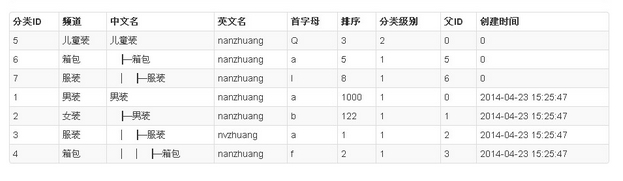

呼叫方式:表格形式
<?php $this->widget('ext.tree.widgets.TreeWidget', array(
    'dataProvider' => $dataProvider,   // 傳遞資料
    'pid'          => 'pid',           // 設定層級關係的欄位
    'tableClass'   => 'items table table-striped table-bordered table-condensed',
    'formatParam'  => 'name',          // 設定需要格式化的欄位
    'formatTime'   => array(           // 需要格式化的時間欄位
        'created'
    ),
    'tableHead'    => array(           // 表格欄位標題
        '分類ID', '頻道', '中文名', '英文名',
        '首字母', '排序', '分類級別', '父ID', '創建時間',
    ),
)); ?>
呼叫方式:下拉框形式
<?php $this->widget('ext.tree.widgets.TreeWidget', array(
    'dataProvider' => $cate,            // 傳遞資料
    'pid'          => 'pid',            // 設定父 ID
    'formatParam'  => 'name',           // 設定需要格式化的欄位
    'treeType'     => false,            // 輸出下拉框格式
    'selectClass'  => 'class="span11"',  // 下拉框樣式
    'defaultSelectValue' => array(      // 預設值與首個選項
        0, '≡ 作為一級欄目 ≡'
    ),
)); ?>
TreeWidget.php
<?php

/**
 * Description of Tree
 *
 * @author 汪嘉誠
 * @email 819434425@qq.com
 *
 * 表格方式呼叫
 * <?php $this->widget('ext.tree.widgets.TreeWidget', array(
 *     'dataProvider' => $dataProvider,
 *     'pid'          => 'pid',
 *     'tableClass'   => 'items table table-striped table-bordered table-condensed',
 *     'formatParam'  => 'name',
 *     'formatTime'   => array('created'),
 *     'tableHead'    => array('分類ID', '頻道', '中文名', /* ... * /),
 * )); ?>
 *
 * 下拉框方式呼叫
 * <?php $this->widget('ext.tree.widgets.TreeWidget', array(
 *     'dataProvider' => $cate,
 *     'pid'          => 'pid',
 *     'formatParam'  => 'name',
 *     'treeType'     => false,
 *     'selectClass'  => 'class="span11"',
 *     'defaultSelectValue' => array(0, '≡ 作為一級欄目 ≡'),
 * )); ?>
 */
class TreeWidget extends Widget {

    /** CArrayDataProvider 資料物件或陣列資料 */
    public $dataProvider;

    /** 接收賦值的原始資料 */
    public $arrAll = array();

    /** 以 _ID 為鍵名的多維關係 */
    public $arrIdRelation = array();

    /** 上述關係的簡化版本,用來輸出樹狀圖 */
    public $arrIdRelationSimple = array();

    /** 轉成以 _ID 為鍵名的原始資料 */
    public $arrIdAll = array();

    /** 所有的父子關係 */
    public $arrIdSon = array();

    /** 葉節點的 _ID */
    public $arrIdLeaf = array();

    /** 根節點的 _ID */
    public $arrIdRoot = array();

    /** 每個節點底下所有子孫的 _ID */
    public $arrIdChildren = array();

    /** 每個節點回溯到根的路徑 */
    public $arrIdBackPath = array();

    /** 輸出樹的單行結構模板 */
    public $strItem = '<br />{$strSep}{$name}';

    /** 表格樣式 */
    public $tableClass = 'items table table-striped table-bordered table-condensed';

    /** 資料欄位參數陣列 */
    public $dataKey = array();

    /** 指定需要格式化的欄位 */
    public $formatParam = 'name';

    /** 表格欄位名稱 */
    public $tableHead = array();

    /** 父 ID 欄位名 */
    public $pid = 'pid';

    /**
     * 樹的類型
     * true  → 表格型樹
     * false → 下拉框型樹
     */
    public $treeType = true;

    /** 綁定下拉框的 value */
    public $optionValue = 'id';

    /** 需要格式化的時間欄位 */
    public $formatTime = array();

    /** 下拉框樣式 */
    public $selectClass = 'class="span3"';

    /** 下拉框的預設值與首個選項 */
    public $defaultSelectValue = array(
        0, '≡ 作為一級欄目 ≡',
    );

    /** 下拉框是否多選 */
    public $isMultiple = false;

    /** 綁定到下拉框的預設值 */
    public $bindSelectValue = 0;

    /** 執行 */
    public function run() {
        if (is_array($this->dataProvider) && count($this->dataProvider) > 0) {
            $data = $this->_run($this->dataProvider);
        } else if (is_object($this->dataProvider) && count($this->dataProvider->rawData) > 0) {
            $data = $this->_run($this->dataProvider->rawData);
        }

        $this->render('tree', array('data' => $data));
    }

    private function _run($datas) {
        foreach ($datas as $data) {
            $this->arrAll[] = $data;
        }
        $this->dataKey = array_keys($data);

        $this->processData();

        if ($this->treeType === true) {
            $data = $this->getTable();
        } else {
            $data = $this->getSelect($this->pid, $this->bindSelectValue,
                                     $this->isMultiple, $this->selectClass,
                                     $this->defaultSelectValue);
        }

        return $data;
    }

    /** 取得 HTML */
    public function getHtml() {
        return $this->genHtml();
    }

    /** 表格類型:組出單行的欄位結構 */
    public function getItemName() {
        $html = '<tr>';
        foreach ($this->dataKey as $v) {
            // 只有需要格式化的欄位才在前面插入層級分隔線
            $str = ($this->formatParam == $v) ? '{$strSep}' : '';
            $html .= '<td>' . $str . '{$' . $v . '}</td>';
        }
        $html .= '</tr>';
        return $html;
    }

    /** 表格欄位標題 */
    public function getTableHead() {
        $html = '<tr>';
        foreach ($this->tableHead as $v) {
            $html .= '<th>' . $v . '</th>';
        }
        $html .= '</tr>';
        return $html;
    }

    /** 取得表格形式的樹 */
    public function getTable() {
        $this->strItem = $this->getItemName();

        $strRe  = '<table class="' . $this->tableClass . '">';
        $strRe .= '<thead>' . $this->getTableHead() . '</thead><tbody>';
        $strRe .= $this->genHtml();
        $strRe .= '</tbody></table>';

        return $strRe;
    }

    /**
     * 取得下拉框形式的樹
     *
     * @param string $strName   下拉框名稱
     * @param array  $arrValue  已選中的值
     * @param bool   $blmMulti  是否多選
     * @param string $strExt    額外屬性
     * @param array  $arrFirst  首個選項 [值, 文字]
     */
    public function getSelect($strName = 'tree', $arrValue = array(), $blmMulti = false,
                              $strExt = '', $arrFirst = null) {
        !is_array($arrValue) && $arrValue = array($arrValue);

        foreach ($this->arrIdAll as $strTemp => $arrTemp) {
            $this->arrIdAll[$strTemp]['selected'] = '';

            if (in_array($arrTemp['id'], $arrValue)) {
                $this->arrIdAll[$strTemp]['selected'] = ' selected="selected"';
            }
        }

        $this->strItem = '<option value="{$' . $this->optionValue . '}"{$selected}'
                       . ' title="{$' . $this->formatParam . '}">{$strSep}'
                       . '{$' . $this->formatParam . '}</option>';

        $strRe  = '<select id="id_' . $strName . '" name="' . $strName . ($blmMulti ? '[]' : '') . '"';
        $strRe .= ($blmMulti ? ' multiple="multiple"' : '')
                . (empty($strExt) ? '' : ' ' . $strExt) . '>';

        if (is_array($arrFirst) && count($arrFirst) == 2) {
            $strRe .= '<option value="' . $arrFirst[0] . '">' . $arrFirst[1] . '</option>';
        }

        $strRe .= $this->getHtml() . '</select>';

        return $strRe;
    }

    /** 遞迴整理父子關係 */
    private function helpForGetRelation($arrData) {
        $arrRe = array();

        foreach ($arrData as $strTemp => $arrTemp) {
            $arrRe[$strTemp] = $arrTemp;

            if (isset($this->arrIdRelation[$strTemp])) {
                $arrRe[$strTemp] = $this->arrIdRelation[$strTemp];
            }

            if (count($arrRe[$strTemp]) > 0) {
                $arrRe[$strTemp] = $this->helpForGetRelation($arrRe[$strTemp]);
            } else {
                array_push($this->arrIdLeaf, $strTemp);
            }
        }

        return $arrRe;
    }

    /** 遞迴收集節點底下所有子孫 */
    private function helpForGetChildren($arrData) {
        $arrRe = array_keys($arrData);

        foreach ($arrData as $arrTemp) {
            $arrRe = array_merge($arrRe, $this->helpForGetChildren($arrTemp));
        }

        return $arrRe;
    }

    /** 遞迴回溯節點到根的路径 */
    private function helpForGetBackPath($str) {
        $arrRe = array();
        $intTemp = $this->arrIdAll[$str][$this->pid];

        if ($intTemp > 0) {
            $intTemp = '_' . $intTemp;
            array_push($arrRe, $intTemp);
            $arrRe = array_merge($arrRe, $this->helpForGetBackPath($intTemp));
        }

        return $arrRe;
    }

    /** 資料前處理 */
    private function processData() {
        $count = count($this->arrAll);

        foreach ($this->arrAll as $arrTemp) {
            $strTemp = '_' . $arrTemp['id'];
            $this->arrIdAll[$strTemp] = $arrTemp;

            if ($arrTemp[$this->pid] > 0 && $count > 1) {
                $strTemp_ = '_' . $arrTemp[$this->pid];

                !isset($this->arrIdRelation[$strTemp_]) && $this->arrIdRelation[$strTemp_] = array();
                $this->arrIdRelation[$strTemp_][$strTemp] = array();

                !isset($this->arrIdSon[$strTemp_]) && $this->arrIdSon[$strTemp_] = array();
                array_push($this->arrIdSon[$strTemp_], $strTemp);
            } else {
                !isset($this->arrIdRelation[$strTemp]) && $this->arrIdRelation[$strTemp] = array();
                array_push($this->arrIdRoot, $strTemp);
            }
        }

        $this->arrIdRelation = $this->helpForGetRelation($this->arrIdRelation);
        $this->arrIdLeaf = array_unique($this->arrIdLeaf);

        foreach ($this->arrIdRelation as $strTemp => $arrTemp) {
            $this->arrIdChildren[$strTemp] = $this->helpForGetChildren($arrTemp);

            // 只保留根節點,作為輸出的起點
            in_array($strTemp, $this->arrIdRoot) && $this->arrIdRelationSimple[$strTemp] = $arrTemp;
        }

        $arrTemp = array_keys($this->arrIdAll);
        foreach ($arrTemp as $strTemp) {
            $this->arrIdBackPath[$strTemp] = $this->helpForGetBackPath($strTemp);
        }
    }

    /** 產生層級分隔線 */
    private function genSeparator($intLen) {
        $strRe = '';
        $i = 0;

        while ($i < $intLen) {
            $strRe .= ' ' . (($i + 1 == $intLen) ? '├' : '│');
            $i++;
        }

        !empty($strRe) && $strRe .= '─';

        return $strRe;
    }

    /** 遞迴產生輸出內容 */
    private function genHtml($arrRelation = null, $intSep = 0) {
        $strRe = '';

        null === $arrRelation && $arrRelation = $this->arrIdRelationSimple;

        foreach ($arrRelation as $strKey => $arrTemp) {
            if (count($this->arrIdAll[$strKey]) > 0) {
                // 時間欄位格式化
                if (!empty($this->formatTime) && count($this->formatTime) > 0) {
                    foreach ($this->formatTime as $formatTime) {
                        if ($this->arrIdAll[$strKey][$formatTime] > 0) {
                            $this->arrIdAll[$strKey][$formatTime] =
                                date('Y-m-d H:i:s', $this->arrIdAll[$strKey][$formatTime]);
                        }
                    }
                }

                $strSep = $this->genSeparator($intSep);

                extract($this->arrIdAll[$strKey]);
                eval('$strRe .= "' . $this->strItem . '";');

                count($arrTemp) > 0 && $strRe .= $this->genHtml($arrTemp, ($intSep + 1));
            }
        }

        return $strRe;
    }
}
?>
tree.php
<?php if (!empty($data)): ?>
<?php echo $data; ?>
<?php else: ?>
<tr><td colspan="4" class="empty"><span class="empty">沒有找到資料.</span></td></tr>
<?php endif; ?>
使用上有幾點值得注意:pid 決定層級歸屬,formatParam 決定哪一列前面要畫上樹狀分隔線,而 treeType 則在表格與下拉框兩種輸出之間切換。另外 genHtml() 內部使用了 eval 來套用模板,這是為了讓模板字串可以任意自訂;若要在多人協作的專案中使用,建議改成字串替換以避開 eval 的風險。
- 上一篇文章: iOS 開發除錯:破解 EXC_BAD_ACCESS 崩潰
- 下一篇文章: 讓 iPhone Safari 網頁以全螢幕開啟的做法