
iOS 讀取本機通訊錄實戰:權限申請、字段解析與列表展示
編輯:iOS 相關教學
一、引入必要的框架
在工程中添加 AddressBook.framework 和 AddressBookUI.framework。
二、獲取通訊錄
1. 定義數組並初始化
NSMutableArray *addressBookTemp;

- (id)initWithNibName:(NSString *)nibNameOrNil bundle:(NSBundle *)nibBundleOrNil
{
    addressBookTemp = [NSMutableArray array];
}
2. 定義 model 存放聯繫人的各項屬性
新建一個繼承自 NSObject 的類,頭文件如下:
@interface TKAddressBook : NSObject {
    NSInteger sectionNumber;
    NSInteger recordID;
    NSString *name;
    NSString *email;
    NSString *tel;
}

@property NSInteger sectionNumber;
@property NSInteger recordID;
@property (nonatomic, retain) NSString *name;
@property (nonatomic, retain) NSString *email;
@property (nonatomic, retain) NSString *tel;

@end
實現文件:
@implementation TKAddressBook
@synthesize name, email, tel, recordID, sectionNumber;
@end
3. 讀取聯繫人
從 iOS 6 開始,訪問通訊錄必須先獲得用戶授權。注意:iOS 9 之後更推薦使用 Contacts.framework,這裡的 AddressBook API 屬於較早期的做法。
// 新建一個通訊錄對象
ABAddressBookRef addressBooks = nil;

if ([[UIDevice currentDevice].systemVersion floatValue] >= 6.0)
{
    addressBooks = ABAddressBookCreateWithOptions(NULL, NULL);

    // 獲取通訊錄權限
    dispatch_semaphore_t sema = dispatch_semaphore_create(0);
    ABAddressBookRequestAccessWithCompletion(addressBooks, ^(bool granted, CFErrorRef error){
        dispatch_semaphore_signal(sema);
    });
    dispatch_semaphore_wait(sema, DISPATCH_TIME_FOREVER);
    dispatch_release(sema);
}
else
{
    addressBooks = ABAddressBookCreate();
}

// 獲取通訊錄中的所有人
CFArrayRef allPeople = ABAddressBookCopyArrayOfAllPeople(addressBooks);

// 通訊錄中人數
CFIndex nPeople = ABAddressBookGetPersonCount(addressBooks);

// 循環,獲取每個人的個人信息
for (NSInteger i = 0; i < nPeople; i++)
{
    TKAddressBook *addressBook = [[TKAddressBook alloc] init];

    // 獲取個人
    ABRecordRef person = CFArrayGetValueAtIndex(allPeople, i);

    // 獲取個人名字
    CFTypeRef abName     = ABRecordCopyValue(person, kABPersonFirstNameProperty);
    CFTypeRef abLastName = ABRecordCopyValue(person, kABPersonLastNameProperty);
    CFStringRef abFullName = ABRecordCopyCompositeName(person);

    NSString *nameString     = (__bridge NSString *)abName;
    NSString *lastNameString = (__bridge NSString *)abLastName;

    if ((__bridge id)abFullName != nil) {
        nameString = (__bridge NSString *)abFullName;
    } else {
        if ((__bridge id)abLastName != nil)
        {
            nameString = [NSString stringWithFormat:@"%@ %@", nameString, lastNameString];
        }
    }

    addressBook.name = nameString;
    addressBook.recordID = (int)ABRecordGetRecordID(person);

    ABPropertyID multiProperties[] = {
        kABPersonPhoneProperty,
        kABPersonEmailProperty
    };
    NSInteger multiPropertiesTotal = sizeof(multiProperties) / sizeof(ABPropertyID);

    for (NSInteger j = 0; j < multiPropertiesTotal; j++) {
        ABPropertyID property = multiProperties[j];
        ABMultiValueRef valuesRef = ABRecordCopyValue(person, property);
        NSInteger valuesCount = 0;
        if (valuesRef != nil) valuesCount = ABMultiValueGetCount(valuesRef);

        if (valuesCount == 0) {
            CFRelease(valuesRef);
            continue;
        }

        // 獲取電話號碼和 email
        for (NSInteger k = 0; k < valuesCount; k++) {
            CFTypeRef value = ABMultiValueCopyValueAtIndex(valuesRef, k);
            switch (j) {
                case 0: {   // Phone number
                    addressBook.tel = (__bridge NSString*)value;
                    break;
                }
                case 1: {   // Email
                    addressBook.email = (__bridge NSString*)value;
                    break;
                }
            }
            CFRelease(value);
        }
        CFRelease(valuesRef);
    }

    // 添加到數組,循環結束後 addressBookTemp 即包含所有聯繫人
    [addressBookTemp addObject:addressBook];

    if (abName)     CFRelease(abName);
    if (abLastName) CFRelease(abLastName);
    if (abFullName) CFRelease(abFullName);
}
三、在 TableView 中展示
// 行數
- (NSInteger)numberOfSectionsInTableView:(UITableView *)tableView {
    return 1;
}

// 列數
- (NSInteger)tableView:(UITableView *)tableView numberOfRowsInSection:(NSInteger)section {
    return [addressBookTemp count];
}

// cell 內容
- (UITableViewCell *)tableView:(UITableView *)tableView cellForRowAtIndexPath:(NSIndexPath *)indexPath {

    NSString *cellIdentifier = @"ContactCell";

    UITableViewCell *cell = [tableView dequeueReusableCellWithIdentifier:cellIdentifier];

    if (cell == nil){
        cell = [[UITableViewCell alloc] initWithStyle:UITableViewCellStyleSubtitle
                                     reuseIdentifier:cellIdentifier];
    }

    TKAddressBook *book = [addressBookTemp objectAtIndex:indexPath.row];

    cell.textLabel.text = book.name;

    cell.detailTextLabel.text = book.tel;

    return cell;
}
列表效果:
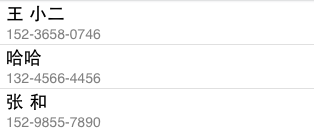
補充:通訊錄裡的電話號碼若帶有「-」等分隔符,可以在存入數組前先做一次 NSString 處理,方案很多,本文不再展開。
四、刪除通訊錄數據
ABRecordRef person = objc_unretainedPointer([myContacts objectAtIndex:indexPath.row]);
CFErrorRef *error;
ABAddressBookRemoveRecord(addressBook, person, error);
ABAddressBookSave(addressBook, error);
myContacts = nil;
[tableView deleteRowsAtIndexPaths:[NSArray arrayWithObject:indexPath]
                 withRowAnimation:UITableViewRowAnimationFade];
以上就是本文的全部內容,希望對大家的學習有所幫助。