
全局更換 UILabel 默認字體:兩種方案與 runtime 實戰
項目做到中期,突然接到需求:接入一套全新的品牌字體,全 App 的 Label 都要換掉,但少數刻意指定過字體的地方要保持原樣。聽起來簡單,落地卻很棘手——頁面多、Label 數量龐大,動態生成的界面更是容易漏改;更麻煩的是 Label 的來源五花八門,有用純代碼創建的,有從 xib 加載的,也有 storyboard 裡拖出來的。逐個排查顯然不現實。
方案一:用 attributedText 做局部混排
這嚴格說來不是「換默認字體」,而是精細控制同一個 Label 內不同片段的樣式。從 iOS 6 開始,UILabel 提供了 attributedText 屬性,配合 NSAttributedString 可以輕鬆實現一段文字裡多種顏色、多種字體混排。
頭文件
@interface ViewController : UIViewController
@property (nonatomic, strong) IBOutlet UILabel *attrLabel;
- (IBAction)next:(id)sender;
@end
實現
self.title = @"For iOS 6 & later";

NSMutableAttributedString *str =
    [[NSMutableAttributedString alloc] initWithString:@"Using NSAttributed String"];

[str addAttribute:NSForegroundColorAttributeName value:[UIColor blueColor]  range:NSMakeRange(0, 5)];
[str addAttribute:NSForegroundColorAttributeName value:[UIColor redColor]   range:NSMakeRange(6, 12)];
[str addAttribute:NSForegroundColorAttributeName value:[UIColor greenColor] range:NSMakeRange(19, 6)];

[str addAttribute:NSFontAttributeName value:[UIFont fontWithName:@"Arial-BoldItalicMT" size:30.0] range:NSMakeRange(0, 5)];
[str addAttribute:NSFontAttributeName value:[UIFont fontWithName:@"HelveticaNeue-Bold" size:30.0] range:NSMakeRange(6, 12)];
[str addAttribute:NSFontAttributeName value:[UIFont fontWithName:@"Courier-BoldOblique" size:30.0] range:NSMakeRange(19, 6)];

attrLabel.attributedText = str;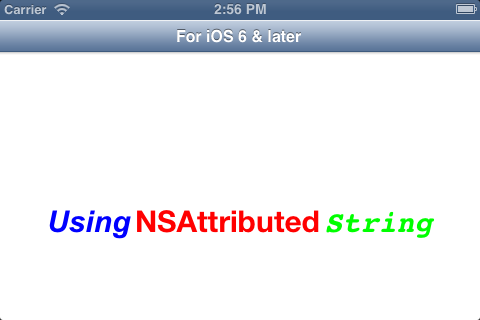
若需要支持 iOS 6 之前的系統,則要引入第三方庫 TTTAttributedLabel,並額外依賴 CoreText.framework。
方案二:用 runtime 一次性換掉默認字體
如果目標是「全局替換、個別例外」,那麼 Method Swizzling 才是最省事的做法:在 UILabel 的類別裡把三個初始化入口全部換掉,讓每個新建的 Label 都自動套上品牌字體。之所以要換三個,是因為 Label 的誕生途徑只有三條:init、initWithFrame: 以及從 nib 加載時的 awakeFromNib。
建立類別
#import <UIKit/UIKit.h>

@interface UILabel (YHBaseChangeDefaultFont)
@end
交換實現
#import "UILabel+YHBaseChangeDefaultFont.h"
#import <objc/runtime.h>

@implementation UILabel (YHBaseChangeDefaultFont)

/**
 * 每個類加載時都會走到的入口,只執行一次
 * 這裡把 init / initWithFrame: / awakeFromNib 三個初始化方法換成自定義版本
 * 若業務代碼後續又單獨設置了 font,則以那個設置為準
 */
+ (void)load {
    static dispatch_once_t onceToken;
    dispatch_once(&onceToken, ^{
        Class class = [self class];

        SEL originalSelector  = @selector(init);
        SEL originalSelector2 = @selector(initWithFrame:);
        SEL originalSelector3 = @selector(awakeFromNib);

        SEL swizzledSelector  = @selector(YHBaseInit);
        SEL swizzledSelector2 = @selector(YHBaseInitWithFrame:);
        SEL swizzledSelector3 = @selector(YHBaseAwakeFromNib);

        Method originalMethod  = class_getInstanceMethod(class, originalSelector);
        Method originalMethod2 = class_getInstanceMethod(class, originalSelector2);
        Method originalMethod3 = class_getInstanceMethod(class, originalSelector3);
        Method swizzledMethod  = class_getInstanceMethod(class, swizzledSelector);
        Method swizzledMethod2 = class_getInstanceMethod(class, swizzledSelector2);
        Method swizzledMethod3 = class_getInstanceMethod(class, swizzledSelector3);

        BOOL didAddMethod = class_addMethod(class, originalSelector,
                                            method_getImplementation(swizzledMethod),
                                            method_getTypeEncoding(swizzledMethod));
        BOOL didAddMethod2 = class_addMethod(class, originalSelector2,
                                             method_getImplementation(swizzledMethod2),
                                             method_getTypeEncoding(swizzledMethod2));
        BOOL didAddMethod3 = class_addMethod(class, originalSelector3,
                                             method_getImplementation(swizzledMethod3),
                                             method_getTypeEncoding(swizzledMethod3));

        if (didAddMethod) {
            class_replaceMethod(class, swizzledSelector,
                                method_getImplementation(originalMethod),
                                method_getTypeEncoding(originalMethod));
        } else {
            method_exchangeImplementations(originalMethod, swizzledMethod);
        }

        if (didAddMethod2) {
            class_replaceMethod(class, swizzledSelector2,
                                method_getImplementation(originalMethod2),
                                method_getTypeEncoding(originalMethod2));
        } else {
            method_exchangeImplementations(originalMethod2, swizzledMethod2);
        }

        if (didAddMethod3) {
            class_replaceMethod(class, swizzledSelector3,
                                method_getImplementation(originalMethod3),
                                method_getTypeEncoding(originalMethod3));
        } else {
            method_exchangeImplementations(originalMethod3, swizzledMethod3);
        }
    });
}
在替換方法中寫入目標字體
- (instancetype)YHBaseInit {
    id __self = [self YHBaseInit];
    UIFont *font = [UIFont fontWithName:@"這裡輸入你的字體名字" size:self.font.pointSize];
    if (font) {
        self.font = font;
    }
    return __self;
}

- (instancetype)YHBaseInitWithFrame:(CGRect)rect {
    id __self = [self YHBaseInitWithFrame:rect];
    UIFont *font = [UIFont fontWithName:@"這裡輸入你的字體名字" size:self.font.pointSize];
    if (font) {
        self.font = font;
    }
    return __self;
}

- (void)YHBaseAwakeFromNib {
    [self YHBaseAwakeFromNib];
    UIFont *font = [UIFont fontWithName:@"這裡輸入你的字體名字" size:self.font.pointSize];
    if (font) {
        self.font = font;
    }
}

@end
驗證:三種來源都不需要額外代碼
UILabel *label = [[UILabel alloc] initWithFrame:CGRectMake(20, 100, 280, 30)];
label.text = @"你是從 initWithFrame 來的 label";

UILabel *label2 = [[UILabel alloc] init];
label2.frame = CGRectMake(20, 200, 280, 30);
label2.text = @"你是從 init 來的 label";

[self.view addSubview:label];
[self.view addSubview:label2];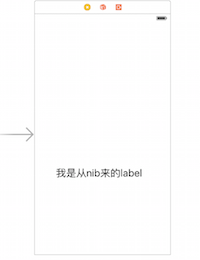
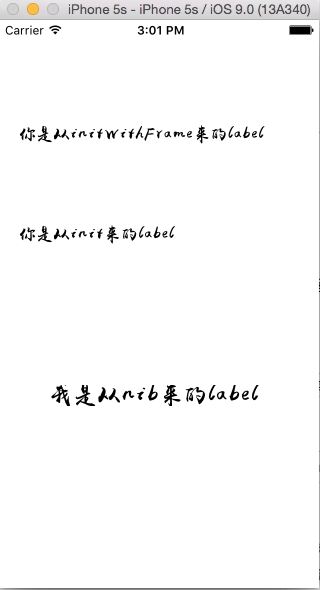
運行後可以看到,無論哪種創建路徑,字體都已經被替換:
兩種方案的取捨
attributedText 解決的是「一段文字內多種樣式」,屬於展示層的精細化需求;runtime 交換解決的是「全項目統一換字體」,屬於工程治理層的需求。需要留意的是,Swizzling 屬於侵入性較強的手段:一是要避免在 init 裡直接寫死字體,否則後續無法被外部覆蓋;二是自定义字體務必確認已正確註冊(或已加入 Info.plist 的 UIAppFonts),否則 fontWithName: 返回 nil,代碼會靜默跳過。此外,Swift 項目如今更傾向於自建 UILabel 子類或封裝工厂方法,可讀性與可控性都更好。