
iOS 中四種 JSON 解析方案對比與實作示例
作為一種輕量級的資料交換格式,JSON 早已取代 XML 成為網路接口的事實標準。iOS 上做 JSON 解析,可以選擇的庫不少,本文用同一份真實接口資料,把四種常見做法各跑一遍,順便談談效能取捨。
準備工作
遇到格式混亂的 JSON,可以先丟進線上格式化工具(例如 bejson.com)做校驗與可視化,比用眼睛硬看快得多。
從 iOS 5 開始,Apple 提供了原生支援 NSJSONSerialization。但為了相容舊版本系統,過去專案往往會引入第三方庫。本文示範的四種方案分別是:TouchJson、SBJson、JSONKit,以及 iOS 5 的原生 API。TouchJson 與 SBJson 需要先下載各自的庫檔。
示例資料來源為國家氣象局的公開天氣預報接口,共有三個地址:
https://www.weather.com.cn/data/sk/101010100.html
https://www.weather.com.cn/data/cityinfo/101010100.html
https://m.weather.com.cn/data/101010100.html
其中第三個回傳的資訊最完整,包含六天天氣。每個城市對應一個區域編號,替換編號即可取得該城市資料。(提醒:這組接口年代久遠,如今未必仍可用,此處僅作為 JSON 結構解析的示範。)
界面與頭文件
建立新專案,佈置一個 UITextView 與四個按鈕即可(示例為相容舊寫法,未使用 ARC):
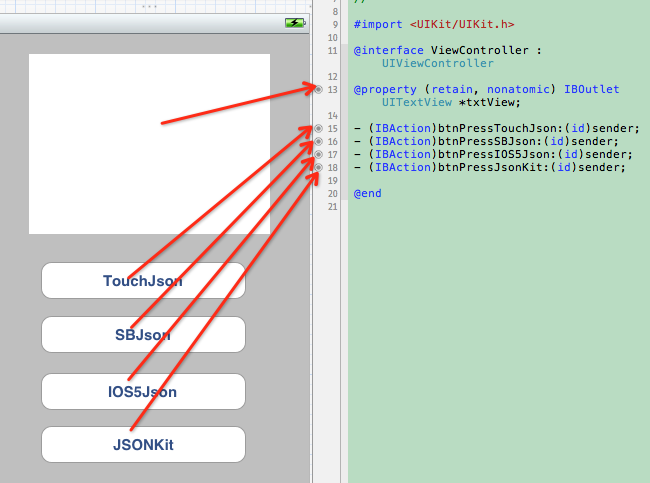
#import <UIKit/UIKit.h>

@interface ViewController : UIViewController
@property (retain, nonatomic) IBOutlet UITextView *txtView;
- (IBAction)btnPressTouchJson:(id)sender;
- (IBAction)btnPressSBJson:(id)sender;
- (IBAction)btnPressIOS5Json:(id)sender;
- (IBAction)btnPressJsonKit:(id)sender;
@end
方案一:TouchJson
需引入 #import "TouchJson/JSON/CJSONDeserializer.h":
- (IBAction)btnPressTouchJson:(id)sender
{
    NSURL *url = [NSURL URLWithString:@"https://m.weather.com.cn/data/101010100.html"];
    NSError *error;

    NSString *jsonString = [NSString stringWithContentsOfURL:url
                                                    encoding:NSUTF8StringEncoding
                                                       error:&error];
    NSLog(@"jsonString--->%@", jsonString);

    // 反序列化為字典,指定 UTF-8 避免取值亂碼
    NSDictionary *rootDic = [[CJSONDeserializer deserializer]
                             deserialize:[jsonString dataUsingEncoding:NSUTF8StringEncoding]
                                   error:&error];

    // 回傳的 JSON 有兩層,取出第二層
    NSDictionary *weatherInfo = [rootDic objectForKey:@"weatherinfo"];
    NSLog(@"weatherInfo--->%@", weatherInfo);

    txtView.text = [NSString stringWithFormat:@"今天是 %@ %@ %@ 的天氣狀況是:%@ %@ ",
                    [weatherInfo objectForKey:@"date_y"],
                    [weatherInfo objectForKey:@"week"],
                    [weatherInfo objectForKey:@"city"],
                    [weatherInfo objectForKey:@"weather1"],
                    [weatherInfo objectForKey:@"temp1"]];
}
方案二:SBJson
需引入 #import "SBJson/SBJson.h":
- (IBAction)btnPressSBJson:(id)sender
{
    NSURL *url = [NSURL URLWithString:@"https://m.weather.com.cn/data/101180701.html"];
    NSError *error = nil;

    NSString *jsonString = [NSString stringWithContentsOfURL:url
                                                    encoding:NSUTF8StringEncoding
                                                       error:&error];

    SBJsonParser *parser = [[SBJsonParser alloc] init];
    NSDictionary *rootDic = [parser objectWithString:jsonString error:&error];
    NSDictionary *weatherInfo = [rootDic objectForKey:@"weatherinfo"];

    txtView.text = [NSString stringWithFormat:@"今天是 %@ %@ %@ 的天氣狀況是:%@ %@ ",
                    [weatherInfo objectForKey:@"date_y"],
                    [weatherInfo objectForKey:@"week"],
                    [weatherInfo objectForKey:@"city"],
                    [weatherInfo objectForKey:@"weather1"],
                    [weatherInfo objectForKey:@"temp1"]];
}
方案三:原生 NSJSONSerialization
iOS 5 以上可用,無需引入任何第三方庫:
- (IBAction)btnPressIOS5Json:(id)sender
{
    NSError *error;

    NSURLRequest *request = [NSURLRequest requestWithURL:
                             [NSURL URLWithString:@"https://m.weather.com.cn/data/101180601.html"]];

    NSData *response = [NSURLConnection sendSynchronousRequest:request
                                            returningResponse:nil
                                                        error:nil];

    // 系統自帶解析類,直接產出字典
    NSDictionary *weatherDic = [NSJSONSerialization JSONObjectWithData:response
                                                              options:NSJSONReadingMutableLeaves
                                                                error:&error];
    NSDictionary *weatherInfo = [weatherDic objectForKey:@"weatherinfo"];

    txtView.text = [NSString stringWithFormat:@"今天是 %@ %@ %@ 的天氣狀況是:%@ %@ ",
                    [weatherInfo objectForKey:@"date_y"],
                    [weatherInfo objectForKey:@"week"],
                    [weatherInfo objectForKey:@"city"],
                    [weatherInfo objectForKey:@"weather1"],
                    [weatherInfo objectForKey:@"temp1"]];

    NSLog(@"weatherInfo字典裡面的內容為--》%@", weatherDic);
}
順帶一提,示例用的是同步請求,這只適合演示。實際專案請務必走非同步,避免阻塞主線程讓界面凍住。
方案四:JSONKit
需引入 #import "JSONKit/JSONKit.h"。JSONKit 的用法很有特色——它直接給 NSString 增加了解析方法:
- (IBAction)btnPressJsonKit:(id)sender
{
    // 單層 JSON:value 都是字串或數字,用 objectFromJSONString 即可
    NSString *json1 = @"{\"a\":123, \"b\":\"abc\"}";
    NSLog(@"json1:%@", json1);

    NSDictionary *data1 = [json1 objectFromJSONString];
    NSLog(@"json1.a:%@", [data1 objectForKey:@"a"]);
    NSLog(@"json1.b:%@", [data1 objectForKey:@"b"]);
    [json1 release];

    // 嵌套 JSON:value 中有 array 或 object 時,
    // 建議改用帶 parseOptions 的版本,較不容易出錯
    NSString *json2 = @"{\"a\":123, \"b\":\"abc\", \"c\":[456, \"hello\"], \"d\":{\"name\":\"張三\", \"age\":\"32\"}}";
    NSLog(@"json2:%@", json2);

    NSDictionary *data2 = [json2 objectFromJSONStringWithParseOptions:JKParseOptionLooseUnicode];
    NSLog(@"json2.c:%@", [data2 objectForKey:@"c"]);
    NSLog(@"json2.d:%@", [data2 objectForKey:@"d"]);
    [json2 release];
}
效能比較
iOS 5 內建了解析 API 之後,就有人做了橫向測試。參與比較的框架包括:
- SBJSON (json-framework)
- TouchJSON (from touchcode)
- YAJL (objective-C bindings)
- JSONKit
- NextiveJson
- NSJSONSerialization
測試方式是取四份 JSON 格式的資料檔,每份各解析 100 次,比較總耗時。
結果相當有意思:系統自帶的 API 最快;應用最廣泛的 SBJSON 反而排在倒數第二,這個結果頗出人意料;表現最接近系統 API 的是 JSONKit。
選型建議
單純從解析速度出發:
1. deployment target 在 iOS 5 以上,直接用系統的 NSJSONSerialization,沒有理由再引入第三方庫;
2. 若必須支援更低版本,選 JSONKit。
不過速度只是其中一項指標。以今天的眼光回看,這幾個庫裡 JSONKit 以 C 實現、效能優異但曾長期缺乏維護;TouchJson 與 SBJSON 則是純 Objective-C 實現,可讀性較好。真正該優先考慮的是:是否仍在維護、是否支援 ARC、以及有沒有已知的記憶體問題——這些對長期專案的影響,遠大於幾毫秒的解析差距。
- 上一篇文章: Objective-C 冒泡排序實作與提前結束優化示例
- 下一篇文章: Core Data 基本資料操作:新增、查詢與列表綁定