
iOS 開發:擴充 RCLabel 實作 HTML 富文本排版
iOS 是相當重視使用者體驗的平台,互動形式也很多,但有個需求一直不太好處理:在一段文字的某幾個字上加入互動行為。若改用 Button 之類的獨立控制項去拼,文字換行與對齊又會變成另一場惡夢。
這個問題的由來很實際:專案裡的某個畫面有一批廣告標籤,這些標籤是嵌在文案中間的,使用者點到標籤要能跳到對應的廣告頁。
CoreText 可以解決,但直接操作 CoreText 相當繁瑣;市面上的第三方富文本庫多數把重心放在排版,對「文字超連結」這件事的支援並不夠直覺。與其硬套,不如挑一個輕量、以 CoreText 為基礎的元件做針對性封裝。RCLabel 就是這樣一個把 HTML 字串轉成排版視圖的第三方工具,程式碼精簡,擴充性也好。
一、為 RCLabel 加上非同步網路圖片支援
圖文混排一直是 UI 開發的核心痛點,這方面最有名的一套框架是 DTCoreText。我在某個專案中沒有採用它,原因有兩個:一是體積龐大,而專案需求其實不高;二是要在它裡面改東西的成本太高。最後我選了 RCLabel,加上一些簡單的優化就達到了要求。
先說明需求:從伺服器拿到的資料是字串,其中穿插圖片的位置以 HTML 的 img 標籤表示,標籤裡的資源路徑就是圖片網址。畫面呈現時,圖片位置要先留白,接著非同步下載,回來後再把圖插回文字中。
RCLabel 本身就能解析帶 HTML 標籤的資料,先看看怎麼用。以下是我封裝的 HTML 顯示視圖:
@interface YHBaseHtmlView () <YHRTLabelImageDelegate>
{
    // RCLabel 物件
    RCLabel * _rcLabel;
    // 保存排版結構,供非同步載入完成後刷新
    RTLabelComponentsStructure * _origenComponent;
    // 含 HTML 標籤的原始字串
    NSString * _srt;
}
@end

@implementation YHBaseHtmlView

- (instancetype)initWithCoder:(NSCoder *)coder {
    self = [super initWithCoder:coder];
    if (self) {
        _rcLabel = [[RCLabel alloc] init];
        [self addSubview:_rcLabel];
    }
    return self;
}

- (instancetype)initWithFrame:(CGRect)frame {
    self = [super initWithFrame:frame];
    if (self) {
        _rcLabel = [[RCLabel alloc] initWithFrame:frame];
        [self addSubview:_rcLabel];
    }
    return self;
}

- (void)reSetHtmlStr:(NSString *)htmlStr {
    _srt = htmlStr;
    // 這個 delegate 是我另外加的,後面會解釋
    _rcLabel.imageDelegate = self;
    _rcLabel.frame = CGRectMake(0, 0, self.frame.size.width, 0);
    // 解析 HTML 並取得排版結構
    _origenComponent = [RCLabel extractTextStyle:htmlStr IsLocation:NO withRCLabel:_rcLabel];
    _rcLabel.componentsAndPlainText = _origenComponent;
    // 取得排版後的高度
    CGSize size = [_rcLabel optimumSize];
    _rcLabel.frame = CGRectMake(0, 0, _rcLabel.frame.size.width, size.height);
    self.frame = CGRectMake(self.frame.origin.x, self.frame.origin.y,
                            _rcLabel.frame.size.width, size.height);
}

// 圖片下載完成後重新排版
- (void)YHRTLabelImageSuccess:(RCLabel *)label {
    _origenComponent = [RCLabel extractTextStyle:_srt IsLocation:NO withRCLabel:_rcLabel];
    _rcLabel.componentsAndPlainText = _origenComponent;

    CGSize size = [_rcLabel optimumSize];
    _rcLabel.frame = CGRectMake(0, 0, _rcLabel.frame.size.width, size.height);
    self.frame = _rcLabel.frame;
    if ([self.delegate respondsToSelector:@selector(YHBaseHtmlView:SizeChanged:)]) {
        [self.delegate YHBaseHtmlView:self SizeChanged:self.frame.size];
    }
}
@end
RCLabel 的用法可以濃縮成三步:初始化並設定 frame、用帶 HTML 標籤的字串產生排版屬性、把屬性設回去並重算視圖高度。
但它有個限制:圖片部分只支援本地圖片,內部是走 [UIImage imageNamed:],也就是說 img 標籤裡只能放本地圖檔名稱。要滿足我們的需求,得做一點擴充。
1. 在屬性解析方法中多帶一個參數,用來區分本地圖與網路圖:
// 我加了 location 這個布林值;rcLabel 參數也是為後面的 delegate 回呼準備的
+ (RTLabelComponentsStructure *)extractTextStyle:(NSString *)data
                                       IsLocation:(BOOL)location
                                      withRCLabel:(RCLabel *)rcLabel;
2. 在實作中補上分支處理(原檔一千九百多行,這裡只列出我加入的部分):
#warning 這裡進行了兼容性處理
if (location) {
    // 本地圖片渲染
    if (tempURL) {
        UIImage *tempImg = [UIImage imageNamed:tempURL];
        component.img = tempImg;
    }
} else {
    // 網路圖片處理:先讀快取
    NSData *ceche = [[YHBaseCecheCenter sharedTheSingletion]
                      readCecheFile:tempURL fromPath:YHBaseCecheImage];
    if (ceche) {
        UIImage *tempImg = [UIImage imageWithData:ceche];
        component.img = tempImg;
    } else {
        // 沒有快取,在背景佇列下載
        dispatch_async(dispatch_get_global_queue(DISPATCH_QUEUE_PRIORITY_HIGH, 0), ^{
            if (tempURL) {
                NSData *data = [YHBaseData getDataWithUrl:tempURL];
                if (data) {
                    // 寫入快取
                    [[YHBaseCecheCenter sharedTheSingletion]
                        writeCecheFile:data withFileID:tempURL toPath:YHBaseCecheImage];
                    UIImage *tempImg = [UIImage imageWithData:data];
                    component.img = tempImg;
                    // 下載完成後通知視圖重新排版
                    if ([[rcLabel imageDelegate] respondsToSelector:@selector(YHRTLabelImageSuccess:)]) {
                        // 必須回主線程,否則刷新會延遲
                        dispatch_async(dispatch_get_main_queue(), ^{
                            [[rcLabel imageDelegate] YHRTLabelImageSuccess:rcLabel];
                        });
                    }
                }
            }
        });
    }
}
二、視圖類與模型類的設計
RCLabel 的核心價值是把 HTML 轉成可互動的富文本排版。因此只要把要顯示的文字組裝成 HTML 字串,把需要互動的部分包成 a 標籤,點擊時 RCLabel 就會回呼對應的連結。
.h 檔:
@class YHBaseLinkingLabelModel;

@protocol YHBaseLinkingLabelProtocol <NSObject>
@optional
/** 點擊超連結後觸發,model 中有連結網址與文字 */
- (void)YHBaseLinkingLabelClickLinking:(YHBaseLinkingLabelModel *)model;
/** 尺寸改變後觸發 */
- (void)YHBaseLinkingLabelSizeChange:(CGSize)size;
@end

@interface YHBaseLinkingLabel : YHBaseView
/** 文字陣列,元素為文字對應的超連結模型 */
@property(nonatomic, strong) NSArray<YHBaseLinkingLabelModel *> *textArray;
@property(nonatomic, weak) id<YHBaseLinkingLabelProtocol> delegate;
/** 一般文字顏色 */
@property(nonatomic, strong) UIColor *textColor;
/** 超連結文字顏色 */
@property(nonatomic, strong) UIColor *linkColor;
/** 一般字級 */
@property(nonatomic, assign) NSUInteger fontSize;
/** 超連結字級 */
@property(nonatomic, assign) int linkingFontSize;
/** 是否顯示下劃線 */
@property(nonatomic, assign) BOOL isShowUnderLine;
@end
.m 檔(三個初始化方法內容相同,這裡只列一個,其餘比照辦理即可):
@interface YHBaseLinkingLabel () <YHBaseHtmlViewProcotop>
@end

@implementation YHBaseLinkingLabel
{
    // 前面封裝過的 HTML 富文本視圖
    YHBaseHtmlView * _label;
}

- (instancetype)initWithFrame:(CGRect)frame {
    self = [super initWithFrame:frame];
    if (self) {
        _label = [[YHBaseHtmlView alloc] init];
        [self addSubview:_label];
        [_label mas_makeConstraints:^(MASConstraintMaker *make) {
            make.leading.equalTo(@0);
            make.trailing.equalTo(@0);
            make.top.equalTo(@0);
            make.bottom.equalTo(@0);
        }];
        _label.delegate = self;
    }
    return self;
}

// 設定文字陣列
- (void)setTextArray:(NSArray<YHBaseLinkingLabelModel *> *)textArray {
    _textArray = textArray;
    // 轉成 HTML
    NSString *htmlString = [self transLinkingDataToHtmlStr:textArray];
    // 重新排版
    [_label reSetHtmlStr:htmlString];
}

- (void)setTextColor:(UIColor *)textColor {
    _textColor = textColor;
    _label.fontColor = textColor;
}

- (void)setLinkColor:(UIColor *)linkColor {
    _linkColor = linkColor;
    _label.linkingColor = linkColor;
}

- (void)setFontSize:(NSUInteger)fontSize {
    _fontSize = fontSize;
    [_label setFontSize:(int)fontSize];
}

- (void)setLinkingFontSize:(int)linkingFontSize {
    _linkingFontSize = linkingFontSize;
    [_label setLinkingSize:linkingFontSize];
}

- (void)setIsShowUnderLine:(BOOL)isShowUnderLine {
    _isShowUnderLine = isShowUnderLine;
    [_label setShowUnderLine:isShowUnderLine];
}

- (NSString *)transLinkingDataToHtmlStr:(NSArray<YHBaseLinkingLabelModel *> *)data {
    NSMutableString *mutStr = [[NSMutableString alloc] init];
    for (int i = 0; i < data.count; i++) {
        // model 中存放超連結的文字與對應網址
        YHBaseLinkingLabelModel *model = data[i];
        if (!model.linking) {
            [mutStr appendString:model.text];
        } else {
            [mutStr appendString:@"<a href="];
            [mutStr appendString:model.linking];
            [mutStr appendString:@">"];
            [mutStr appendString:model.text];
            [mutStr appendString:@"</a>"];
        }
    }
    return mutStr;
}

#pragma mark - delegate
// 點擊回呼
- (void)YHBaseHtmlView:(YHBaseHtmlView *)htmlView ClickLink:(NSString *)url {
    for (YHBaseLinkingLabelModel *model in _textArray) {
        if ([model.linking isEqualToString:url]) {
            if ([self.delegate respondsToSelector:@selector(YHBaseLinkingLabelClickLinking:)]) {
                [self.delegate YHBaseLinkingLabelClickLinking:model];
                return;
            }
        }
    }
}

// 尺寸改變回呼
- (void)YHBaseHtmlView:(YHBaseHtmlView *)htmlView SizeChanged:(CGSize)size {
    if ([self.delegate respondsToSelector:@selector(YHBaseLinkingLabelSizeChange:)]) {
        [self.delegate YHBaseLinkingLabelSizeChange:size];
    }
}
@end
上面用到的 YHBaseLinkingLabelModel 負責文字與連結的映射,定義如下:
@interface YHBaseLinkingLabelModel : YHBaseModel
/** 文字內容 */
@property(nonatomic, strong) NSString *text;
/** 超連結網址,nil 代表純文字 */
@property(nonatomic, strong) NSString *linking;
@end
YHBaseHtmlView 是對 RCLabel 的一層封裝,同時做了若干優化與改動,程式碼較長,這裡不再展開。
在 ViewController 中這樣使用:
- (void)viewDidLoad {
    [super viewDidLoad];

    YHBaseLinkingLabel *label = [[YHBaseLinkingLabel alloc]
                                  initWithFrame:CGRectMake(100, 100, 200, 100)];
    NSMutableArray *array = [[NSMutableArray alloc] init];
    for (int i = 0; i < 6; i++) {
        YHBaseLinkingLabelModel *model = [[YHBaseLinkingLabelModel alloc] init];
        if (!(i % 2)) {
            model.text = [NSString stringWithFormat:@"第%d個標籤", i];
            model.linking = [NSString stringWithFormat:@"第%d個標籤", i];
        } else {
            model.text = @",不能點的文字,";
        }
        [array addObject:model];
    }

    label.textColor = [UIColor blackColor];
    label.linkColor = [UIColor purpleColor];
    label.fontSize = 15;
    label.linkingFontSize = 17;
    label.isShowUnderLine = YES;
    label.delegate = self;
    label.textArray = array;

    [self.view addSubview:label];
}

- (void)YHBaseLinkingLabelClickLinking:(YHBaseLinkingLabelModel *)model {
    NSLog(@"%@", model.linking);
}
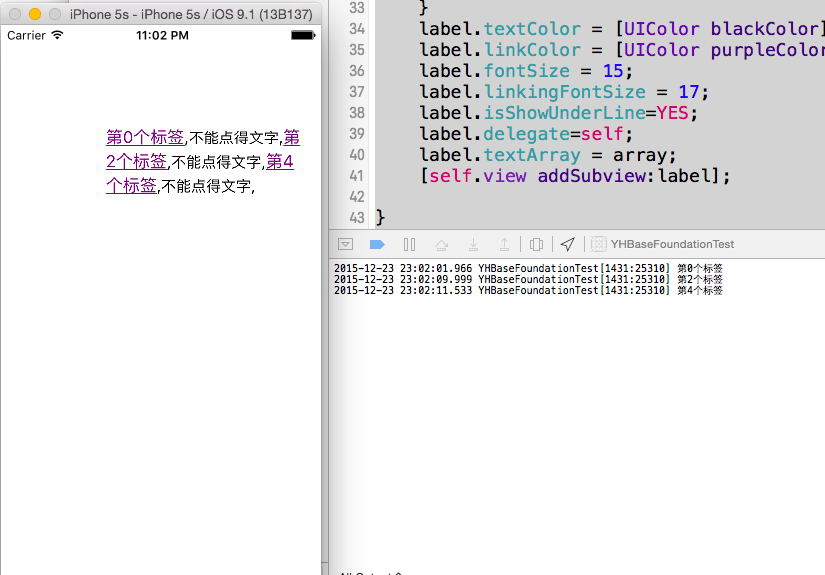
實際跑起來的效果如上圖:偶數項是可點擊的紫色標籤,奇數項是純文字,點擊後能拿到對應模型。整體做法不複雜,但把「HTML 解析 + 局部互動 + 非同步圖片」三件事一次解決, reuse 性相當不錯。