
修好 iSlsk 的 FireWire GUID 無法識別問題
編輯:iOS 相關教學
iSlsk 是當時相當好用量的一款 P2P 下載工具,但不少人一打開就遇到這段提示:Your Firewire GUID couldn't be recognized and therefore music importing will not be available,結果下載的檔案無法順利匯入。經過測試,原因與解法如下。
圖1
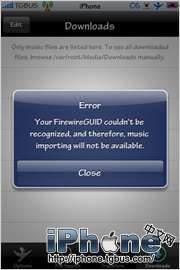
點擊查看大圖
修正流程
1. 檢查 ioreg。輸入帳號密碼登入(若無人使用會自動註冊並連線),接著確認 /usr/bin/ 底下有沒有名為 ioreg 的檔案。沒有的話請下載後解壓,上傳到該目錄。
2. 執行權限指令。用 Term-vt100 或其他終端軟體依序輸入:
chmod 755 /usr/bin/ioreg
chown mobile:mobile /Applications/iSlsk.app/
chown mobile:mobile /Applications/iSlsk.app/*
3. 補上相依函式庫。下載 libncurses.5.dylib 並上傳至 /usr/lib,然後執行:
chmod 777 /usr/lib/lib*
以上都完成後重新啟動 iSlsk,GUID 的問題應該就解決了。
- 上一篇文章: 讓 iPhone 開機時滾動顯示系統載入項目
- 下一篇文章: 為什麼 iPhone 的「用量」與「待機時間」老是變成 --