
把「軟件更新」從設定裡拿掉,杜絕誤觸升級
編輯:iOS 相關教學
越獄用戶中大概都有這類下場:手滑點了軟件更新做 OTA,然後裝置就變磚了。為了防患未然,這裡說明如何把「軟件更新」這一項從設定中移除——做完之後,它就徹底不出現了。
1. 開啟「設定」,最後看一眼「軟件更新」長什麼樣子。
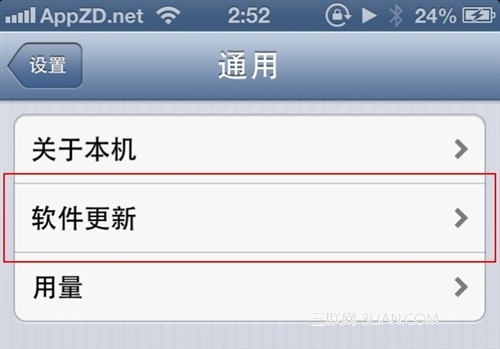
2. 用 iFile 或 iTools 開啟 /Applications/Preferences.app/General.plist,刪除下圖標示的那段並存檔。
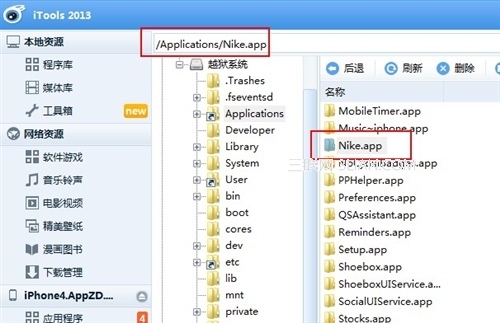
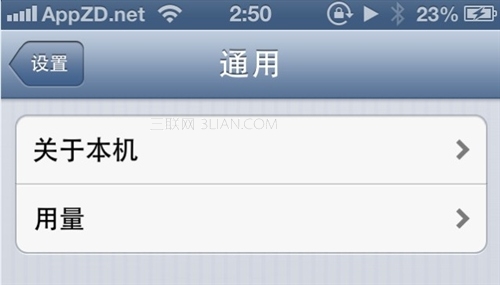
3. 把設定關掉再重開,你會發現「軟件更新」已經消失。
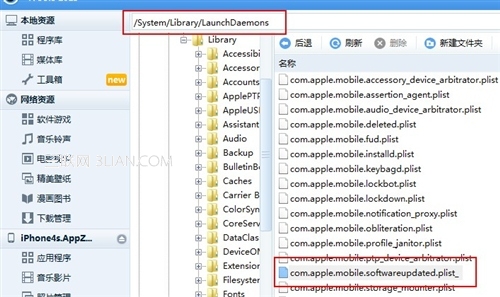
4. 另一條路:保留選項但讓它永遠更新不了,效果一樣。做法是刪除(或改名)/System/Library/LaunchDaemons/com.apple.mobile.softwareupdate.plist——把副檔名改動後,點進軟件更新只會看到一個不停轉圈的畫面,同樣不會誤觸升級。
5. 收工。
6. 若忘了備份,把下列內容貼回原本的位置即可還原:
<dict>
<key>cell</key>
<string>PSLinkCell</string>
<key>cellClass</key>
<string>PSBadgedTableCell</string>
<key>detail</key>
<string>Softwareupdate PrefController</string>
<key>id</key>
<string>SOFTWARE_update _LINK</string>
<key>label</key>
<string>SOFTWARE_update </string>
</dict>
- 上一篇文章: 五個方法,讓 iPhone 5 用起來像 iPhone 5s
- 下一篇文章: 怎麼知道有人趁你不在動過手機?