
為iPhone 4開啟iOS原生虛擬內存,告別LowMemory
編輯:iOS 相關教學
本文的虛擬內存開啟方法適用於iOS 5.1.1至6.1.2。iOS 6.1.2對iPhone 4的內存要求偏高,開沒幾個軟件就狂噴LowMemory錯誤日誌,成功開啟虛擬內存即可解決(原理類似PC用硬盤空間補內存不足)。
以下依內存使用率由高到低排列部分狀態,有圖有真相。
共運行88個程序,包含真實賽車3、英雄戰歌等多款大型遊戲,內建512M內存僅剩8824K可用空間,此時虛擬內存調用320MB磁盤空間,操作起來幾乎感受不到卡頓。
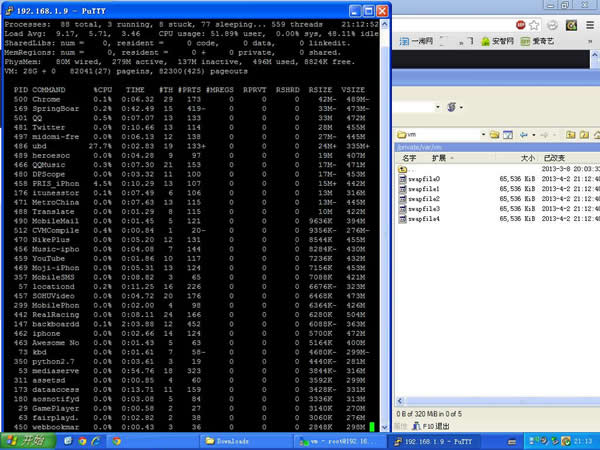
相關檔案說明如下。若覺得效果不理想,只要刪除 com.apple.virtualMemory.plist 與 com.apple.dynamic_pager.plist,再把 com.apple.SpringBoard.plist 還原,然後在命令列中輸入 reboot 即可回復原狀,不必重刷:
com.apple.virtualMemory.plist 放在 /private/var/preferences
com.apple.dynamic_pager.plist 放在 /System/Library/LaunchDaemons
此外,/System/Library/LaunchDaemons/com.apple.SpringBoard.plist 必須手動修改,內容見下方(記得先備份)。
在 /private/var 裡新建名為 VM 的文件夾,權限設置如圖:
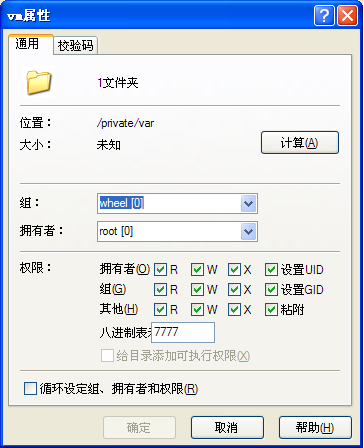
全部完成後重啟手機,若 /private/var/VM 中出現 swapfile0,即代表成功。
軟件名稱:iFiles(蘋果資源管理器)1.9.3
com.apple.SpringBoard.plist 依規則加入標示部分,建議使用iFile修改:
<?xml version="1.0" encoding="UTF-8"?>
<!DOCTYPE plist PUBLIC "-//Apple//DTD PLIST 1.0//EN" "https://www.apple.com/DTDs/PropertyList-1.0.dtd">
<plist version="1.0">
<dict>
    <key>EmbeddedHomeScreen</key>
    <true/>
    <key>HighPriorityIO</key>
    <true/>
    <key>Label</key>
    <string>com.apple.SpringBoard</string>
    <key>MachServices</key>
    <dict>
        <key>PurpleSystemAppPort</key>
        <dict>
            <key>ResetAtClose</key>
            <true/>
        </dict>
        <key>com.apple.dynamic_pager</key>
        <dict>
            <key>ResetAtClose</key>
            <true/>
        </dict>
        <key>com.apple.SBUserNotification</key>
        <true/>
        <key>com.apple.UIKit.statusbarserver</key>
        <true/>
        <key>com.apple.springboard</key>
        <dict>
            <key>ResetAtClose</key>
            <true/>
        </dict>
    </dict>
    <key>POSIXSpawnType</key>
    <string>Interactive</string>
    <key>ProgramArguments</key>
    <array>
        <string>/System/Library/CoreServices/SpringBoard.app/SpringBoard.env</string>
    </array>
    <key>RunAtLoad</key>
    <false/>
    <key>ThrottleInterval</key>
    <integer>5</integer>
    <key>UserName</key>
    <string>mobile</string>
</dict>
</plist>
- 上一篇文章: 我叫MT助手怎麼裝?兩種安裝方式一次學會
- 下一篇文章: iPhone 5S的Home鍵會用上藍寶石玻璃嗎?