IOS等待時動畫效果的實現
編輯:關於IOS教程
查詢時間或長或短,為了提升用戶體驗,目前用的比較多的手段之一就是查詢等待時添加一個動態等待效果。當我們在請求網絡時加載頁面時有個動作效果,效果圖如下:
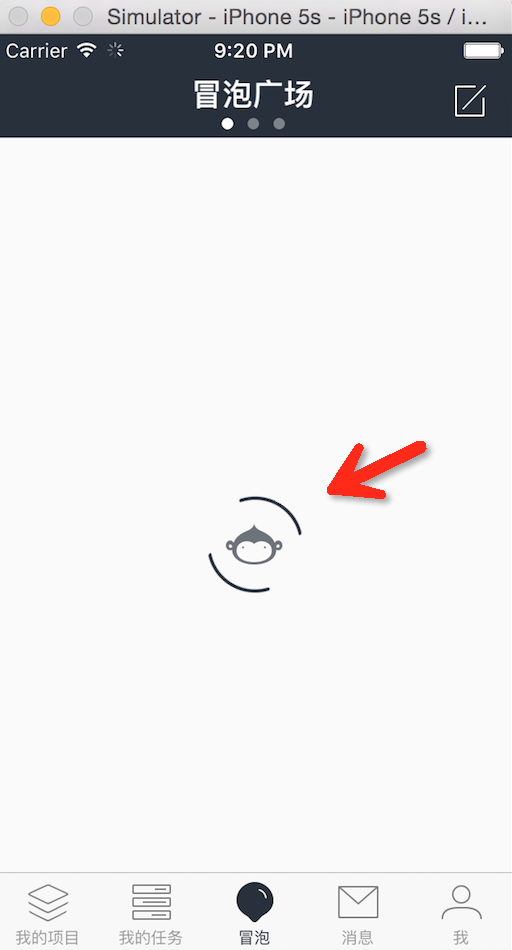
源代碼可以網上找開源項目Coding.net,上面的效果原理為兩張圖片組合,外面那個則為動畫轉動,裡面的圖標則是透明度的變化;主要代碼如下:
1:把它封裝在EaseLoadingView裡面
@interface EaseLoadingView : UIView
@property (strong, nonatomic) UIImageView *loopView, *monkeyView;
@property (assign, nonatomic, readonly) BOOL isLoading;
- (void)startAnimating;
- (void)stopAnimating;
@end
@interface EaseLoadingView ()
@property (nonatomic, assign) CGFloat loopAngle, monkeyAlpha, angleStep, alphaStep;
@end

@implementation EaseLoadingView
- (instancetype)initWithFrame:(CGRect)frame{
 self = [super initWithFrame:frame];
 if (self) {
  self.backgroundColor = [UIColor clearColor];
  _loopView = [[UIImageView alloc] initWithImage:[UIImage imageNamed:@"loading_loop"]];
  _monkeyView = [[UIImageView alloc] initWithImage:[UIImage imageNamed:@"loading_monkey"]];
  [_loopView setCenter:self.center];
  [_monkeyView setCenter:self.center];
  [self addSubview:_loopView];
  [self addSubview:_monkeyView];
  [_loopView mas_makeConstraints:^(MASConstraintMaker *make) {
   make.center.equalTo(self);
  }];
  [_monkeyView mas_makeConstraints:^(MASConstraintMaker *make) {
   make.center.equalTo(self);
  }];
  _loopAngle = 0.0;
  _monkeyAlpha = 1.0;
  _angleStep = 360/3;
  _alphaStep = 1.0/3.0;
 }
 return self;
}
- (void)startAnimating{
 self.hidden = NO;
 if (_isLoading) {
  return;
 }
 _isLoading = YES;
 [self loadingAnimation];
}
- (void)stopAnimating{
 self.hidden = YES;
 _isLoading = NO;
}
- (void)loadingAnimation{
 static CGFloat duration = 0.25f;
 _loopAngle += _angleStep;
 if (_monkeyAlpha >= 1.0 || _monkeyAlpha <= 0.0) {
  _alphaStep = -_alphaStep;
 }
 _monkeyAlpha += _alphaStep;
 [UIView animateWithDuration:duration delay:0.0 options:UIViewAnimationOptionCurveLinear animations:^{
  CGAffineTransform loopAngleTransform = CGAffineTransformMakeRotation(_loopAngle * (M_PI / 180.0f));
  _loopView.transform = loopAngleTransform;
  _monkeyView.alpha = _monkeyAlpha;
 } completion:^(BOOL finished) {
  if (_isLoading && [self superview] != nil) {
   [self loadingAnimation];
  }else{
   [self removeFromSuperview];
   _loopAngle = 0.0;
   _monkeyAlpha = 1,0;
   _alphaStep = ABS(_alphaStep);
   CGAffineTransform loopAngleTransform = CGAffineTransformMakeRotation(_loopAngle * (M_PI / 180.0f));
   _loopView.transform = loopAngleTransform;
   _monkeyView.alpha = _monkeyAlpha;
  }
 }];
}
@end
注意loadingAnimation這裡面有動作的處理及透明度的處理,當停止加載後把它自個從當前的視圖去除;
2:UIView (Common)在UIView擴展類裡
#pragma mark LoadingView
@property (strong, nonatomic) EaseLoadingView *loadingView;
- (void)beginLoading;
- (void)endLoading;
@end
- (void)setLoadingView:(EaseLoadingView *)loadingView{
 [self willChangeValueForKey:@"LoadingViewKey"];
 objc_setAssociatedObject(self, &LoadingViewKey,
        loadingView,
        OBJC_ASSOCIATION_RETAIN_NONATOMIC);
 [self didChangeValueForKey:@"LoadingViewKey"];
}
- (EaseLoadingView *)loadingView{
 return objc_getAssociatedObject(self, &LoadingViewKey);
}
- (void)beginLoading{
 for (UIView *aView in [self.blankPageContainer subviews]) {
  if ([aView isKindOfClass:[EaseBlankPageView class]] && !aView.hidden) {
   return;
  }
 }
 if (!self.loadingView) { //初始化LoadingView
  self.loadingView = [[EaseLoadingView alloc] initWithFrame:self.bounds];
 }
 [self addSubview:self.loadingView];
 [self.loadingView mas_makeConstraints:^(MASConstraintMaker *make) {
  make.self.edges.equalTo(self);
 }];
 [self.loadingView startAnimating];
}
- (void)endLoading{
 if (self.loadingView) {
  [self.loadingView stopAnimating];
 }
}
注意:cocoa的KVO模型中,有兩種通知觀察者的方式,自動通知和手動通知。顧名思義,自動通知由cocoa在屬性值變化時自動通知觀察者,而手動通知需要在值變化時調用 willChangeValueForKey:和didChangeValueForKey: 方法通知調用者。
3:使用頁面調用
- (void)sendRequest{
 [self.view beginLoading];
 __weak typeof(self) weakSelf = self;
 [[Coding_NetAPIManager sharedManager] request_CodeFile:_myCodeFile withPro:_myProject andBlock:^(id data, NSError *error) {
  [weakSelf.view endLoading];
  if (data) {
   weakSelf.myCodeFile = data;
   [weakSelf refreshCodeViewData];
  }
  [weakSelf.view configBlankPage:EaseBlankPageTypeView hasData:(data != nil) hasError:(error != nil) reloadButtonBlock:^(id sender) {
   [weakSelf sendRequest];
  }];
 }];
}
其中[self.view beginLoading]跟[weakSelf.view endLoading]就可以調用動畫效果;
補充:另一種是有很多不同的圖片組成的動畫效果,可以用每一張圖片然後FOR遍歷組成出動作效果;
//設置普通狀態的動畫圖片
 NSMutableArray *idleImages = [NSMutableArray array];
 for (NSUInteger i = 1; i<=60; ++i) {
    UIImage *image = [UIImage imageNamed:[NSString stringWithFormat:@"dropdown_anim__000%zd",i]];
    [idleImages addObject:image];
  [idleImages addObject:image];
 }
以上內容是本文通過IOS等待時動畫效果的實現,希望對大家有所幫助。


相關文章
+