IOS封裝自定義布局的方法
編輯:關於IOS教程
一、概述
1、對於經常使用的控件或類,通常將其分裝為一個單獨的類來供外界使用,以此達到事半功倍的效果
2、由於分裝的類不依賴於其他的類,所以若要使用該類,可直接將該類拖進項目文件即可
3、在進行分裝的時候,通常需要用到代理設計模式
二、代理設計模式
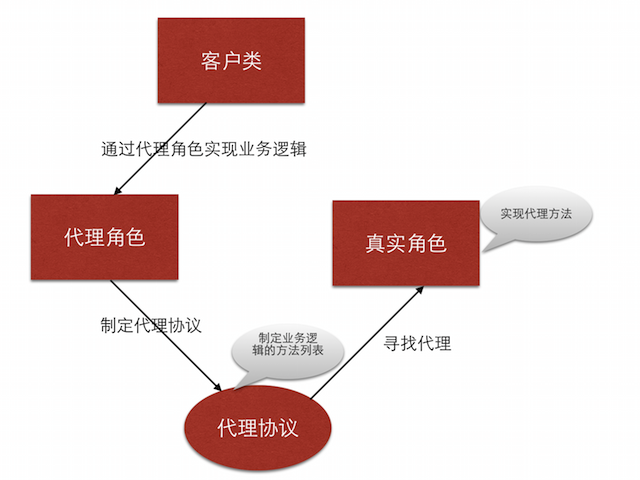
1、代理設計模式的組成
客戶類(通常作為代理):通常委托這是角色來完成業務邏輯
真實角色:將客戶類的業務邏輯轉化為方法列表,即代理協議
代理協議:
- 定義了需要實現的業務邏輯
- 定義了一組方法列表,包括必須實現的方法或選擇實現的方法
- 代理協議是代理對象所要遵循一組規則
代理角色
- 若要作為代理,需要遵守代理協議,並且實現必須實現的代理方法
- 代理角色可以通過調用代理協議中的方法完成業務邏輯,也可以附加自己的操作
文字描述通常是抽象的,一下通過圖示來闡述代理設計模式
三、自定義布局類的封裝
1、業務邏輯
如圖

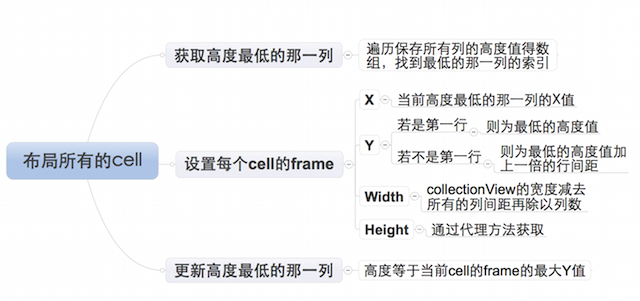
2、布局每個cell的業務邏輯
由於設置每個cell的布局屬性的業務邏輯較復雜,特附上如下思維導圖
3、封裝思路封裝需要根據客戶類業務邏輯需求來提供接口
1)、通過代理協議的可選實現的方法獲取的屬性值的屬性,需要設置默認值
2)、未提供默認值的且必須使用的屬性,需要通過必須實現的方法來獲得
3)、自定義布局提供的接口可選
- 列數
- 列之間的間距
- 行之間的間距
- 內邊距
4)、自定義布局提供的接口必選
每個元素的高度,寬度可以通過列數和列間距計算得到
四、封裝步驟
設置代理協議,提供接口
//聲明LYPWaterFlowLayout為一個類
@class LYPWaterFlowLayout;
@protocol LYPWaterFlowLayoutDelegate <NSObject>
//必須實現的方法
@required
/**獲取瀑布流每個元素的高度*/
- (CGFloat)waterFlowLayout:(LYPWaterFlowLayout *)waterFlowLayout heightForItemAtIndex:(NSInteger)index itemWith:(CGFloat)itemWith;
//可選實現的方法
@optional
/**獲取瀑布流的列數*/
- (NSInteger)columnCountInWaterFlowLayout:(LYPWaterFlowLayout *)waterFlowLayout;
/**獲取瀑布流列間距*/
- (CGFloat)columnMarginInWaterFlowLayout:(LYPWaterFlowLayout *)waterFlowLayout;
/**獲取瀑布流的行間距*/
- (CGFloat)rowMarginInWaterFlowLayout:(LYPWaterFlowLayout *)waterFlowLayout;
/**獲取瀑布流的內邊距*/
- (UIEdgeInsets)edgeInsetsInWaterFlowLayout:(LYPWaterFlowLayout *)waterFlowLayout;
@end
設置代理屬性
@interface LYPWaterFlowLayout : UICollectionViewLayout
/**代理*/
@property (nonatomic, weak) id<LYPWaterFlowLayoutDelegate> delegate;
@end
設置通過可選代理方法獲取屬性值的屬性的默認值
/**默認的列數*/
static const NSInteger LYPDefaultColumnCount = 3;
/**默認每一列之間的間距*/
static const CGFloat LYPDefaultColumMargin = 10;
/**默認每一行之間的間距*/
static const CGFloat LYPDefaultRowMargin = 10;
/**默認邊緣間距*/
static const UIEdgeInsets LYPDefaultEdgeInsets = {10, 10, 10, 10};
設置通過可選代理方法獲取屬性值的屬性的訪問方式若代理提供屬性值,則忽略默認值
- (NSInteger)columnCount
{
  //判斷代理是否實現了獲取列數的可選方法
  if ([self.delegate respondsToSelector:@selector(columnCountInWaterFlowLayout:)])
  {
    //實現,返回通過代理設置的列數
    return [self.delegate columnCountInWaterFlowLayout:self];
  }
  else
  {
    //為實現,返回默認的列數
    return LYPDefaultColumnCount;
  }
}
注:其他屬性值的獲取與上述方法幾乎完全相同,不再贅述
設置布局
1)、設置需要的成員屬性
/**所有cell的布局屬性*/
@property (nonatomic, strong) NSMutableArray *attrsArray;
/**所有列的當前高度*/
@property (nonatomic, strong) NSMutableArray *columnHeights;
2)、通過懶加載的方式初始化成員屬性
/**--attrsArray--懶加載*/
- (NSMutableArray *)attrsArray
{
  if (_attrsArray == nil)
  {
    _attrsArray = [NSMutableArray array];
  }
  return _attrsArray;
}
/**--columnHeights--懶加載*/
- (NSMutableArray *)columnHeights
{
  if (_columnHeights == nil)
  {
    _columnHeights = [NSMutableArray array];
  }
  return _columnHeights;
}
3)、初始化布局
- (void)prepareLayout
{
  [super prepareLayout];

  /**清除之前跟布局相關的所有屬性,重新設置新的布局*/
  //清除之前計算的所有列的高度
  [self.columnHeights removeAllObjects];
  //設置所有列的初始高度
  for (NSInteger i = 0; i<self.columnCount; i++)
  {
    self.columnHeights[i] = @(self.edgeInsets.top);
  }
  //清除之前所有的布局屬性
  [self.attrsArray removeAllObjects];

  /**開始創建每一個cell對應的布局屬性*/
  NSInteger count = [self.collectionView numberOfItemsInSection:0];
  for (NSInteger i = 0; i<count; i++)
  {
    NSIndexPath *indexPath = [NSIndexPath indexPathForItem:i inSection:0];
    //獲取indexPath位置cell對應的布局屬性
    UICollectionViewLayoutAttributes *attrs = [self layoutAttributesForItemAtIndexPath:indexPath];
    //將indexPath位置的cell的布局屬性添加到所有cell的布局屬性數組中
    [self.attrsArray addObject:attrs];
  }
}
4)、返回包含所有cell的布局屬性的數組
- (nullable NSArray<UICollectionViewLayoutAttributes *> *)layoutAttributesForElementsInRect:(CGRect)rect
{
  return self.attrsArray;
}
設置每一個cell的布局屬性

- (nullable UICollectionViewLayoutAttributes *)layoutAttributesForItemAtIndexPath:(nonnull NSIndexPath *)indexPath
{
  //獲取indexPath位置的布局屬性
  UICollectionViewLayoutAttributes *attrs = [UICollectionViewLayoutAttributes layoutAttributesForCellWithIndexPath:indexPath];

  /**設置cell布局屬性的frame*/

  /***確定cell的尺寸***/
  //獲取collectionView的寬度
  CGFloat collectionViewWidth = self.collectionView.frame.size.width;
  //cell寬度
  CGFloat width = ((collectionViewWidth - self.edgeInsets.left - self.edgeInsets.right - (self.columnCount - 1) * self.columMargin)) / self.columnCount;
  //cell高度
  CGFloat height = [self.delegate waterFlowLayout:self heightForItemAtIndex:indexPath.item itemWith:width];

  /***設置cell的位置***/
  NSInteger destColumn = 0;
  CGFloat minColumnHeight = [self.columnHeights[0] doubleValue];
  for (NSInteger i = 1; i<self.columnCount; i++)
  {
    CGFloat columnHeight = [self.columnHeights[i] doubleValue];
    if (minColumnHeight > columnHeight)
    {
      minColumnHeight = columnHeight;
      destColumn = i;
    }
  }
  //計算cell的位置
  CGFloat x = self.edgeInsets.left + destColumn * (width + self.columMargin);
  CGFloat y = minColumnHeight;
  //判斷是不是第一行
  if (y != self.edgeInsets.top)
  {
    //若不是第一行,需要加上行間距
    y += self.rowMargin;
  }

  /**給cell的布局屬性的frame賦值*/
  attrs.frame = CGRectMake(x, y, width, height);

  //更新最短那列的高度
  self.columnHeights[destColumn] = @(CGRectGetMaxY(attrs.frame));

  /**返回indexPath位置的cell的布局屬性*/
  return attrs;
}
5)、設置collectionView內容的尺寸
- (CGSize)collectionViewContentSize
{
  //獲取最高的那一列的高度
  CGFloat maxColumnHeight = [self.columnHeights[0] doubleValue];
  for (NSInteger i = 1; i<self.columnCount; i++)
  {
    CGFloat columnHeight = [self.columnHeights[i] doubleValue];
    if (maxColumnHeight < columnHeight)
    {
      maxColumnHeight = columnHeight;
    }
  }
  //返回collectionView的contentSize,高度為最高的高度加上一個行間距
  return CGSizeMake(0, maxColumnHeight + self.rowMargin);
}
以上就是本文的全部內容,希望對大家的學習有所幫助。


相關文章
+