淺析iOS給圖片加水印的方法
編輯:關於IOS教程
話不多說,直接上代碼
新建了一個UIImage的類目,在.h中聲明
+ (UIImage *)imageWithimage:(UIImage *)image content:(NSString *)content frame:(CGRect)frame;
.m如下
+ (UIImage *)imageWithimage:(UIImage *)image content:(NSString *)content frame:(CGRect)frame {
 // 開啟圖形'上下文'
 UIGraphicsBeginImageContextWithOptions(image.size, NO, 0);
 // 繪制原生圖片
 [image drawAtPoint:CGPointZero];
 // 在原生圖上繪制文字
 NSString *str = content;
 // 創建文字屬性字典
 NSDictionary *dictionary = @{NSForegroundColorAttributeName: [UIColor blackColor], NSFontAttributeName: [UIFont systemFontOfSize:20]};
 // 繪制文字屬性
 [str drawInRect:frame withAttributes:dictionary];
 // 從當前上下文獲取修改後的圖片
 UIImage *imageNew = UIGraphicsGetImageFromCurrentImageContext();
 // 結束圖形上下文
 UIGraphicsEndImageContext();
 return imageNew;
}
但是需要注意的是 drawInRect: withAttributes:方法在iOS7.0以後才能使用, 使用該方法的時候需要先看系統是否合適,也可以在方法中加上判斷.
 double device = [[UIDevice currentDevice].systemVersion doubleValue];
 if (device >= 7.0f) {
  // do something
 }
之後在VC中導入頭文件, 創建一個imageView
 // 調用方法傳入一個image對象,想要添加的文字和文字所在位置
 UIImage *image = [UIImage imageWithimage:[UIImage imageNamed:@"3"] content:@"伊利丹" frame:      CGRectMake(20, 500, 100, 100)];
 UIImageView *imageView = [[UIImageView alloc]initWithFrame:CGRectMake(0, 0, kScreenWidth, kScreenHeight)];
 imageView.image = image;
 [self.view addSubview:imageView];
效果如下圖,簡單的實現了在圖片上加水印的功能,如果想要改變文字的大小和顏色可以在方法中修改.或者給方法添加一個文字屬性的字典參數.
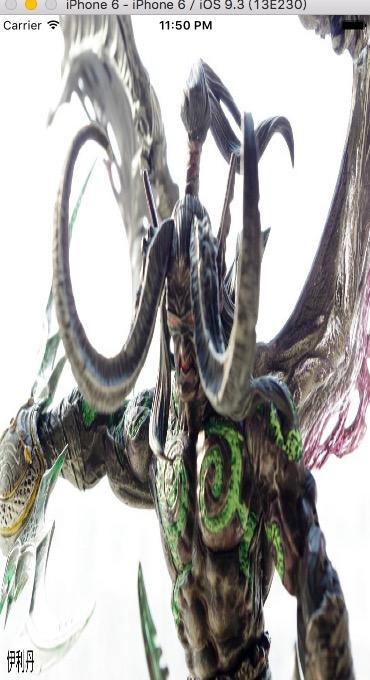
以上就是在iOS給圖片加水印的全部內容,本文給出了實例代碼,相信對大家理解更有幫助,希望能對大家開發IOS有所幫助。


相關文章
+